cosmon
Noogram is an open system for running long AI-agent missions inside your own perimeter, keeping every step as plain files you own. Its kernel, cosmon, is a stateless CLI that gives each agent an identity, a lifecycle, and crash recovery.
The code lives at github.com/noogram/cosmon,
open-core: the kernel, the CLI, and the runtime are AGPL-3.0-only, and the
network SDK third parties link to talk to an instance over the wire is
Apache-2.0 (LICENSE maps
the split crate by crate). It is early-stage but functional. The core types,
the cs CLI, state persistence, tmux transport, and the DAG engine all ship
today, and the API is still moving, so expect breaking changes before 1.0.
- A social organization of agents. A long mission becomes small tasks, each with a precise goal. Agents take them on side by side, wait on one another when one task depends on another, and cross-examine each other's findings through panels, reviews, and counter-arguments before anything reaches you. Work at scale, the way a good team organizes itself.
- Runs inside your perimeter. The agent works on your corpus, on your machine. Every step, every decision, and every result is written to plain files on a disk you control. Only the model call leaves your machine. There is no server in the loop, database, or Cosmon account.
- You stay the judge. The agent hands you a draft on its own branch, with its reasoning and evidence alongside; what the gates couldn't verify is marked unverified, never silently accepted. Nothing lands until it passes your gates.
- The story can't be quietly rewritten. Every mission leaves a complete,
replayable work record. If anyone, human or agent, edits it after the fact
without resealing it,
cs verifynotices. It detects accidental edits; a determined forger can rewrite the record and its seal. - Work survives a crash. Everything the agents record lives in those same plain files, so a fresh worker picks up where a crashed one stopped.
- A harness over the harnesses you already use: Claude Code, Codex, Aider, and other CLI agents; hosted APIs from Anthropic, OpenAI, Google Gemini, Mistral AI, Qwen, DeepSeek, GLM, Kimi, and more; or local models through llama.cpp and Ollama.
- Federate (under construction). Several machines cooperating on one mission, with no central owner.
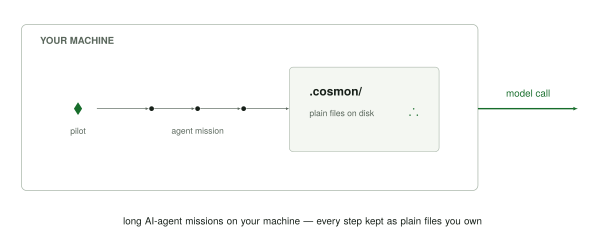
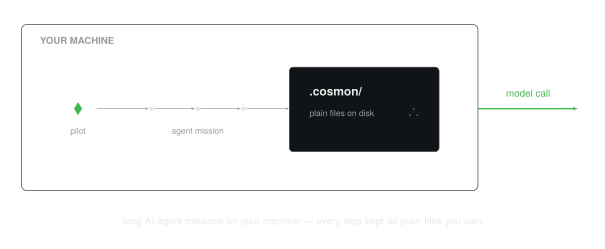
noogram and its cosmon kernel
On a single machine, the tool you run is cosmon; its command is cs. You
cs tackle a piece of work to start an agent on it, and cs done to close it
out; the record of both lands under .cosmon/.
Noogram's ambition is a federated agentic system: many cosmon instances
cooperating, each keeping its own record, with no single owner in the middle.
The first brick is already here: the remote mode, where a cosmon-remote
client talks to a cosmon-rpp-adapter service over HTTP(S) on another host.
Broader peer-to-peer federation between instances is on the roadmap; the shape of
that link is still being explored. That larger, cooperating whole is noogram;
cosmon is its kernel. Today, run several agents in parallel on one machine and
cosmon does that by itself, complete and standalone. See
Noogram & the Cosmon kernel for the
relationship, and Agent adapters for how a concrete
agent or model plugs in.
Where to go next
- Want it running now? Install cosmon, then Ten minutes to cosmon takes you from an empty terminal to one merged piece of agent work.
- New here? The Explanation section is the conceptual on-ramp: the physics vocabulary, the kernel/distribution split, formulas and adapters and fleets, and how cosmon survives crashes. Start there.
- Learning by doing? The tutorials walk you from your first molecule to your first fleet to composing a DAG.
- Looking up a command? The CLI reference is
generated from the tool itself, grouped by role. The full
nucleate → tackle → wait → donecycle is covered in The three regimes.
This site is built by mdBook and rendered by the same pipeline that builds cosmon's own documentation.
Install cosmon
Cosmon is one command, cs. There is no daemon to run, no service to
register, no account to create: you put it on your PATH and you are done.
Every route installs two files: cs and cosmon-remote,
the connector for driving a remote cosmon service, side by side in the same
directory. cs is the whole product; cosmon-remote is inert until you point it
at a remote service, so you can ignore it. It is named here so the second file is
listed here to explain its presence in the install directory.
Pick whichever of the three routes below fits how you already manage tools. The first two install the same bytes. The release pipeline builds the tarballs once, signs them once, and Homebrew's formula is rendered from those very artifacts. The third compiles from source, for platforms outside the four release targets.
Already installed? To update or roll back, see Update and roll back cosmon; otherwise skip to Ten minutes to cosmon.
Route 1: the install script (recommended)
Works on macOS and Linux, on arm64 and x86_64:
curl -fsSL https://noogram.org/cosmon/install.sh | sh
On Linux, add --with-services to install and activate the scheduler and
daemon supervisor as user services. This is opt-in; the command above remains
a client-only install:
curl -fsSL https://noogram.org/cosmon/install.sh | sh -s -- --with-services
The service option requires a working user service manager. It creates only
missing, valid empty supervisor and scheduler configuration files under
~/.config/cosmon, preserves existing configuration and state byte-for-byte,
and prints the exact status and uninstall commands.
--dir also controls where the two service binaries are installed.
The installer writes to ~/.local/bin, which is not on the default PATH on
a fresh macOS or Linux account. When it is not, the installer says so and prints
the line to add. Add it before you check the version, and the check succeeds the
first time:
export PATH="$HOME/.local/bin:$PATH"   # skip if the installer did not ask for it
cs --version
cs --help
You should see the command groups (lifecycle, fleet, execution, …). That export
only affects the current shell. Put the same line in your shell profile
(~/.zshrc, ~/.bashrc) so the next terminal finds cs too.
If you installed elsewhere (--dir, COSMON_INSTALL_DIR, or the
/usr/local/bin fallback), export that directory instead.
The same route, verifying the installer first
The installer is signed. Every release publishes it as
cosmon-install-<version>.sh with a .sig and a .pem beside it, keyless and
Rekor-anchored like the binaries. But piping it into sh consumes it before
anything could check that signature, so on the one-liner above the signature
does no work. Reported by an external reader on issue #32, and correct: the
bytes served at that URL are byte-identical to the signed asset today, which is
exactly the property an attacker at the CDN or in the TLS path would change.
The convenience route stays. If you would rather check before you run on a shared machine, in CI, or the first time you install cosmon anywhere, download the versioned asset, verify it, then run it:
ver=0.7.3                                   # the release you want
base="https://github.com/noogram/cosmon/releases/download/v${ver}"
curl -fsSLO "${base}/cosmon-install-${ver}.sh"
curl -fsSLO "${base}/cosmon-install-${ver}.sh.sig"
curl -fsSLO "${base}/cosmon-install-${ver}.sh.pem"

cosign verify-blob \
  --certificate-identity-regexp 'https://github.com/.*/cosmon/.github/workflows/release.yml@.*' \
  --certificate-oidc-issuer https://token.actions.githubusercontent.com \
  --signature  "cosmon-install-${ver}.sh.sig" \
  --certificate "cosmon-install-${ver}.sh.pem" \
  "cosmon-install-${ver}.sh" \
  && sh "cosmon-install-${ver}.sh"
cosign verify-blob exits non-zero on anything it cannot tie back to
release.yml at a cosmon tag, and the && is what makes that exit status
refuse to run the script. Everything after that is the same installer doing the
same sha256 check on the same tarballs. You have only moved the trust boundary
from the endpoint served me these bytes to this workflow, at this tag,
produced them.
What that one line actually does
Piping a script from the internet into your shell deserves an explanation, so here is the whole of it. The installer:
- Detects your platform from
uname -sanduname -m, and maps it to one of the four targets cosmon builds: macOS on arm64 or x86_64, Linux on x86_64 or arm64. Anything else is refused with a clear message rather than guessed at. To see what it resolves for your machine without installing anything:curl -fsSL https://noogram.org/cosmon/install.sh | sh -s -- --print-target. - Downloads the release
SHA256SUMSfrom the GitHub Releases ofnoogram/cosmon. That file is the source of truth for both the exact tarball name and its digest, which is how the installer can ask forlatestwithout knowing the version string up front. - Downloads the tarball for your target over HTTPS (
--proto '=https' --tlsv1.2), usingcurlorwget, whichever you have. - Verifies the sha256 of what it downloaded against
SHA256SUMS. This leg is fail-closed: a mismatch, a missing digest, or nosha256sum/shasumon the box all abort the install rather than proceeding. Nothing is written to yourPATHbefore the digest matches. - Unpacks and installs
csinto~/.local/bin, falling back to/usr/local/binif that directory is not writable. The tarball also carriescosmon-remote, the connector for driving a remote cosmon service, and the installer places it in the same directory, so one command gives you both laptop tools.
It carries no secret and needs no privilege beyond writing to that one directory.
Choosing a version
The default is the latest release. To pin a specific one, either flag or environment works:
curl -fsSL https://noogram.org/cosmon/install.sh | sh -s -- --version v0.1.0
# or
curl -fsSL https://noogram.org/cosmon/install.sh | COSMON_VERSION=v0.1.0 sh
v0.1.0 is the tag format the installer expects, shown here as an example.
pinning any specific version requires that tag to actually exist as a published
release. --dir <path> (or COSMON_INSTALL_DIR) changes where cs lands.
Route 2: Homebrew
Since v0.2.0 the tap noogram/homebrew-tap
is live, on macOS and on Linuxbrew, arm64 and x86_64 alike:
brew install noogram/tap/cosmon
This is not a separate build. The release pipeline renders the formula from the
same tagged, signed release tarballs the install script downloads, and brew
verifies the same sha256 digests. Identical bytes, identical provenance.
Route 3: build from source
If you would rather compile it yourself, or you are on a platform outside the four release targets, build from the cosmon repository.
On Linux (glibc) the build links the Secret Service keyring backend through
libdbus, so install the system headers first, otherwise the compile fails at
libdbus-sys with "The system library dbus-1 required by crate libdbus-sys
was not found". macOS needs nothing extra (it uses the native keychain), and
the prebuilt Linux release binaries above are static musl, so this applies only
when you compile on glibc:
sudo apt install libdbus-1-dev pkg-config          # Debian/Ubuntu
sudo dnf install dbus-devel pkgconf-pkg-config     # Fedora
Then build:
git clone https://github.com/noogram/cosmon && cd cosmon
cargo install --path crates/cosmon-cli --locked
Re-run cs --help afterwards to confirm it landed on your PATH. Note that a
source build is your build: it is not covered by the release signature, so the
provenance check below does not apply to it.
Verify where the binary came from
The sha256 check proves the bytes match the digest the release published. It
does not, on its own, prove who produced that release. That proof is a cosign
signature check you run once, deliberately, and it is worth doing:
→ Verify the binary's provenance
A note on package registries
The product is the cs binary published on GitHub Releases, versioned by the
git tag it was built from. If cosmon ever appears on crates.io, npm, or PyPI,
those entries only hold the name and point back here. They do not contain the
shipped binary. Do not expect cargo install cosmon /
npm install cosmon / pip install cosmon to give you the released binary.
What is not installed
A manual page. man cs reports No manual entry for cs after any of the
three routes: the release tarball carries the binaries and nothing else, and the
installer writes no man1 page. The manual source is tracked in the repository
at crates/cosmon-cli/man/cs.1 if you want to install it by hand; otherwise the
same reference is available from the tool itself, which is where it is kept
current:
cs help            # the command groups
cs help guide      # the handbook
cs <command> --help
The generated CLI reference in this book is rendered from that same source.
Next
- Ten minutes to cosmon: run one piece of work end to end.
- Update and roll back cosmon: move to a newer or older release.
- Set up cosmon (prerequisites): the other tools a worker needs (git, tmux, a model backend) before the tutorials.
Ten minutes to cosmon
This is the shortest path from an empty terminal to one piece of work that an AI
agent did, finished, and merged into your main. Every block below is meant to
be copied and run in order.
If you want the same journey with the why behind each verb, take the tutorials instead. This page is the short route; the tutorials provide the explanation.
0. What you need
Two things beyond cs itself either way, because a cosmon worker is a real
terminal session doing real git work:
git --version         # each worker runs on its own branch, in its own worktree
tmux -V               # each worker lives in a tmux session
Then it forks on what runs the worker:
You have Claude Code. One line of config completes setup. There is no backend to stand up:
claude --version # confirm it is on PATH
Dispatch with cs tackle <id> --adapter claude below, or set
default = "claude" under [adapters] in .cosmon/config.toml so you can
drop the flag. No Ollama, no model to pull, nothing to serve.
You want a local model instead. A model backend has to actually be running and serving something before you dispatch:
ollama serve          # a model backend on localhost:11434 (the default adapter)
ollama pull qwen3:8b  # …serving a model. `serve` alone serves nothing
ollama serve with nothing pulled is the first sharp edge people hit: the
daemon answers, so everything looks healthy, and the dispatch dies seconds
after it starts. Cosmon now checks before spawning and refuses with a named
repair. Pulling the model first avoids that detour.
Pull qwen3:8b specifically, which is also cosmon's built-in default.
The local loop needs a model that emits structured tool_calls on
/v1/chat/completions; qwen3:8b was measured to do that. A model that
merely looks more capable is often the wrong choice. For example,
qwen2.5-coder:7b, for instance, pastes its tool call into the message
text as raw JSON, which lands in your output verbatim instead of creating
a file. vLLM and llama-server work the same way, at their own endpoint; both,
other models, and how to switch, are in docs/guides/local-model-selection.md
(the OpenAI-compatible servers guide).
Missing git or tmux? Neither is installed by cosmon, and on a machine with
no package manager yet, there is a prerequisite before installation. See
Set up cosmon, which spells out how to get git,
tmux and Ollama from nothing on macOS and Linux.
1. Install cs
curl -fsSL https://noogram.org/cosmon/install.sh | sh
export PATH="$HOME/.local/bin:$PATH"   # skip if the installer did not ask for it
cs --version
~/.local/bin is not on the default PATH on a fresh account; without the
export line cs --version exits 127. Put it in your shell profile too.
Homebrew and from-source routes, what that script does line by line, and why
man cs is not installed are on Install cosmon.
2. Initialise a project
From the root of any repository you want cosmon to track:
cd ~/path/to/your/project
cs init
That creates .cosmon/, the directory holding all of cosmon's project state:
your units of work, their event logs, and the canonical recipes. Later commands
walk up to find it, the way git finds .git/. Running it twice is safe.
cs init also writes three files outside .cosmon/: a .gitleaks.toml at the
repository root and two per-user files in your home directory. They are listed,
with what removes them, in
Set up cosmon → what cs init writes.
3. Create a unit of work
cs nucleate task-work --var topic="Add a --version flag to the CLI"
A formula (task-work) is the recipe: a small TOML file of ordered steps. A
molecule is one run of that recipe: cosmon's unit of tracked work, with a
state, a current step, and a durable trace on disk.
Nucleate creates the molecule. Nothing executes yet. The command prints an id:
Nucleated molecule task-20260711-a1b2 from formula task-work
  Steps: 2
Yours will differ; substitute it everywhere below.
4. Put it in motion
cs tackle task-20260711-a1b2
If you picked "You have Claude Code" in step 0, add --adapter claude (or skip
the flag if you already set default = "claude" in .cosmon/config.toml).
Tackle creates a git worktree and branch for this molecule, opens a tmux session, and launches your agent inside it with the briefing injected. It returns immediately. The worker runs in the background while your shell stays free.
5. Watch it work
cs peek
cs peek is the fleet portal: workers on the left, the selection followed on the
right. Press p to drop into the live pane of the selected worker, q to come
back up. Never use tmux attach; it breaks the agent's rendering.
To block until the work is finished instead of watching it:
cs wait task-20260711-a1b2
6. Close the loop
cs done task-20260711-a1b2
Done merges the worker's branch into main, kills the tmux session, and
removes the worktree. It is the only verb that merges: a worker can finish its
own steps, but it cannot merge itself. That call stays yours.
Confirm:
cs status
The molecule shows as completed and no worker is running. That empty ensemble is the correct resting state.
The whole cycle, in one picture
cs nucleate   →   cs tackle   →   cs wait   →   cs done
  create          start a         block until    merge the
  the work        worker on it    it finishes    result, clean up
Everything the worker did is still on disk under .cosmon/, long after the tmux
pane is gone. That on-disk trace is the point: a worker dying never loses your
work.
Where to go next
- Understand what you just ran: Your first molecule walks the same four verbs slowly, with the vocabulary explained.
- Run several at once: Running a fleet of agents.
- Chain work into a graph: Composing a DAG.
- Look up a command: the CLI reference, generated from the tool itself.
- Drive it in plain English: Pilot cosmon in natural language.
Set up cosmon (prerequisites)
This is the first tutorial. By the end you will have every prerequisite in
place, a project that cosmon can track, and everything the next tutorial,
Your first molecule, needs to actually run. If
you skip this page, the nucleate → tackle → wait → done cycle in that tutorial
will stall on a missing tool, so do it here, once.
Just want
cson your machine? Installing the binary has its own page, Install cosmon, and a condensed run through the whole cycle is Ten minutes to cosmon. This tutorial covers what a worker needs around the binary (git, tmux, a model backend) and does not repeat the install routes.
New to the physics-inspired names (nucleate, evolve, spore, …)? You do not need them yet. This page installs tools; the vocabulary is introduced word by word as you meet it, and explained in full in The physics vocabulary.
What you are about to install
Cosmon steers agents, AI coding sessions that run in their own terminal, and it keeps their state in plain files inside your project. So the prerequisites are the things an agent needs to live in, plus the files cosmon writes to:
| Prerequisite | Why cosmon needs it | Check it is there |
|---|---|---|
| git | Each worker runs on its own git branch, in its own worktree. Cosmon merges that branch back when the work is done. | git --version |
| tmux | A worker is a long-lived terminal session. Cosmon spawns each one inside a tmux pane so it survives your shell closing. | tmux -V |
| A model backend | The actual worker. By default the built-in local adapter drives a local OpenAI-compatible endpoint (e.g. Ollama); or pass --adapter claude to launch an external CLI in the tmux pane. | ollama serve (default) or claude --version |
The cs binary | Cosmon itself: a single stateless command-line tool. | cs --help |
| At least one formula | A formula is the recipe a piece of work follows: a small TOML file of ordered steps. Cosmon ships canonical ones (like task-work) so you have one on day zero. | (created by cs init, below) |
If the first four checks all print a version, you already have the hard part.
Step 1: Confirm git and tmux
git --version     # e.g. git version 2.44.0
tmux -V           # e.g. tmux 3.4
If either is missing, install it with your platform's package manager and re-run the checks:
sudo apt install git tmux          # Debian/Ubuntu
sudo dnf install git tmux          # Fedora/RHEL
brew install git tmux              # macOS or Linuxbrew, if you have Homebrew
sudo port install git tmux         # macOS with MacPorts
On a clean macOS there is no package manager yet. brew is not part of
macOS; on a fresh machine brew install git tmux exits 127 just as tmux -V
did, which is a confusing place to land. Install Homebrew first, from its own
canonical instructions at brew.sh, then run the brew line
above. (git alone is an exception: git --version on macOS offers to install
the Command Line Tools, which include it. That route does not provide tmux.)
Neither tool is installed by cosmon, and both are required. Cosmon is the pilot; these tools provide the vehicle.
Step 2: Confirm a model backend
Cosmon does not do the coding itself; it pilots a model that does. With no
adapter configured the default is the built-in local adapter: cosmon drives
the agent loop itself against a local OpenAI-compatible endpoint, for example
Ollama on localhost:11434. Start that endpoint before the
first dispatch:
ollama serve # or any OpenAI-compatible endpoint on localhost:11434
Ollama is not installed by cosmon either, and on a clean machine ollama serve
exits 127. Install it first, from its own canonical instructions at
ollama.com/download. It provides a .dmg on macOS
and a one-line script on Linux. Then pull the model cosmon defaults to before the
first dispatch:
ollama pull qwen3:8b
ollama serve with nothing pulled is the classic sharp edge: the daemon answers,
everything looks healthy, and the dispatch dies seconds in. Cosmon checks and
refuses with a named repair, but pulling first skips the detour.
To pilot an external coding-agent CLI instead, pass --adapter claude (Claude
Code), aider, or codex; those need the tool installed and authenticated on
your PATH. The adapter only has to be reachable by name; cosmon spawns it for
you, you never call it directly. The full resolution chain (flag →
$COSMON_DEFAULT_ADAPTER → config → built-in local) is in the
adapter explanation.
Step 3: Install the cs binary
If you have not installed it yet, do it now. The routes (install script, Homebrew, from source), version pinning, and what the one-liner actually does line by line all live on one page:
The short version, on macOS or Linux:
curl -fsSL https://noogram.org/cosmon/install.sh | sh
The installer writes to ~/.local/bin, which is not on the default PATH on a
fresh account. When it is not, the installer prints the line to add. Add it
before you confirm, or cs --version exits 127:
export PATH="$HOME/.local/bin:$PATH"   # skip if the installer did not ask for it
cs --version
cs --help
You should see the command groups (lifecycle, fleet, execution, …). Put the same
export line in your shell profile so the next terminal finds cs too.
Two files land: the tarball also carries cosmon-remote, the connector
for driving a remote cosmon service, and the installer places it beside cs. It
is inert until you point it at a remote. No manual page is installed, so
man cs will report No manual entry; the equivalent reference is cs help,
cs help guide, and the CLI overview, which is
generated from the tool itself.
Step 4: Initialise a project
Pick any repository you want cosmon to track (a Rust crate, a research repo, a plain folder of notes) and, from its root, run:
cd ~/path/to/your/project
cs init
cs init creates a .cosmon/ directory. That directory is where cosmon keeps
all of its project state: the molecules you will create, their event logs,
and the canonical formulas (including task-work). It walks up from wherever you
run cs, the way git finds .git/, so once .cosmon/ exists every later
command finds it automatically.
cs init is safe to run twice: if .cosmon/ already exists it does nothing.
What cs init writes, and where
.cosmon/ is not quite everything. Three files land outside it, and knowing
them up front is what makes cosmon removable:
| Path | What it is | Removed by |
|---|---|---|
<project>/.cosmon/ | all project state: molecules, event logs, formulas, config | rm -rf .cosmon |
<project>/.gitleaks.toml | the secret-scan baseline cs done uses before it merges; scaffolded only if you do not already have one, and never overwritten | rm .gitleaks.toml |
<config>/cosmon/consent.toml | your answer to the one-time telemetry-sharing question. It is deliberately kept out of the project so a sharing toggle never shows up in git log. Deny-by-default: when the question cannot be asked (no terminal), a decline is recorded without asking. Revisit it with cs opt-in-share --status. | rm that file |
<data>/neurion/auto-register.jsonl | an append-only hint file for neurion, if you use it; harmless and unread otherwise | rm that file |
<config> and <data> are your platform's standard directories:
~/Library/Application Support for both on macOS; ~/.config and
~/.local/share on Linux.
So rm -rf .cosmon removes the project's work, which is what you usually want.
It does not perform a full uninstall. A full uninstall is that rm -rf, plus the three
rows above, plus deleting cs and cosmon-remote from wherever you installed
them (~/.local/bin by default).
Confirm the formulas landed:
ls .cosmon/formulas/
You should see task-work.formula.toml among others. That is the one formula
the next tutorial uses.
Step 5: Confirm the project is live
cs status
cs status is cosmon's git status: a quick read of the project's tracked work.
On a freshly initialised project it reports an empty ensemble: no molecules yet.
That empty report is success: cosmon is installed, the project is registered, and
there is nothing running.
You are ready
You now have the four tools and an initialised project. Nothing is running, and that is the correct resting state; an initialised project holds files, not processes.
Go to Your first molecule to create and run one unit of tracked work end to end.
You do not have to type
csby hand. If you already work inside an agentic coding CLI (Claude Code, Codex, gemini-cli, opencode, aider, …), one line in its context file lets you drive the same cycle in plain English: "nucleate a task to … , then tackle it and wait". See Pilot cosmon in natural language. Learn the commands here first: it is what lets you tell whether the agent is doing the right thing.
Your first molecule
In this tutorial you will create one piece of tracked work, hand it to an AI
worker, wait for it to finish, and close the loop: the full nucleate → tackle → wait → done cycle that every piece of work in cosmon goes through. By the end
you will have watched a molecule go from nothing to a merged result.
Before you start: finish Set up cosmon. You need cs, tmux, an
agent adapter, git, and a project where you have run cs init.
The commands below use physics-inspired names. Each one is glossed the first time it appears; the full story is in The physics vocabulary.
The four verbs, in one picture
Cosmon runs every piece of work through the same four-step loop:
cs nucleate   →   cs tackle   →   cs wait   →   cs done
  create          start a         block until    merge the
  the work        worker on it    it finishes    result, clean up
You will run each verb once.
Step 1: Nucleate a molecule
From your project root:
cs nucleate task-work --var topic="Add a --version flag to the CLI"
Two new words here:
- A molecule is cosmon's unit of tracked work: one running instance of a recipe, bound to a task. It has a state, a current step, and a durable trace on disk. Think of it as a single job with a memory.
- A formula is that recipe:
task-workis a formula, a small TOML template of ordered steps ("implement", then "verify"). The molecule is one run of that formula, the way an object is one instance of a class.
Nucleate means create the molecule from the formula: pure creation, nothing executes yet. The command prints the new molecule's id:
Nucleated molecule task-20260711-a1b2 from formula task-work
  Steps: 2
Steps: 2 describes the formula's shape: task-work has an implement step and a
verify step. It does not report progress; nothing has run yet. Copy the id; you will use it in
the next three steps. (Your id will differ; substitute it everywhere you see
task-20260711-a1b2 below.)
Confirm it exists and is pending:
cs observe task-20260711-a1b2
cs observe is a one-shot read of a single molecule's state. It reports
pending: the molecule exists on disk but no one is working on it yet.
Step 2: Tackle it
cs tackle task-20260711-a1b2
Tackle is the verb that puts a molecule into motion. In one command cosmon:
- creates a git worktree and a branch for this molecule,
- opens a tmux session, and
- launches your agent adapter inside it, with the molecule's briefing injected.
The agent is now a worker: a live process, in its own pane, driving this one molecule. It reads the formula's steps and executes them, recording its progress as it goes.
cs tackle returns immediately; it does not wait for the work to finish. The
worker runs in the background tmux session while your shell stays free.
Step 3: Wait for it
You do not poll by hand. Ask cosmon to notify you:
cs wait task-20260711-a1b2
cs wait blocks until the molecule reaches a terminal state (completed or
collapsed), then returns. While it blocks, the worker is stepping through the
formula: implementing, then verifying, committing its work to the molecule's
branch at each step.
When cs wait returns, the molecule has finished its steps and marked itself
completed, but its work remains on its own branch and has not reached your
main yet.
Tip. In real use you background the wait (
cs wait <id> &) so you can do other things while the worker runs, and get notified on completion. For this first run, a foreground wait is fine; it just sits there until the worker is done.
If you want to watch it work while you wait, open a second terminal and run
cs peek, the fleet portal shown in the next tutorial.
Step 4: Done
cs done task-20260711-a1b2
Done closes the loop. It merges the worker's branch back into main, kills
the tmux session, and removes the worktree. After it returns, the work is in your
main branch and nothing is left running.
cs done is the only verb that merges and tears down; a worker can finish its
own steps, but it cannot merge itself. That is a human's call, which is why you
run cs done; the worker cannot make that decision.
Confirm the loop is closed:
cs status
The molecule now shows as completed, and the ensemble has no running workers.
What just happened
You ran one molecule through its whole life:
| Verb | What it did | State after |
|---|---|---|
cs nucleate | Created the molecule from the task-work formula | pending |
cs tackle | Spawned a worker to drive it | running |
cs wait | Blocked until the worker finished its steps | completed |
cs done | Merged the branch and cleaned up | completed + merged |
The molecule's full trace (every step, every commit) is on disk in
.cosmon/state/, and survives long after the worker's tmux pane is gone. That
on-disk trace is the whole point: see
Crash recovery for why a worker dying never
loses your work.
Next
- Run several molecules at once and watch them live: Running a fleet of agents.
- Wire molecules into a dependency graph: Composing a DAG.
- See every verb grouped by role: the Molecule lifecycle reference.
Running a fleet of agents
The whole reason cosmon exists is to run many agents at once without losing
track of who is doing what. In this tutorial you will start three independent
workers in parallel and watch them from a single live portal, cs peek. By the
end you will have three molecules running side by side and know how to read the
fleet at a glance.
Before you start: finish Your first molecule. You
should be comfortable with nucleate → tackle → wait → done for one molecule.
The ensemble is the whole fleet: every molecule and worker seen at once. That is the word cosmon uses for "all your running work together."
Step 1: Nucleate three independent molecules
These three tasks have nothing to do with each other, so they can all run at the same time. Nucleate one after another:
cs nucleate task-work --var topic="Write the README quickstart"     # → mol A
cs nucleate task-work --var topic="Add unit tests for the parser"   # → mol B
cs nucleate task-work --var topic="Fix the changelog formatting"    # → mol C
Each prints its own id. Note all three (referred to below as A, B, C). Confirm they are all pending:
cs status
You should see three pending molecules and no workers.
Step 2: Tackle all three in parallel
Because the molecules are independent, you can put them all into motion at once. Tackle each; the command returns immediately, so three quick calls launch three workers:
cs tackle <A>
cs tackle <B>
cs tackle <C>
Each cs tackle gets its own worktree, its own tmux session, and its
own git branch, so the three workers never collide: they edit separate
checkouts of the repo and only meet again at merge time.
Step 3: Watch the fleet with cs peek
Now the payoff. Instead of attaching to three terminals, open one portal:
cs peek
cs peek is cosmon's fleet observation command: a TUI (terminal UI) that shows
every worker in the ensemble on the left and a detail view on the right. It is
the one tool you reach for to watch a fleet. It is a read-only window on your
molecules, so it cannot disturb them.
Keys inside cs peek:
| Key | What it does |
|---|---|
j / k | Move the selection down / up the worker list |
p | Show the selected worker's live tmux pane: what the agent is doing right now |
b | Briefing: the plan the worker is following |
l | Log: the worker's step-by-step history |
e | Events: the raw event stream |
q | Quit the portal |
Press j/k to move between your three workers and p to drop into each one's
live output. This is the "fractal descent" cosmon is built around: one portal,
one keystroke down to any single worker, back up with one keystroke.
Do not
tmux attachto a worker's session to check on it. That breaks the agent's rendering and confuses it.cs peek+pshows you the same pane read-only, which is always what you want.
Step 4: Read the ensemble as a table
cs peek is the live portal; for a one-shot snapshot (handy in scripts) use
cs ensemble:
cs ensemble
NAME          ROLE            EFFECTIVE   LIVE            COST    MOLECULE
worker-A      Implementation  healthy     working:step 1  $0.42   <A>
worker-B      Implementation  healthy     working:step 2  $0.31   <B>
worker-C      Implementation  suspect     stale           $0.20   <C>
The EFFECTIVE / LIVE columns tell you the health of each worker at a glance:
healthy and working is good; suspect / stale means a worker has stopped
making progress (you will handle that case in
Recover a crashed agent). Add --json for
machine-readable output.
Step 5: Wait, then close each loop
Background a wait on each molecule so you are notified as they finish:
cs wait <A> &
cs wait <B> &
cs wait <C> &
The & sends each wait to the background, so your shell stays responsive and all
three notify you independently. As each molecule completes, close its loop with
cs done:
cs done <A>
cs done <B>
cs done <C>
Because the three workers touched different files, all three branches merge
cleanly into main. (When parallel workers do touch the same file, cs done
detects the conflict, aborts the merge cleanly, and prints exact recovery
commands; you will see that in Composing a DAG.)
What just happened
You ran a real fleet: three agents, three branches, one portal. The pattern
scales: ten workers read the same way as three, because cs peek and
cs ensemble always show the whole ensemble, never one session at a time.
Next
- Make molecules depend on each other instead of running independently: Composing a DAG.
- Go deeper on the monitoring toolkit: Monitor the fleet with cs peek.
Composing a DAG
So far your molecules have been independent. Real work has order: clean the data before you build features, build the API and the UI before you integration- test them. In this tutorial you will wire molecules into a DAG, a directed acyclic graph of dependencies, and let cosmon run them in the right order, automatically. By the end you will have run a small pipeline end to end with a single command.
Before you start: finish Running a fleet of agents.
A DAG is just "work with arrows": each molecule points at the ones that must finish before it can start. "Acyclic" means no arrow ever loops back, so the graph always has a beginning. The running graph of linked molecules is called a polymer (or a mission): where one molecule is a single unit, a polymer is the whole wired chain.
Step 1: Wire a linear chain
Molecules become a DAG when you connect them with --blocked-by. The rule reads
like English: if B is blocked by A, then A must finish before B can start.
Nucleate three tasks and chain them A → B → C:
cs nucleate task-work --var topic="Fetch raw data"                 # → A
cs nucleate task-work --var topic="Clean and validate" \
    --blocked-by <A>                                                # → B
cs nucleate task-work --var topic="Build features" \
    --blocked-by <B>                                                # → C
Each --blocked-by records the edge on both molecules at once: the new one
learns it is blocked, the referenced one learns it blocks. You never maintain two
sides by hand. --blocks is the mirror flag if you prefer to wire from the other
direction; both are repeatable, so --blocked-by <A> --blocked-by <B> fans two
dependencies into one molecule.
Cosmon validates the graph as you build it: a reference to a molecule that does not exist aborts the nucleation, and so does any edge that would create a cycle.
Step 2: Inspect the graph
Before running anything, look at what you wired:
cs deps <B>
⏳ Blocked by:
  <A>   [pending]

⛔ Blocks:
  <C>   [pending]
cs deps shows one molecule's direct neighbours. To see the whole connected
chain at once, walk it transitively:
cs deps <C> --transitive
Add --json to either for structured output you can pipe into other tools.
Step 3: Run the whole DAG with cs run
You could tackle each molecule by hand in order, but that is exactly the bookkeeping cosmon exists to remove. Hand the whole graph to the runtime with one command, pointing it at the root:
cs run <A>
cs run is the resident runtime: it walks the DAG for you. Step by step it:
- discovers the full graph by following the edges out from
<A>, - finds the ready frontier: every molecule whose upstream is already done
(at the start, just
<A>), - advances the ready molecules,
- when one finishes, unlocks whatever it was blocking, recomputing the frontier,
- repeats until nothing is left, then exits.
So <A> runs first; only when it completes does <B> become ready; then <C>.
You wired the order once, declaratively, and the runtime enforces it.
cs run blocks your terminal until the whole graph drains. For anything
long-running, launch it in a detached tmux session so your shell stays free:
tmux new -d -s runtime cs run <A> --poll-interval 5
Useful options:
cs run <A> \
    --timeout 300 \       # give up after 300s (exit code 124); 0 = no limit
    --poll-interval 1     # seconds between scheduler ticks
Step 4: When branches diverge, cs done protects you
cs run calls cs done for each molecule as it completes, merging its branch
before dispatching whatever depended on it, so each worker sees its
predecessor's committed output in its own worktree. This is why order matters for
content as well as timing: B's worker can read A's finished files because A was
merged first.
If two molecules that touch the same file ever merge in a way that conflicts,
cs done does not leave you with a broken tree. It aborts the merge cleanly
and prints exact recovery steps, for example:
Conflict detected in 1 file(s):
  src/config.rs

To resolve:
  cd .worktrees/<mol-id> && git merge main
  # fix conflicts
  git add . && git commit
  cd - && cs done <mol-id>
Diamonds and parallelism
A chain is the simplest DAG. The same flags build a diamond, where two molecules run in parallel and a third fans them back in:
cs nucleate task-work --var topic="Setup infrastructure"      # → infra
cs nucleate task-work --var topic="Build API"  --blocked-by <infra>   # → api
cs nucleate task-work --var topic="Build UI"   --blocked-by <infra>   # → ui
cs nucleate task-work --var topic="Integration tests" \
    --blocked-by <api> --blocked-by <ui>                              # → tests
Under cs run, api and ui become ready together the moment infra
completes, run in parallel, and tests waits for both. You describe the shape;
the runtime finds the parallelism.
What just happened
You moved from "three independent jobs" to "a pipeline with a shape." The shape
lives in the edges (--blocked-by) and cs run turns that shape into the
correct execution order, including running independent branches at once. Nothing
about a single molecule changed; you only added arrows between them.
Next
- Package a whole wired graph as a reusable, shareable template: Germinate a polymer from a spore.
- Understand who holds the clock in each mode: The three regimes.
- Wire cosmon into your own scheduler instead of
cs run: Wire cosmon into an external scheduler.
Verify the binary's provenance
Every cosmon release binary is reproducibly built, signed with a short-lived Sigstore certificate bound to the release workflow, and recorded in the public Rekor transparency log. You can check all three from your own machine, without having to trust "a download from the internet."
Why this page exists
Installing cs checks that
the tarball you carried home weighs what the stall said it would weigh: the
sha256 from the release's SHA256SUMS, served over TLS. That is real, and it
is fail-closed: a mismatch aborts the install. But it only proves the basket
matches the stall's label. It does not prove who filled the basket.
Cosign and Rekor are the greengrocer's signed, dated, publicly-posted receipt: "I, the release workflow, packed this exact basket on this exact day, and here is the entry in the town ledger anyone can read." You check the receipt once; after that, your trust attaches to the verified binary rather than the download channel.
Be clear about the trust boundary. The
curl … | shinstaller does the sha256 leg only. It does not verify signatures, and it does not needcosigninstalled. The cryptographic provenance proof below is opt-in: it is a separate step, it needscosign(and, for Layer 3,rekor-cli) on your machine, and you run it when you want the stronger claim.
What a release carries
For each platform target (aarch64-apple-darwin, x86_64-apple-darwin,
x86_64-unknown-linux-musl, aarch64-unknown-linux-musl) the GitHub Release
carries:
| File | What it is |
|---|---|
cosmon-<v>-<target>.tar.gz | the cs binary, tarred (what the installer downloads) |
cosmon-<v>-<target>.tar.gz.sig | cosign signature over the tarball |
cosmon-<v>-<target>.tar.gz.pem | the short-lived signing certificate |
cosmon-<v>-<target> | the raw cs binary (so you can verify what's on your PATH) |
cosmon-<v>-<target>.sig / .pem | cosign signature + cert over the raw binary |
cosmon-<v>-<target>.spdx.json | SPDX SBOM (dependency closure) |
cosmon-service-<v>-<target>.tar.gz | the cosmon-rpp-adapter + cs-oidc-mock service binaries (see Run cosmon as a remote service) |
cosmon-service-<v>-<target>.tar.gz.sig / .pem | cosign signature + cert over the service tarball |
SHA256SUMS | one digest per shipped artifact |
Verify in 3 layers, weakest to strongest
Layer 1: the sha256 check (you already have it)
The installer fails closed if the downloaded tarball's sha256 does not match
the digest in the release's SHA256SUMS. You get this for free on every
install. It proves byte-integrity of the download against the release's own
manifest. It does not establish provenance; layers 2 and 3 close that gap.
Layer 2: cosign signature (provenance)
Prove the binary on your PATH was signed by the cosmon release workflow:
v=0.1.0
target=aarch64-apple-darwin          # match your platform
base="https://github.com/noogram/cosmon/releases/download/v${v}"

curl -sSLO "${base}/cosmon-${v}-${target}"        # raw binary we signed
curl -sSLO "${base}/cosmon-${v}-${target}.sig"
curl -sSLO "${base}/cosmon-${v}-${target}.pem"

cosign verify-blob \
  --certificate-identity-regexp 'https://github.com/noogram/cosmon/.github/workflows/release.yml@.*' \
  --certificate-oidc-issuer https://token.actions.githubusercontent.com \
  --signature  "cosmon-${v}-${target}.sig" \
  --certificate "cosmon-${v}-${target}.pem" \
  "cosmon-${v}-${target}"
# Verified OK
--certificate-identity-regexp is the load-bearing pin: it asserts the
certificate's subject to the cosmon release.yml workflow. A signature from
another repository's workflow will not pass. --certificate-oidc-issuer pins
the token issuer to GitHub Actions. Swap the org if you forked.
To verify the binary already sitting on your PATH (instead of the raw
download), point the last argument at it. It is byte-identical to the signed
binary inside the tarball:
cosign verify-blob \
  --certificate-identity-regexp 'https://github.com/noogram/cosmon/.github/workflows/release.yml@.*' \
  --certificate-oidc-issuer https://token.actions.githubusercontent.com \
  --signature  "cosmon-${v}-${target}.sig" \
  --certificate "cosmon-${v}-${target}.pem" \
  "$(which cs)"
Layer 3: Rekor transparency log (public, after-the-fact audit)
Keyless cosign uploads every signature to the public Rekor log by default, so the signing event is permanently auditable even if you weren't watching when it happened. Find the entry:
rekor-cli search --artifact "cosmon-${v}-${target}"
# or by the certificate:
rekor-cli search --pki-format=x509 --public-key "cosmon-${v}-${target}.pem"
cosign verify-blob already checks the Rekor inclusion proof during Layer 2;
Layer 3 is for an independent auditor who wants to read the log directly.
Reproduce the build yourself (optional, strongest)
Because the build is reproducible (--locked + pinned SOURCE_DATE_EPOCH +
path remapping), you can rebuild the exact bytes and compare:
git clone https://github.com/noogram/cosmon && cd cosmon
git checkout v${v}
export SOURCE_DATE_EPOCH="$(git log -1 --pretty=%ct)"
export RUSTFLAGS="-C strip=symbols --remap-path-prefix=${PWD}=/cosmon --remap-path-prefix=${HOME}=/home"
cargo build --release --locked --bin cs --target ${target}
sha256sum target/${target}/release/cs
# compare against cosmon-${v}-${target}.bin.sha256 from the release
Identical digests prove the published binary is exactly what this source tree
compiles to. This rules out a hidden step between git tag and the bytes you run.
If verification fails
A red cosign verify-blob or a sha256 mismatch is a security signal. Do not
bypass it, do not --insecure, and do not skip the digest. Stop,
and report it as an issue on the repository. A genuine release never fails these
checks; a failure means either a corrupted download or a tampered artifact.
See also
- Install cosmon: installing
csin the first place. - Versioning policy: what a version tag promises.
Update and roll back cosmon
Updating and rolling back use the same command: run the installer (or
brew) again, naming the release you want, then check which binaries your shell now finds. Binaries and project state are separate things; this page covers the binaries and says where the state boundary lies.
It applies to the two client programs installed by Install cosmon:
cs and cosmon-remote.
1. Check what is installed
command -v cs
command -v cosmon-remote
cs --version
cosmon-remote --version
Note both paths, both versions, and the route that put them there (script,
Homebrew, or a source build). Two installations can coexist, and a shell may
cache an old path: if a version is not the one you just installed, run
hash -r (or open a new terminal) and compare command -v with the install
directory. A missing cosmon-remote indicates an incomplete installation and
does not establish that the installation is current.
2. Prepare
- Read the release notes of the target release and the versioning policy. Before 1.0, a minor release may change CLI output, JSON, and state formats.
- Let active work finish before a coordinated change.
- Back up the galaxy's state and configuration. A commit or a worktree copy can
miss ignored files, so copy the directory that actually holds them (normally
.cosmon/at the galaxy root) while nothing is writing to it. cosmon-remoteprofiles and credentials live in the platform configuration directory, or in the keyring, a file, or the environment, depending on the backend you chose. An upgrade does not touch them; if you back them up, keep them as protected as they were.
3. Update
Use the route you installed with.
Install script. Run it again with the directory you noted in step 1:
curl -fsSL https://noogram.org/cosmon/install.sh | sh -s -- --dir "$HOME/.local/bin"
With no version it takes the latest release. An exported COSMON_VERSION or
COSMON_INSTALL_DIR is honored, so an old pin left in your environment keeps
you on the old release: env | grep COSMON_ shows it. To verify the installer
before running it, use the download-and-verify route in
Install cosmon;
the versioned installer file does not pin its payload by itself, so still pass
--version.
Homebrew.
brew update
brew upgrade noogram/tap/cosmon
A formula pinned with brew pin is skipped until you brew unpin it.
Then repeat step 1. Both programs should report the new version.
4. Roll back to a published tag
Choose a tag that exists among the releases for your platform, and install it over the current one, in the same directory:
target_tag=v0.6.0        # replace with the tag you want
install_dir="$HOME/.local/bin"

curl -fsSL https://noogram.org/cosmon/install.sh | sh -s -- --version "$target_tag" --dir "$install_dir"
# or
curl -fsSL https://noogram.org/cosmon/install.sh | COSMON_VERSION="$target_tag" sh -s -- --dir "$install_dir"
The installer checks the tarball's sha256 before it writes anything, so a
corrupt download leaves the current binaries in place. It then replaces cs and
cosmon-remote one after the other: if it fails part-way, run step 1 and check
both. Check "$install_dir/cs" --version and "$install_dir/cosmon-remote" --version first, then the ones your shell finds.
If the older archive has no cosmon-remote, the installer warns and installs
cs only. Into an existing directory, the connector already there stays, at its
current version; into a new directory, there is none. Neither is a paired
rollback. Pick a release that ships both programs, or knowingly use the older
cs alone.
Homebrew. There is no package downgrade command here, and you should not
write into the package prefix. Install the tagged pair into a directory of your
own and put it first on PATH:
mkdir -p "$HOME/.cosmon-pinned/$target_tag"
curl -fsSL https://noogram.org/cosmon/install.sh | sh -s -- --version "$target_tag" --dir "$HOME/.cosmon-pinned/$target_tag"
export PATH="$HOME/.cosmon-pinned/$target_tag:$PATH"
hash -r; cs --version; cosmon-remote --version
To return to the managed installation, remove that line from PATH, run
hash -r, and check the versions again.
5. State and running processes
Replacing the binaries does not rewrite galaxy state, profiles, or credentials.
Commands run by the newer version may, though, write in a newer format, and no
release pair is certified as readable by the older one. Follow the migration
notes of the release you move to. If an older cs cannot use the current state,
stop and restore from the backup of step 2 rather than deleting state, resetting
the repository, or overwriting work done since the upgrade.
Two commands have names that suggest more than they do:
cs init --upgraderefreshes project material (missing files, ignore rules, the managed instruction block). It does not install or downgrade binaries.cs migrate rollbackreverses a state residence move. It is not a release rollback.
A process that is already running keeps the binary it started from. Start a
fresh cs session, or restart your own long-running clients, after replacing
the files. Updating cosmon-remote on your machine does not deploy or restart
the remote service; the host side is covered in
Run cosmon as a remote service.
Recover a crashed agent
Goal: a worker died (the laptop rebooted, a tmux server was killed, a model call timed out) and a molecule is now stranded. This guide gets it moving again (or retires it) without losing any work.
The key fact that makes recovery cheap: cosmon keeps its truth on disk in
.cosmon/state/. Worker memory is not authoritative. A crash preserves every molecule; it only strands the live worker that was driving it. Recovery is noticing the strand and re-attaching a fresh worker. See Crash recovery for the mechanism.
There is no single recover verb. Recovery is a short sequence of one-decision
commands: scan, then decide one molecule at a time.
When you need this
- After a host reboot or an editor/IDE crash.
- After a
SIGKILLor OOM of a tmux server. - When
cs ensembleshows molecules that sayrunningbut you cannot reach. - As the first move in any "something is wrong, I don't know what" triage.
Step 1: Scan for strands
cs patrol
cs patrol runs the fleet's health checks and surfaces molecules whose lifecycle
says running but whose worker process is gone. For a read-only look that
mutates nothing, use the anomaly catalog instead:
cs health
Both tell you the same thing: which molecules are stranded. cs patrol never
silently re-tackles anything; it detects and reports; you pick the fix.
Step 2: Decide, one molecule at a time
For each stranded molecule, choose exactly one verb:
| Situation | Verb | What it does |
|---|---|---|
| The worker is alive but sitting idle mid-step | cs resume <id> | Re-propels the existing worker (a nudge to continue). |
| The worker is genuinely dead, but the work is worth continuing | cs resurrect <id> | Revives the molecule with a fresh worker: the re-tackle after a crash. |
| You want to park it and record why | cs stuck <id> --reason "..." | Freezes the molecule and notes the blocker. |
| It is not worth recovering | cs collapse <id> --reason "..." | Terminates it permanently, with a reason on the record. |
Example: a worker died on a molecule you still want:
cs resurrect task-20260711-a1b2
A fresh worker starts in a new tmux session, reads the molecule's on-disk trace, and picks up from where the state file says it was.
Step 3: Confirm it is moving
cs peek
Select the recovered molecule (j/k) and press p to see its new worker's
live pane. Or, for a one-shot check:
cs observe task-20260711-a1b2
If a frozen molecule's blocker later clears, bring it back with:
cs thaw task-20260711-a1b2
Scope
Recovery is project-local: these verbs act on molecules in the current
project's .cosmon/state/, discovered by walking up from your working directory.
For another project, run the same verbs from that project's directory. Pending,
Completed, and Collapsed molecules are never "stranded"; only running
molecules with a dead worker are.
See also
- Crash recovery: why a crash loses nothing.
- The three regimes: who is entitled to move a molecule forward.
- Molecule lifecycle reference: every recovery verb in full.
Curate the backlog with temperature tags
Goal: keep a growing backlog of pending molecules honest, so it never turns
into sediment that a later cs run or patrol accidentally resurrects. Cosmon's
tool for this is a small set of temperature tags you attach to pending work.
A pending molecule that just sits there untagged is the problem. The tag says, in one word, how hot the work is: whether to grab it now, park it, or let it cool. The cost of stale pendings is not disk space; it is scope pollution: a greedy runtime can pick them up.
The four temperatures
| Tag | Meaning |
|---|---|
temp:hot 🔥 | Actionable now: tackle soon; often unblocks other work. |
temp:warm 🌡️ | Valid and non-urgent: fine to park on the shelf. |
temp:cold ❄️ | Interesting but deprioritised: revisit in a later cycle. |
temp:frozen 🧊 | Blocked on an external decision or a missing prerequisite. |
Tag a molecule
cs tag task-20260711-a1b2 --add temp:warm
Remove or change a tag the same way:
cs tag task-20260711-a1b2 --remove temp:warm --add temp:hot
See only the actionable queue
cs ensemble --tag temp:hot
Add --json to feed the actionable set into a script.
The rules that keep it clean
- Every pending molecule older than ~48h should carry a
temp:*tag. If it has none, either tag it orcs collapseit with a reason. An untagged, aging pending is a backlog bug and requires a decision. - Drop the tag when you tackle it. A hot molecule you have started is no longer on the shelf; it is in motion. If it bounces back to pending (a revision), re-tag it.
- Promote when a blocker clears. When a
temp:frozenmolecule's prerequisite lands, re-tag ittemp:hotortemp:warmand consider tackling it. - Decomposition auto-tags its children. Any workflow that nucleates child
molecules should immediately tag each child
temp:warm, so no child is ever born invisible. The periodic sweep is only a safety net; decomposition should apply the tag directly.
Periodic hygiene
Every week or so (or after a big session) let the system curate itself. The
temp-review formula scans every pending by age and tag, triages the stale
ones, and writes a report:
cs nucleate temp-review
cs tackle <id>
cs wait <id>
cs done <id>
The worker sweeps the backlog and produces a triage report: what it collapsed,
what it tagged, the top priorities, and trends. Because curation is itself just a
molecule, the backlog stays honest with the same nucleate → tackle → wait → done loop you use for everything else.
See also
- Fleet management reference:
cs tag,cs ensemble. - Your first molecule: the lifecycle loop the
temp-reviewsweep rides on.
Bootstrap a new project with cs init
Goal: make cosmon track the work in an existing repository (a Rust crate, a research repo, a folder of notes) without vendoring cosmon's source or turning your project into a cosmon subdirectory. One command does it.
Cosmon is a substrate: your project embeds it. Nothing of cosmon's source enters your dependency graph. Your project holds only a
.cosmon/directory; a single globally-installedcsreaches into it.
Step 1: Initialise
From the root of the project you want tracked:
cd ~/path/to/your/project
cs init
This creates .cosmon/, containing:
state/: the on-disk source of truth for every molecule you create,formulas/: the canonical formula recipes (task-work,temp-review, …),- a project id and default configuration.
cs init is strictly idempotent: run it twice and the second run is a no-op, so
it is safe in scripts and CI.
Step 2: Verify
cs status
ls .cosmon/formulas/
cs status reports an empty ensemble (no molecules yet); the ls shows the
formulas that shipped with init. That is a healthy fresh project.
How cosmon finds your project
Once .cosmon/ exists, every cs invocation walks up from your current
directory to find it, exactly the way git finds .git/. So you can run cs
from any subdirectory and it resolves to the same project state. If you are inside
a git worktree, cosmon detects it and redirects to the main repo's .cosmon/, so
commands behave identically from a worktree and from the main checkout.
Choosing a mode
Cosmon supports two embedding modes; pick one:
| You need… | Use… |
|---|---|
The full lifecycle: cs tackle to spawn workers, cs run for DAGs | The globally-installed cs + a project .cosmon/ (what cs init sets up). |
| Only to create/read/evolve molecules in-process from Rust, no spawning | The cosmon-embed crate (Inert-only facade). |
Most projects want the first. The second is for test harnesses, CI jobs, or
third-party schedulers that run the actual work themselves and use cosmon purely
as a state store. A per-project cosmon daemon is neither: it is prohibited by
cosmon's architecture; the cs binary is stateless by design.
A lighter footprint: --soft
If you want to propagate cosmon's conventions into a project without any
orchestration state at all, generate just a minimal CLAUDE.md:
cs init --soft                    # generic conventions
cs init --soft --template rust    # cargo-based conventions
--soft writes a single small file any agent can read, and creates no
.cosmon/: no runtime, no state. Use it when you want an agent to follow the
house style without asking cosmon to track molecules there yet.
Upgrading an existing project
When a new cosmon release adds canonical formulas, backfill them without touching your existing files:
cs init --upgrade
This adds any missing canonical formulas and a project_id if absent, and
overwrites nothing you already have. It also writes or refreshes the
marker-bounded ## Cosmon section in CLAUDE.md (or AGENTS.md) so an agent
in the project knows how to drive cs; text outside the markers is never
touched. Cosmon's rules in .cosmon/.gitignore live in a block delimited by
# cosmon:gitignore:start / # cosmon:gitignore:end, which --upgrade
rewrites in place. A customised file without those markers is left alone,
unless git reports that it excludes the archive subtree; then the block is
appended below your lines. cs doctor gitignore reports which state you are in.
Next
- Create your first tracked molecule: Your first molecule.
- Bootstrap a whole galaxy of related projects: see the
galaxy-onboardingworkflow (referenced from the project reference). - Full command surface: Project commands reference.
Germinate a polymer from a spore
Goal: you have a mission shape (a whole DAG of molecules) that you want to reuse or share without rewiring it by hand every time. A spore packages that shape as one parameterizable template; germinating it stamps out the whole running graph in one command.
Two words up front. A spore is a shareable template of an entire wired DAG: recipes (formulas) plus fleet config and an optional proof, the way a formula is the template of a single molecule. A polymer is the running graph a spore germinates into: a mission of linked molecules. Where a formula nucleates one molecule, a spore germinates the whole set. It is the same generative relation, one scale up.
cs spore is a declarative front end over cs nucleate. It does not add a
scheduler or a molecule type. It replays the same nucleate-and-wire calls you would
otherwise type by hand.
What a spore declares
A spore is one spore.toml. It bundles:
[spore]: name, version, description.[spore.params.*]: the parameters callers fill in (typed:string,int,bool,enum,list<string>), each with arequiredflag and optional default.[spore.formulas.*]: named recipe aliases pointing at*.formula.tomlfiles. A formula is the recipe a single molecule follows.[[spore.node]]: each node: akind(fixed/fanout/emergent), a formula alias, and per-node variables.[[spore.edge]]: the typedblocked-byedges wiring the DAG. The edge set must be acyclic.[spore.seal](optional): a.tlamodule that proves a property of the plan.
The parser is fail-closed: it rejects an emergent node with no bounds, an edge cycle, an unknown node kind, a parameter-type mismatch, and duplicate or dangling node references.
Step 0: Install someone else's spore
If the spore is yours, it is already on disk and you can skip to step 1. If someone shared one as a repository, a GitHub URL, or a directory, install it:
cs spore install github:noogram/cosmon/spores/cosmon-dev
cs spore install https://github.com/noogram/cosmon/tree/main/spores/cosmon-dev
cs spore install ../shared/bundle --dest spores/shared
This does two things, and the second is the one that is easy to forget by hand:
it copies the bundle into <project>/spores/<name>/, and it registers each
of the bundle's recipes in .cosmon/formulas/. A germinated molecule stores its
formula by id, and cs tackle looks that id up in your project's registry.
A bundle whose recipes were never installed germinates fine and then runs
every node on the adapter default, with the per-step adapter/model pins the
author wrote silently inert.
Install refuses before writing anything: on a --expect-hash mismatch (the id
cs spore export prints), a bundle missing a file its manifest declares, a
symlink in the fetched tree, a non-empty destination, or a registry recipe of
the same name with different content. Re-installing an unchanged bundle is a
no-op. Add --dry-run to see the plan first.
Step 1: Validate before you germinate (dry run)
Always check what a spore would create before it creates anything:
cs spore validate ./spore.toml --var subject="octopus cognition"
cs spore validate parses and expands the spore as a dry run: it prints the
ordered list of cs nucleate … --blocked-by … calls it would make, and
germinates nothing. Pass --json for one NDJSON object per expanded call. Fill
parameters with --var key=value (repeatable); a list<string> splits on commas
(--var axes=a,b,c).
spore: demo (v1) - 3 call(s)
seal: none
  • frame [fixed]      formula: work.formula.toml
  • analyse-0 [fanout] formula: work.formula.toml  blocked-by: frame
  • analyse-1 [fanout] formula: work.formula.toml  blocked-by: frame
Step 2: Germinate it
When the dry run looks right, germinate the polymer into the live state store:
cs spore run ./spore.toml --var subject="octopus cognition"
This nucleates every node and wires every edge, in dependency order so each
blocked-by reference already exists when its dependent is created. Each
germinated molecule is tagged temp:warm automatically (backlog-curation
discipline; see
Curate the backlog with temperature tags).
seal: none
Germinated spore demo into 3 molecule(s):
  task-20260629-...  (work)
  task-20260629-...  (work)
  task-20260629-...  (work)
You now have a live polymer. Run it exactly like the DAG you wired by hand in
Composing a DAG: point cs run at the root, or
tackle nodes as they become ready.
You can pass a directory instead of a file (cs spore run ./bundle/), and
--json prints one NDJSON line per germinated molecule.
The seal gate, stated honestly
cs spore run never claims a proof is verified when it is not:
- A spore with no seal germinates freely (
seal: none). - A sealed spore on a machine without the TLC verifier wired in fails closed by default and refuses to germinate.
--allow-unchecked-sealopts into the risk; the status then readsseal: present, NOT verified, neververified.
Step 3: Share a spore
Emit a content-addressed bundle for sharing:
cs spore export ./spore.toml            # prints a blake3: bundle id
cs spore export ./spore.toml --out dist/
The id is a stable hash over the manifest and every recipe and seal file it references, in sorted order: the same content always yields the same id, so the bundle is its own registry entry.
See also
- Composing a DAG: wiring the same shape by hand.
- Execution commands reference:
cs spore,cs run. - The physics vocabulary: spore, polymer, germinate, and how they relate to formula and molecule.
Protect reference inputs from a worker
Goal: give a worker ground truth to read (expected outputs, golden files, a reference dataset) and make sure the merge fails if the worker changed it.
A worker that is told to make a result match its reference can do so by editing
the reference. --protect closes that route.
Declare the paths when you nucleate
cs nucleate task-work --var topic="Make the parser pass the fixtures" \
    --protect tests/fixtures/expected.json \
    --protect data/reference/
Each --protect is relative to the repository root and names a file or a
directory (a directory protects everything below it). It is repeatable. An
absolute path or one containing .. is refused before any molecule is created,
and the flag cannot be combined with --from.
What happens next
- The worker's briefing lists the paths as read-only, with the reason.
cs tackleclears the write bits on those paths in the worker's worktree.cs donerefuses a branch that changed any of them. It exits with code 78 (protected_path_modified) and names each path.
When the change is intended
If you have read the change and it is correct, merge it explicitly:
cs done <id> --allow-protected-change
The override exists only at the terminal; the Remote Pilot Port has no equivalent.
See also: Molecule lifecycle commands for the
--protect flag, and Execution commands for
cs done.
Monitor the fleet with cs peek
Goal: watch what your agents are doing (across one project or many) without attaching to terminals or tailing raw log files. Cosmon's observability is a fractal portal: a recursive, read-only tool rather than a fixed dashboard, from a fleet overview down to a single worker's live pane.
Reach for these tools before
tmux,tail, orcat. Ifcs peekcannot show you something, report the observability gap. Returning to shell archaeology does not close it.
The one tool: cs peek
cs peek
cs peek is the canonical fleet observation command: a TUI portal. The left
pane lists every worker; the right pane follows your selection. One keystroke
descends one level:
| Key | What it shows |
|---|---|
j / k | Move the selection down / up the worker list |
p | The selected worker's live tmux pane: what the agent is doing right now |
b | Briefing: the plan the worker is following |
l | Log: its step-by-step history |
e | Events: the raw event stream |
s | Synthesis (for molecules that produce one) |
r | Responses |
q | Quit |
? | Help overlay with keybindings. Press Tab there for the glyph legend |
The table is dense with symbols: a lifecycle pastille (♥ 💤 · 🧊 👻),
a whisper bubble, a temperature, a trust bar, an energy bar. You are not
expected to memorise them. Press ? then Tab, and the legend sits beside the
table it explains, saying what each glyph means and what to do about it. The
same legend is mirrored in man cs and in the
handbook
for reading away from the terminal.
The energy cell reports IN/CACHED/OUT/RSN: total input, its cached subset,
total output, and its reasoning subset. Its cost is never an unlabelled zero.
Codex sessions that report a ChatGPT plan show subscription N%, meaning the
share of the reported usage-limit window consumed. Other priced sessions show
ref $N.NN, a list-price reference estimate rather than a billing claim; an
unpriced or unread cost is —.
Press p to drop into any worker's output, q to come back up. That descend-
and-return is the whole model: you keep the fleet view while you inspect one
worker.
Across many projects at once
cs peek --all
--all is shorthand for --all-galaxies --phase all: every project under the
cluster root and every phase, finished work and the archive included. For the
daily multi-project view without the archive, use cs peek --all-galaxies; to
see only finished work still owed a cs done, use --phase harvestable.
One-shot snapshots (for scripts and quick checks)
cs peek is the live portal. When you want a single printed snapshot instead
(in a script, a CI log, a quick glance) use these:
cs ensemble          # table of every worker: role, health, cost, molecule
cs status            # a quick DAG overview, like `git status`
cs pulse             # runtime-vitality reading: a tachometer + status lights
cs ensemble --json (and --json on the others) gives machine-readable output.
The EFFECTIVE / LIVE columns in cs ensemble are your health signal:
healthy + working is good; suspect / stale means a worker has stopped
progressing; take it to Recover a crashed agent.
When something breaks
cs errors            # aggregate molecule-collapse events into one failure view
cs health            # read-only anomaly catalog across the fleet
cs errors answers "what is breaking the fleet, and which molecules are hit,"
with a --since 7d window and a --kind filter for a specific failure class.
cs health mutates nothing; it is the safe first look during triage. Add
--all to cs health to scan every project federation-wide.
The live event stream
To follow events as they land, the raw NDJSON history a molecule writes:
cs tail --follow
cs tail is a notify-driven reader over the fleet's events.jsonl. --follow
stays attached and streams new events; --all-galaxies widens it across every
project (opt-in; cross-project reach is never implicit).
Anti-patterns: do not do these
| Instead of… | Use… | Why |
|---|---|---|
tmux attach to a worker's session | cs peek + p | Attaching breaks the agent's rendering and confuses it. |
watch cs observe … in a shell loop | cs wait <id> & | Hand-polling burns CPU and misses transitions between polls. |
tail -f on events.jsonl | cs tail | Same stream, structured and fleet-aware. |
cat a briefing from a random terminal | cs peek (b) | Loses fleet context. |
See also
- Running a fleet of agents:
cs peekin a live run. - Recover a crashed agent: acting on a
staleworker. - Observability commands reference: every flag.
Pilot cosmon in natural language
Goal: drive cosmon by saying what you want, for example, "nucleate a task
to fix the flaky parser test, then tackle it and wait." This replaces typing
cs commands by hand. You do this by pointing an agentic coding CLI at cosmon's own help
surface, once, in a single line of config.
This is not a new cosmon feature or a plugin.
csis a plain command-line tool with a self-describing help surface. Any agent that can readcs helpand run a shell command can already pilot cosmon. What is missing is a pointer telling it that cosmon is there: aCLAUDE.md/AGENTS.mdsection for every CLI, and (for Claude Code specifically) a skill that carries the same text without needingcs initfirst. See Claude Code: a skill, not just a pointer.
The idea in one picture
An agentic CLI (Claude Code, Codex, gemini-cli, opencode, aider, …) reads a
context file in your repository when it starts. If that file says "to operate
cosmon, run cs help", the agent discovers the whole command surface on its
own, and your English turns into the right cs invocations.
you (English) → agentic CLI → reads `cs help` → runs `cs nucleate …`
The setup consists of installing cs, adding the pointer, and speaking.
Step 1: Install cs
curl -fsSL https://noogram.org/cosmon/install.sh | sh
This installs a single binary into ~/.local/bin (falling back to
/usr/local/bin), verifying its checksum against the release SHA256SUMS. If
that directory is not on your PATH, the installer says so and prints the line
to add. Confirm:
cs --version
cs help          # the surface the agent will read
cs help is the load-bearing part. It prints every command grouped by theme
(molecule lifecycle, fleet management, execution, …) with a one-line
description each, and every subcommand takes --help. That is enough for an
agent to work out the vocabulary without any further documentation.
man csis an optional contributor extra. The published installer ships thecsbinary and nothing else, so do not expect a man page on a fresh machine. Contributors who build from the repository get one viajust install. Point your agent atcs help, which is always present.
Step 2: Add the pointer to your agent's context file
Each CLI reads its own file at startup, commonly AGENTS.md or CLAUDE.md at
the repository root; check your tool's documentation for the exact name. Add a
short section like this:
## Cosmon — Orchestration

Run `cs help` for the full command reference, `cs help guide` for the operator handbook,
and `man cs` for the manual page.

Source of truth: `.cosmon/state/` (JSON). Surfaces are projections — never edit directly.

The normal cycle for one unit of work:
```
cs nucleate task-work --var-file topic=<file>   # a long statement goes in a file, not a flag
cs tackle <id> --adapter claude                 # spawn a worker; omit --adapter for the project default
cs peek                                         # watch it work, or `cs wait <id>` to block
cs whisper <id> --file correction.md            # send a correction while the worker is still open
cs done <id>                                    # merge to the base branch + teardown (required)
```
Use `cs tackle`, not `cs run`, when you intend to read the result before merging: `cs run`
walks a whole DAG and calls `cs done` on completion itself, closing the review window.

Stopping early is not the end of a mission: the work stays on the branch and worktree recorded
at dispatch until you run `cs done <id>` (keep the partial work) or `cs collapse <id> --reason
"…"` (record abandonment). `cs complete`, `cs collapse`, and `cs status` print the exact
branch, recorded worktree (including overrides), and concrete `cs done` command. A collapse
preserves the branch for audit; it never licenses unaudited deletion.

Branch audit is concrete: inspect `git log --oneline <base>..<branch>` and `git diff
--stat <base>...<branch>`. Integrate completed work with `cs done <id>`; for abandoned
active work, put the reviewed disposition in `cs collapse <id> --reason "<verdict>"`.
Retain the branch unless deletion is separately reviewed. `cs status` shows live branches
as active work and collapsed or deliberately unmerged branches with their recorded disposition.

Finishing a mission means `cs status` reads clean afterward — no zombie session, no
un-harvested `Completed` molecule, and no unresolved molecule branch. Active work and retained
branches with a recorded audit disposition are visible, but are not residue. `cs status` says
`clean` or names every unresolved item.

Who does what — you decide the mission and protected inputs (`cs nucleate --protect`) and
accept or drop each result; the pilot drives the cycle above; workers do the work. Full
breakdown: https://docs.noogram.org/explanation/pilot-and-workers.html
That is the whole transport (cs init --upgrade writes and maintains it for you,
inside marker comments it can update without touching anything else you add to the
file). It carries no secrets and pins no versions: it names the tool, states that it
is on PATH, points at cs help for everything else, and spells out the one loop
that is easy to get wrong from cs help alone. A long statement belongs in a file
bound with --var-file instead of being typed into --var; a worker keeps running after wait
returns, so a correction goes through cs whisper --file before cs done; and
cs tackle (not cs run) is the verb that leaves the review window open.
Keep it minimal on purpose. A long transcription of cosmon's commands into your context file is a second copy of the reference that will rot; the block above delegates to the copy that ships with the binary. The same source text also ships as a Claude Code skill. See Which CLIs work below.
Step 3: Speak
With the pointer in place, you talk to your coding CLI normally:
"Nucleate a task to fix the flaky parser test, then tackle it with Claude and wait for it."
and it resolves that into the cycle:
cs nucleate task-work --var topic="fix the flaky parser test"
cs tackle task-20260716-1a2b --adapter claude
cs wait   task-20260716-1a2b
A statement that runs to more than a sentence belongs in a file instead, so it survives verbatim (front matter, quotes, accents, multiple pages) rather than being squeezed through shell quoting:
cs nucleate task-work --var-file topic=enonce.md
Reread, correct, accept is the loop measured against a real worker: cs wait returns as soon as the worker reaches completed, but its tmux pane,
worktree, and branch all survive that state, so you can still act on it.
Reread with cs peek or git diff main...feat/<id>; if something is off, send
a correction with cs whisper <id> --file correction.md. The fix lands as a
new commit on the same branch. Only cs done <id> merges it, so use cs tackle, never cs run, whenever you intend to read a result before it
merges. cs run walks a whole DAG and calls cs done on completion itself,
which closes the review window before you get to look.
Other phrasings map the same way. "What's running right now?" becomes
cs status or cs ensemble, "show me what that worker is doing" becomes
cs peek.
If the agent guesses a flag that does not exist, that is the signal your pointer is being skipped. Make sure the context file is at the repository root and that your CLI actually loads it.
Which CLIs work
Any coding agent that can read a context file and run shell commands. That
includes Claude Code, Codex, gemini-cli, opencode, and aider, among others.
Cosmon does not integrate with them individually and does not detect which one
you are using. It exposes cs help, and they read it. Support is therefore a
property of the CLI (does it read a context file? can it run a shell command?),
not something cosmon maintains per tool.
This is a different axis from
--adapter. Here an agentic CLI drives cosmon from the outside, translating your English intocscommands. The adapter is the reverse: cosmon spawning a model underneath to do the work of a molecule. You can use either alone, or both.
Claude Code: a skill, not just a pointer
Claude Code users have a second option that needs no cs init in the target
repository first: the same Orchestration text above also ships as a Claude Code
skill, tools/cosmon-skill/SKILL.md in this repository. One source text, two
renderings: the ## Cosmon — Orchestration block cs init --upgrade writes
into CLAUDE.md/AGENTS.md, and this skill file. Both are generated from the same
constant (cosmon_filestore::project_upgrade::generate_cosmon_skill_md), so a
test fails if the two ever say something different.
Install it once, at the user level, and it loads on demand in every
repository, including one that has never run cs init. From a clone of
the cosmon repository:
cd tools/cosmon-skill && ./install.sh
That copies SKILL.md into
${CLAUDE_CONFIG_DIR:-$HOME/.claude}/skills/cosmon/ (idempotent and safe to
re-run after an update). When CLAUDE_CONFIG_DIR is set, the installer uses
that directory so the skill is available to the matching account. Pass
./install.sh --link to install a symlink that follows the repository as it
changes. To scope it to a single project instead, copy or symlink SKILL.md
into that project's .claude/skills/cosmon/ directory. Either way, the skill
costs nothing when unused. Claude Code only loads it when you ask it to pilot
cosmon, and it carries the same content as the CLAUDE.md/AGENTS.md pointer,
so a repository with cs init already run and a repository without it read the
same instructions.
Related
- Install cosmon: putting
cson yourPATH. - Set up cosmon (prerequisites): the manual driving path.
- CLI overview: the same surface
cs helpprints.
Pair an implementer with a cross-vendor reviewer
Goal: run two molecules on one piece of work, an implementer and a
reviewer on a different provider, let them exchange evidence through
cs work (ADR-182), and settle both when the implementer finishes or stops.
Messages carry evidence and requests only. They never advance a molecule, satisfy a dependency or give one seat authority over another. Each molecule keeps its own lifecycle, branch and harvest.
1. When to pair
Pair when an independent recomputation or an adversarial check is worth a second seat. In the field, the most useful line in a review brief was "recompute one number independently from the saved outputs".
2. Launch
Nucleate the implementer, then the reviewer with the implementer's id as a
variable, so no brief needs a sed. The owner of the work is the implementer.
impl=$(cs nucleate task-work --var topic="<the task>" --json | jq -r .id)
rev=$(cs nucleate task-work --var topic="review $impl" --var impl="$impl" --json | jq -r .id)
cs work declare "$impl" --seat impl="$impl" --seat review="$rev"
cs tackle "$impl" --adapter claude --model <model>
cs tackle "$rev"  --adapter codex  --model <model>
echo "impl=$impl review=$rev"
Pin the model explicitly on each seat. Do not rely on an account default.
3. Implementer brief
Include: the goal, the operator request verbatim, inputs by path, numbered items, constraints and deliverables. Then:
- Read
cs work inboxat each milestone and ack every message with a disposition. - Send
cs work send --to review --phase finalnaming the final commit beforecs complete. - Run the full gate once, at the end.
- If the gate fails outside your diff with the work committed, collapse with
--reason-kind verification_blocked --reason 'work committed at <sha>; <gate> failed: <class>'. - Write notes to a per-molecule path (see section 9).
4. Reviewer brief
- Find the peer with
cs work list(no owner: your own roster), or use the implementer id passed as a variable. - Challenge at each milestone with
cs work send --to impl. - Give 3 to 6 task-specific checks.
- Recompute one number independently from saved outputs.
- Every verdict names the implementer commit it reviewed.
- Do not
cs completeuntil the implementer has sentfinalor is terminal; the last act iscs work inbox. - Write and commit the review file.
5. Steering
Scope, rules, hold, stop and unblock go through cs whisper, one per seat.
A roster message can be acked --rejected; a steering order must not be. If
you would not accept --rejected as an answer, it is not a roster message.
A real stop is cs collapse.
6. Watching
cs work list <owner> shows each message's stage. cs observe <seat> shows a
seat's molecule. Inside a member, an omitted owner means that member's own
roster; it is never a fleet-wide view.
- Implementer collapsed while the reviewer is active: decide how to settle (section 7).
- Reviewer completed while the implementer is active: compare the commit the verdict names with the implementer's head.
7. When the implementer terminates
Read the collapse reason kind first.
verification_blockedis a documented convention, not a typed outcome. It makes infrastructure-blocked collapses findable withcs errors --kind verification_blocked. It is the worker's claim and never evidence that the branch is safe to merge: checkgit log main..<branch>and whether the failing test touches the diff, then decide yourself.- For any other kind, audit the branch before deleting it.
To settle a pair in one command:
cs collapse <impl-or-review> --with-seats --reason "<why>" [--reason-kind <kind>]
This resolves the declared work of the named molecule, collapses every live
seat with the same reason through the ordinary cs collapse path, skips a
completed seat and prints cs done <seat> for it, and merges nothing. When
the named molecule is already collapsed, --reason may be omitted: its
recorded reason is inherited as "<reason> (seat <name> of work <owner>@<revision>)".
The exit code is non-zero if any seat failed, and a rerun converges from each
molecule's own state. Then harvest with cs done per seat; add --no-merge
for an implementer you already merged by hand.
8. Continuation
- Settle the old pair (section 7).
- Launch a new pair under a new owner, with
cs nucleate --decayed-from <old>on both molecules. - Open the brief with "Continuation of
<old id>(<reason>): merged, do not redesign: …; remains: …", then the original brief for reference. - The new reviewer reads the merged review file, not old envelopes.
Never re-declare a seat name onto another molecule under the old owner. Delivery refuses to hand an earlier holder's pending envelopes to a new one, but a new owner is the clear form. The cost is that the new reviewer starts cold; that is accepted.
9. Shared notes
Write one file per molecule, for example notes/<mol_id>.md, and regenerate
any aggregate on the main branch. Never union-merge code.
10. Cost
Put the reviewer on the other or the cheaper provider. Use high-reasoning models for framing and arbitration only. No spend figures are measured yet, so none are quoted here.
Wire cosmon into an external scheduler
Goal: drive cosmon from your scheduler (cron, a systemd timer, a CI job, a
platform runtime) instead of leaving a cs run in the foreground. Cosmon is a
stateless CLI, so it composes with any scheduler the same way git does: you
call one-shot commands on a clock you own.
Cosmon has two layers. The Transactional Core (
cs tackle,cs done,cs project, …) is stateless and git-like: one decision per invocation, files on disk are the truth. The Resident Runtime (cs run) is a long-lived client of that core; it owns no private truth and holds no lock. An external scheduler drives the core directly and never needs the runtime. See Why a stateless CLI.
Why this works: no daemon, no lock
Every cs command reads the on-disk state, changes it, writes it back, and
exits. There is no background process holding truth in RAM, so it is always safe
for an external scheduler to invoke cs on a timer. Two invocations never race
over a lock, because there is no lock: the state file is the single point of
coordination, and each command is one transaction against it.
Pattern A: tick a DAG from cron
To advance a dependency graph without a long-running cs run, drive it one tick
at a time. Point your scheduler at a bounded run:
# crontab entry: every 5 minutes, advance the DAG rooted at <root>, then exit.
*/5 * * * *  cd /path/to/project && cs run <root> --timeout 60
--timeout 60 bounds each invocation (exit code 124 on deadline), so the job
always returns and the scheduler owns the cadence. Because the runtime is a pure
client of the on-disk state, the next tick resumes exactly where the last one
left off; nothing is lost between fires.
Pattern B: a hand-rolled tackle/done loop
For full control, script the Transactional Core verbs directly. This walks a linear chain sequentially, one molecule per scheduler tick or all at once:
for mol in <A> <B> <C>; do
    cs tackle "$mol"     # spawn one worker on this node
    cs wait "$mol"       # block until it reaches a terminal state
    cs done "$mol"       # merge its branch, tear down, unblock the next
done
cs tackle puts a molecule into motion; cs wait blocks until it finishes;
cs done merges and cleans up. Your scheduler decides when to run the loop;
cosmon decides what each step means.
Pattern C: the built-in patrol scheduler
Cosmon ships its own lightweight scheduler for recurring fleet maintenance,
configured by a patrols.toml file. Lint it before it ever fires: a zero-side-
effect pre-flight that doubles as a CI gate:
cs scheduler validate       # parse & validate patrols.toml, no dispatch
cs scheduler status         # last-known state of every patrol
cs scheduler is a read-only view onto the scheduler's state; adding or
editing a patrol is a patrols.toml edit, validated with the command above.
Keeping projected surfaces fresh
Any batch of molecule changes can leave cosmon's projected surfaces
(STATUS.md, ISSUES.md, …) stale. Have your scheduler project after a batch:
cs project              # project current state onto all surfaces
cs project --check      # dry-run; exit 1 if surfaces are stale (a CI gate)
cs project is strictly idempotent (running it twice is the same as once) so
it is safe to call on every tick. --check makes it a CI guard that fails the
build when a surface has drifted.
Reacting to events (notifications)
To push cosmon events to an external system, pipe its NDJSON event stream into a hook script. Cosmon emits one JSON object per event; a hook reads them on stdin and does whatever you need (post to chat, page on error). Filter to the kinds you care about:
cs tail --follow --json | your-hook.sh
Event kinds include worker_spawned, worker_terminated,
molecule_transitioned, step_completed, and error_occurred. A hook can
forward only a subset (e.g. errors and terminations) and ignore the rest.
What not to do
- Do not run a per-project cosmon daemon. It is prohibited by cosmon's
architecture: the core is stateless on purpose. Your scheduler is the
daemon;
csis the one-shot tool it calls. - Do not leave
cs runin a foreground shell you depend on. If you want it resident, detach it:tmux new -d -s runtime cs run <root>.
See also
- Why a stateless CLI: the design that makes external scheduling safe.
- The three regimes: who holds the clock.
- Composing a DAG:
cs runin the foreground.
Run cosmon as a remote service
Goal: run a cosmon service on a remote GPU box and drive it from your own
machine with cosmon-remote. This is useful for an invited-guest host: a
machine you operate but may not own, where you have no root access and cannot
use Docker.
The client never needs an interactive shell on the service host. It talks to
one HTTP entry point (the fente); an SSH tunnel is only an L0 transport that
makes that entry point local to the client. Configure ProxyJump in your SSH
config if <remote> is behind a bastion.
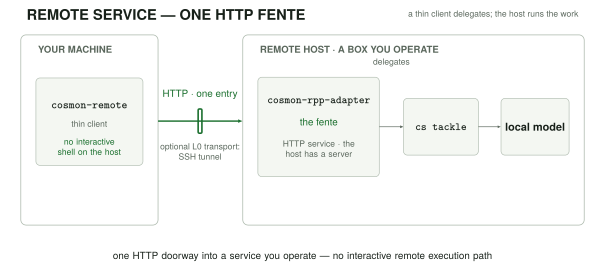
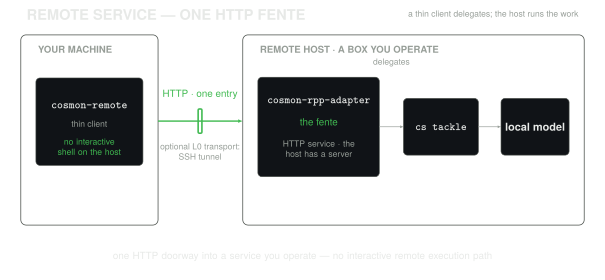
This guide uses a demo identity provider so that the complete auth path is reproducible. Replace it with your production issuer before exposing the service beyond a private tunnel. For how this service surface relates to the runtime, see Control plane vs data plane.
What to deploy
The public noogram/cosmon product closure contains both service components:
| Crate | Role | License |
|---|---|---|
cosmon-rpp-adapter | The HTTP fente and /v1/... service surface. | AGPL-3.0-only |
cosmon-remote | Thin client that drives the service. | AGPL-3.0-only |
The two host-side binaries, cosmon-rpp-adapter (the fente) and cs-oidc-mock
(the demo IdP used in Step 2), ship as a signed cosmon-service-<version>-<target>.tar.gz
release asset per target, alongside the cs CLI tarball. Step 1 therefore has
two routes: download the signed release bundle (no Rust toolchain required),
or build from source. Prefer the download route unless you need an unreleased
revision.
The client, cosmon-remote, is a laptop tool, so it ships with cs: the
cosmon-<version>-<target>.tar.gz release tarball carries both, and the
one-liner installer (curl -fsSL https://noogram.org/cosmon/install.sh | sh)
and the Homebrew formula each place cs and cosmon-remote together. If you
installed cs, you already have the connector. There is no separate client
fetch. The steps below cover only the host. Run the cosmon-remote commands
from Step 4 on the machine where you installed cs.
Remote harvest has two explicit profiles. Scoped lets a binding-granted
cosmon:molecule:harvest credential close and merge ordinary work. Sealed
also requires an independently signed grant installed for that molecule or
mission. Neither profile is selected by an upgrade. See the
remote harvest contract for the
policy table and typed refusals.
The service dispatches work through the same tackle logic as cs tackle, in
process, and it does not spawn a cs binary; it is not a second scheduler. On
the host, the service resolves the selected worker adapter by the same chain as
cs tackle. For this setup it uses the
built-in local adapter: an in-process Ollama /v1 client. No Node.js,
Claude runtime, or tmux session is required for that worker leg.
Step 1: Get the binaries and prepare the remote galaxy
You need three binaries on the host: cosmon-rpp-adapter, cs-oidc-mock, and a
compatible cs. Get them the signed-release way (no toolchain) or build them
from source.
First, make the target directory on the host. This guide calls it $COSMON_HOME.
ssh <remote> "mkdir -p '$COSMON_HOME/bin' '$COSMON_HOME/state/security' '$COSMON_HOME/galaxies'"
Route A: download the signed release bundle (recommended)
Each release ships a cosmon-service-<version>-<target>.tar.gz (the fente + demo
IdP) next to the cs CLI tarball. Pick the target matching the host. A static
Linux box uses x86_64-unknown-linux-musl or aarch64-unknown-linux-musl. Both
tarballs are cosign-signed and Rekor-anchored; verify them as in
Verify the binary's provenance.
ver=0.1.0
target=x86_64-unknown-linux-musl
base="https://github.com/noogram/cosmon/releases/download/v${ver}"
curl -fsSLO "${base}/cosmon-service-${ver}-${target}.tar.gz"   # cosmon-rpp-adapter + cs-oidc-mock
curl -fsSLO "${base}/cosmon-${ver}-${target}.tar.gz"           # cs
tar xzf "cosmon-service-${ver}-${target}.tar.gz"
tar xzf "cosmon-${ver}-${target}.tar.gz"
scp cosmon-rpp-adapter cs-oidc-mock cs <remote>:$COSMON_HOME/bin/
Route B: build from source
Build a static musl release on your development machine. cargo-zigbuild uses
Zig as the cross-linker, so this works without a Linux container. Install its
prerequisites first (Rust's musl target, Zig, and cargo-zigbuild).
cd /path/to/cosmon
cargo zigbuild --release --target x86_64-unknown-linux-musl \
  -p cosmon-rpp-adapter --bin cosmon-rpp-adapter
cargo zigbuild --release --target x86_64-unknown-linux-musl \
  -p cosmon-oidc-testkit --bin cs-oidc-mock
Copy the resulting binaries, plus a compatible cs binary, to $COSMON_HOME/bin.
scp target/x86_64-unknown-linux-musl/release/cosmon-rpp-adapter \
    target/x86_64-unknown-linux-musl/release/cs-oidc-mock \
    /path/to/compatible/cs <remote>:$COSMON_HOME/bin/
Install or configure Ollama on the remote host and make a model that fits its
VRAM available. Initialise the demo galaxy and select the local adapter so
cs tackle selects Ollama rather than an external coding-agent adapter:
ssh <remote> '
  "$COSMON_HOME/bin/cs" init "$COSMON_HOME/galaxies/demo" --tenant demo
  cat >> "$COSMON_HOME/galaxies/demo/.cosmon/config.toml" <<'"'"'EOF'"'"'

[adapters]
default = "local"

[adapters.local]
default_model = "<your-model>"
EOF
'
Step 2: Start the demo identity provider and pin its keys
cs-oidc-mock is a small demo IdP. Its defaults are issuer
https://idp.test.cosmon-oidc-testkit, audience cosmon-rpp-test, a
10-minute token lifetime, and bind address 0.0.0.0:8444. This guide binds it
to loopback on port 8444, writes its JWKS, and uses its POST /issue route to
mint signed test tokens:
ssh <remote> '
  $COSMON_HOME/bin/cs-oidc-mock \
    --bind 127.0.0.1:8444 \
    --write-jwks-out $COSMON_HOME/state/security/jwks/idp.json
'
In a second remote shell, declare the matching issuer and render the demo identity's binding. The issuer, audience, and subject must agree with the token minted below:
ssh <remote> '
  cat > "$COSMON_HOME/state/security/trusted-issuers.toml" <<'"'"'EOF'"'"'
[[issuer]]
iss = "https://idp.test.cosmon-oidc-testkit"
jwks_uri = "http://127.0.0.1:8444/jwks.json"
audiences = ["cosmon-rpp-test"]
EOF

  mkdir -p "$COSMON_HOME/state/nucleons/demo"
  "$COSMON_HOME/bin/cosmon-rpp-adapter" nucleon render \
    --noyau demo --sub demo-operator \
    --iss https://idp.test.cosmon-oidc-testkit --aud cosmon-rpp-test \
    --scope cosmon:molecule:read --scope cosmon:molecule:write \
    --scope cosmon:molecule:harvest \
    > "$COSMON_HOME/state/nucleons/demo/oidc-identity.toml"
'
The trusted issuer and this nucleon binding are both required: a valid token
alone does not grant access to a tenant. With trusted-issuers.toml present,
the adapter fetches keys from each configured jwks_uri. It can also read a
staged security/jwks/*.json file for an issuer listed there. Any staged file
whose iss is absent from the list is refused with a warning at startup and
on every SIGHUP reload. Removing an issuer entry revokes its staged keys on
reload even if the file remains on disk. An existing empty allowlist denies
every issuer; remove the allowlist file only when intentionally returning to
the legacy file-stage fallback.
Binding files are operator-controlled configuration. The adapter does not
keep an independent hash of them. An edit to an existing binding takes effect
after SIGHUP or restart. Keep the state directory writable only by the
operator and review binding edits before reloading. If two binding files
declare the same (issuer, subject, audience) triple, startup refuses the
map; on SIGHUP, the adapter logs duplicate binding refused and keeps the
previous live map. Remove the duplicate and reload again.
In HTTP-fetch mode, send SIGHUP after every edit to
trusted-issuers.toml. The adapter applies issuer additions and removals,
audience changes, and jwks_uri changes, then immediately fetches the current
issuer set. Removed audiences stop validating as soon as the reload is
applied. A new issuer or changed key location needs a successful fetch before
its tokens validate. If a fetch fails, keys already fetched from an unchanged
location remain available; a changed location does not keep keys from the old
location. The adapter logs configuration changes and any fetch failure. Fix an
invalid allowlist file and send SIGHUP again; an invalid file leaves the
prior live configuration in place.
For a production deployment, configure the issuer's jwks_uri in
trusted-issuers.toml and keep the issuer and binding rules explicit.
The adapter checks token times against its own clock. It rejects a token whose
iat or optional nbf is more than 30 seconds in the future. In active
posture, both the declared exp - iat lifetime and the remaining exp - now
time must be at most 15 minutes. In prepared posture, a lifetime or remaining
time over 24 hours is logged as a warning; future iat and nbf values still
cause rejection. Issuers that mint tokens ahead of the adapter clock or issue
longer lived tokens may now receive not_yet_valid or expired refusals.
Synchronize the issuer and adapter clocks and use the posture's token lifetime.
Open /v1/events and /v1/molecules/{id}/logs streams now close when their
bearer expires. They also recheck the live issuer and binding projections,
scope, and deny policy every second and before sending each item. A removed
issuer or binding takes effect on the next recheck after a successful reload;
global_kill and subject, token, or tenant denies take effect within 31 seconds
of an operator file edit (the deny cache refreshes every 30 seconds). The
adapter logs rpp.sse.admission_ended with the route and a broad reason when
it closes an open stream. Clients should reconnect with a current credential
after authorization is restored. A disconnected stream is not resumed by a
later policy change.
Step 3: Start the fente on loopback
The adapter reads state/security/oidc-kill.toml and
state/security/oidc-policy.toml at startup and refreshes them at most 30 s
after a change. Both files are optional. If either file exists but cannot be
read or parsed, the adapter logs an error naming the file and refuses all
tenant admission with global_kill (HTTP 503). This also applies after a
refresh, even if the previous contents were valid. Repair or remove the bad
file; the next refresh restores admission from both files. A misspelled field
in the kill switch or policy structure is an error, so check the adapter log
after changing either file.
OIDC secondary controls use the issuer and subject together. Discovery at
GET /v1/noyaux lists only bindings matching the token's issuer, subject and
audience. Rate limits and GET /v1/quota use an issuer-scoped bucket; after
upgrading, existing subject-only bucket files are no longer consulted and
each principal starts with a fresh bucket. The adapter logs this change at
startup. Audit identity digests also change to the issuer-scoped form.
For a targeted revocation, add issuer to a [[deny.sub]] entry and keep
sub_hash as the BLAKE3 hex digest of the subject alone. For example,
issuer = "https://idp.example" with sub_hash = "<blake3-of-sub>" denies
only that issuer's subject. A [[deny.jti]] entry can likewise specify
issuer and sub_hash alongside jti to target that principal's token.
Existing entries without issuer remain valid and continue to deny every
issuer with the matching subject digest or token ID. Keep those entries when
the broad revocation is intentional; add issuer to narrow them. The adapter
warns when it loads unscoped entries. A sub_hash on a [[deny.jti]] entry
requires issuer; a malformed policy closes admission until repaired.
Start cosmon-rpp-adapter with its state directory, tenant configuration, and
the loopback address that the tunnel will reach. Keep this process supervised
by the service manager available to the host.
ssh <remote> '
  $COSMON_HOME/bin/cosmon-rpp-adapter \
    --bind 127.0.0.1:8443 \
    --config $COSMON_HOME/rpp.toml
'
The rpp.toml config declares the state directory, the tenant galaxies root, and
the directory for tenant artifacts. For example:
bind_addr = "127.0.0.1:8443"
state_dir = "/opt/cosmon/state"
galaxies_root = "/opt/cosmon/galaxies"
artifact_root = "/opt/cosmon/artifacts"
The service is deliberately loopback-only here. The tunnel is the sole L0 path to its HTTP surface; the client does not use a direct shell or container-exec path to create, tackle, or fetch work.
For the harvest administration commands below, give the adapter a separate
host-controlled admin credential at boot. On the operator machine, prepare a
file with umask 077; openssl rand -hex 32 > "$HOME/.config/cosmon/harvest-admin.token"
after creating that directory, then install the same bytes as a mode-0600
secret file on the host. Set COSMON_ADMIN_TOKEN_FILE to that host file's
absolute path in the adapter's supervised environment and restart the adapter.
Use the operator-side file with --admin-token-file; never put the credential
in a tenant bearer, a URL, or a tracked config file. An absent or unreadable
host secret leaves the admin route closed (admin_disabled).
For the example /opt/cosmon layout in rpp.toml, the provisioning step is:
mkdir -p "$HOME/.config/cosmon"
umask 077
openssl rand -hex 32 > "$HOME/.config/cosmon/harvest-admin.token"
scp "$HOME/.config/cosmon/harvest-admin.token" \
  <remote>:/opt/cosmon/state/security/harvest-admin.token
ssh <remote> 'chmod 600 /opt/cosmon/state/security/harvest-admin.token'
# Set COSMON_ADMIN_TOKEN_FILE=/opt/cosmon/state/security/harvest-admin.token
# in the adapter service manager, then restart the adapter.
Step 4: Open the tunnel, mint a demo token, and create a client profile
On the client machine, open a tunnel. It maps the remote service's loopback port to a local port. The mock remains loopback-only on the remote host, so mint its short-lived token server-side and pass it to the client; this avoids needing a second IdP tunnel:
ssh -f -N -L 127.0.0.1:8443:127.0.0.1:8443 <remote>

TOKEN=$(ssh <remote> '
  curl --fail --silent --show-error -X POST \
    "http://127.0.0.1:8444/issue?sub=demo-operator&aud=cosmon-rpp-test&scopes=cosmon:molecule:read,cosmon:molecule:write" \
    | jq -r .access_token
')
export COSMON_REMOTE_TOKEN="$TOKEN"
cosmon-remote stores a default profile and one profile file per service.
Resolution is --profile first, then
$COSMON_REMOTE_PROFILE, then the configured default.
Create the profile manually (or use the service's install.sh profile
installer when your deployment provides one). oidc-url remains required by a
profile. The pre-minted token means this client does not need to reach it:
cosmon-remote config init demo http://127.0.0.1:8443
cosmon-remote config set host http://127.0.0.1:8443
cosmon-remote config set sub demo-operator
cosmon-remote config set aud cosmon-rpp-test
cosmon-remote config set oidc-url http://127.0.0.1:8444
cosmon-remote config set issuer https://idp.test.cosmon-oidc-testkit
cosmon-remote config set client-id cosmon-rpp-test
cosmon-remote config set noyau demo
cosmon-remote config set timeout 30
cosmon-remote config set artifacts-dir ./cosmon-artifacts
cosmon-remote config set phone-home off
Verify both liveness and the identity that the service resolved:
cosmon-remote healthz
cosmon-remote auth me
Provision remote harvest
First grant cosmon:molecule:harvest in the binding for this exact issuer,
subject and audience. Add it to the --scope list in Step 2 when rendering
a new binding, or to the existing binding's [scopes].allowed list and reload
the adapter. A token claiming the scope cannot supply it when the binding
omits it. For the demo issuer, mint a fresh token with that scope as well; the
token's write scope by itself cannot authorize either explicit profile.
Keep read for status and other observations, write for nucleation and
ordinary mutations, and add cosmon:worker:spawn only when dispatch or
auto-propel is intended. A binding reload does not add harvest to existing
bindings automatically.
For the demo identity in Step 4, after updating and reloading its binding, replace the exported token with one that includes the new scope:
TOKEN=$(ssh <remote> '
  curl --fail --silent --show-error -X POST \
    "http://127.0.0.1:8444/issue?sub=demo-operator&aud=cosmon-rpp-test&scopes=cosmon:molecule:read,cosmon:molecule:write,cosmon:molecule:harvest" \
    | jq -r .access_token
')
export COSMON_REMOTE_TOKEN="$TOKEN"
On a freshly provisioned galaxy with [harvest_authority] required absent or
false, select the scoped profile from the operator machine. The
policy fragment
shows the corresponding explicit galaxy setting; the command makes the
compare-and-set administrative write:
cosmon-remote harvest configure --policy scoped \
  --admin-token-file "$HOME/.config/cosmon/harvest-admin.token"
cosmon-remote harvest status --json
cosmon-remote molecule done <completed-molecule-id> \
  --reason "reviewed for remote integration" --json
Check policy: scoped, provenance: explicit, and merged: true in the
responses, then inspect the tenant base branch for the merge. The dedicated
harvest scope alone does not grant write or spawn. If local
[harvest_authority] required = true, selecting scoped refuses
harvest_policy_conflict; resolve that local policy deliberately before
trying again. Do not erase required as an automatic upgrade step.
For a sealed profile, install the external minisign executable on the
operator machine, then use the same admin credential to install only its
public root. init generates an encrypted private key under
$XDG_CONFIG_HOME/cosmon/harvest/keys/<profile>/ (or the corresponding
~/.config directory) and prompts for its password locally. Keep that
directory outside service and worker mounts. A profile with
required = true may select sealed without weakening its local seal policy.
cosmon-remote harvest init \
  --admin-token-file "$HOME/.config/cosmon/harvest-admin.token"
cosmon-remote harvest status --json
cosmon-remote harvest grant --molecule <completed-molecule-id> --expires-in 1h
cosmon-remote harvest status --molecule <completed-molecule-id> --json
cosmon-remote molecule done <completed-molecule-id> \
  --reason "reviewed sealed integration" --json
grant fetches current facts, checks the canonical challenge locally,
displays the grant for review, asks the external signer to sign on this
device, and uploads the signed result. Installation does not merge; done
performs the synchronous transaction. A mission grant uses
--mission <root-molecule-id> instead of --molecule; it applies only to
members of that mission under the signed policy. For offline issuance, run
grant --molecule <id> --export <challenge.json> on a connected client,
grant --sign <challenge.json> on the signing device, then
grant --import <challenge.json.signed.json> on a connected client. The
export, sign and import modes are exclusive.
Grants expire after one hour by default; use --expires-in to choose minutes,
hours or days, or deliberately use --no-expiry until the epoch changes.
On expiry or changed facts, inspect harvest status --molecule and issue a
fresh grant. To revoke all existing grants without replacing the key, a local
operator in the tenant galaxy can run
cs harvest-authority configure --policy sealed --epoch <current-epoch-plus-one>;
the epoch must increase. harvest configure --policy disabled stops remote
harvest immediately, but restoring the old root and epoch could make an
unexpired grant usable again, so bump the epoch before re-enabling it. To
rotate the public root, read the current
key_fingerprint from status and run harvest init --rotate-from <fingerprint>;
the operator device signs the tenant, old and new root digests, and next epoch
with the current private key before uploading the new public root. If that key
is outside the default directory, pass --current-key-file <old-key>;
--key-file <new-key> selects the replacement. The compare-and-set increments
the epoch and invalidates older grants. A
second init with the same key is idempotent. Protect the old private key
according to your retention policy; never copy it into the service.
If the current private key is lost, API rotation cannot proceed. On the server
host, run cs harvest-authority configure --policy sealed --public-key-file <new-public-key> --epoch <current-epoch-plus-one> --local-reset. Local recovery
writes an append-only intent to .cosmon/harvest-root-resets.log before
replacing authority files. Review that record and the resulting root and epoch;
the HTTP admin route has no local reset option.
An explicitly configured cs binary executor cannot perform an explicit
remote harvest: done returns harvest_effect_unsupported. Remove that
binary selection to use the linked library effect. On explicit profiles,
--force, --skip-pre-done-hook and --deploy-off-trunk are refused
harvest_override_requires_ratification; reserved work is also refused.
Use operator review and the local workflow for those cases. A 200 with
merged: false is a valid no-merge or no-op outcome; it is not evidence of
integration. A recovery refusal (harvest_recovery_required) requires
inspection of the durable journal and Git state, never receipt deletion.
Existing galaxies with no remote setting retain their prior behavior:
required = false remains disabled, while required = true keeps the legacy
write-plus-seal path. harvest status reports provenance: legacy. No restart,
upgrade or binding reload chooses scoped or changes an existing binding.
Signing in from inside a container
cosmon-remote login runs the browser half of the OAuth flow: it opens a
one-shot listener for the redirect, sends you to the identity provider, and
catches the ?code=… the browser is bounced back with. By default that
listener binds 127.0.0.1:7777. The URL registered with the provider, which is
the one the browser is told to come back to, is http://127.0.0.1:7777/callback.
On a laptop the two are the same machine and there is nothing to arrange.
Inside a container or a VM they are not the same machine. The browser is on
your desktop; cosmon-remote is in the box. The browser dials its own
127.0.0.1:7777 and the redirect never crosses the boundary. The fix depends
on how the box is reached:
# SSH into a VM: the tunnel's far end is opened on the VM's OWN loopback, so
# the default bind already answers there — no --bind needed.
ssh -L 7777:localhost:7777 you@the-vm
cosmon-remote login

# A container reached by a PUBLISHED port is different: sshd is not in the
# loop, so the port lands on the container's external interface, not its
# loopback. Publish the port at run time and bind the listener to match:
docker run -p 127.0.0.1:7777:7777 … your-image
cosmon-remote login --bind 0.0.0.0
--bind moves the listener only. The advertised redirect_uri stays
http://127.0.0.1:7777/callback. It is registered with the provider by exact
match, so changing it would simply be rejected, and it is the address your
browser must dial for the forward to pick the redirect up. The port is not
part of the flag, and it is not stored anywhere either: the listener's port is
read out of the advertised redirect_uri at the moment of binding, so the two
have no way to disagree about it.
A non-loopback bind is announced on stderr, once, before the browser opens. It
widens who can connect to the catcher for the length of one login. What
bounds that: only a request echoing this flow's high-entropy state can end
the wait. Everything else is answered 404 and discarded. A captured code is
useless without the PKCE verifier, which never leaves the process.
Prefer forwarding from 127.0.0.1 on the desktop side (as above) so the
forwarded port is not itself exposed to the desktop's network.
Step 5: Drive the measured golden path
From the thin client, create a molecule, dispatch it, wait for its detached worker to finish, and retrieve its artifact:
cosmon-remote do --yes "write a Rust function that returns the nth Fibonacci number"
cosmon-remote artifact list <molecule-id>
cosmon-remote artifact get <molecule-id> <artifact-token> --out ./result.md
The do gesture nucleates, tackles, follows the molecule to a terminal status,
and then closes it with a harvest. The close is best-effort: a refused harvest
leaves the deliverable where it was and reports the reason. Pass --no-close
to skip it, or --close-reason to supply the harvest reason. tackle returns a
worker session promptly while the local Ollama worker runs detached on the
remote host. The successful path is:
thin client -> tunnel -> fente -> in-process tackle -> local Ollama worker
             <- artifact get <- completed molecule <- detached worker
This confirms the full service contract: a profile-authenticated thin client
creates work over the tunnel, the remote service dispatches the local adapter,
the molecule reaches completed, and the client receives the resulting
artifact without an interactive remote execution path.
Addressing artifacts
artifact list prints opaque artifact tokens such as art_...; use the token,
not a server path, with artifact get <molecule-id> <artifact-token>. During
the tackle, the adapter creates <artifact_root>/<noyau>/<molecule-id>/ and
exports that directory as $COSMON_ARTIFACT_DIR to the worker. The client
fetches bytes with --out; when omitted, it writes under
./cosmon-artifacts/<molecule-id>/<artifact-token>.
Troubleshooting and security
A 503 tackle_unavailable arrives bare: the client prints the status, the
label, and the request_id, and no probable cause. That is deliberate. The
label is a catch-all. The adapter collapses every dispatch failure it has no
named label for onto it (for example a local-adapter backend that is
unreachable), so a cause printed here would
be a guess, and a guess that names the wrong one sends the investigation the
wrong way. Diagnose it instead with cosmon-remote doctor, which checks each
of those and reports what it found. On a sovereign local-adapter host in
particular, this 503 does not imply a missing Claude Code install: the local
Ollama path does not require one. An empty artifact list normally means
the worker has not written its deliverable or has not completed yet. A 401 or
403 from auth me means to compare the token's issuer, subject, audience, and
scopes with trusted-issuers.toml and the rendered nucleon binding.
Security: the local worker is sandboxed for untrusted work: it receives a six-tool, shell-free registry rather than host-shell access; a toolchain preflight runs before work; and each molecule has a wall-clock limit. It cannot use that worker interface to scan the host or read outside its worktree.
Smoke the whole stack locally before you trust it
Everything above is a sequence of gestures you perform once, by hand, and then have to believe about your next deployment. One command re-performs the whole thing against real containers and tells you which step broke:
python3 -m venv .venv && . .venv/bin/activate
pip install -r tests/e2e/requirements.txt
bash scripts/rpp-remote-e2e.sh
The suite lives in tests/e2e/ and is driven by pytest; the shell entry point
is a pass-through that forwards every argument, so the whole runner is available
from it:
bash scripts/rpp-remote-e2e.sh -k healthz     # one test, alone
bash scripts/rpp-remote-e2e.sh -x --pdb       # stop at the first red, break in
bash scripts/rpp-remote-e2e.sh --junitxml=e2e.xml
pytest tests/e2e -m "not stack"               # the parts needing no docker
It builds both images from crates/cosmon-rpp-adapter/deploy/docker-compose.yml,
waits on the two healthchecks that file already declares, and then drives the
stack with the compiled cosmon-remote binary over the published loopback
ports: login (the real authorization-code + PKCE flow against the mock IdP,
headless), auth me, nucleate, observe, tackle (a real worker, spawned by
the image), a wait for that worker to drive the molecule to completed, and a
done that must come back having merged the worker's branch onto the tenant
base branch.
Every assertion says why the value it expects is the right one, naming the ADR
section, route document or invariant it derives from; when one breaks, the
failure prints that sentence together with the request as sent, the response as
received and the tail of the adapter's own log. Each exchange is also written to
.rpp-remote-e2e/<stamp>/artifacts/ as its own file, beside the familiar
one-line-per-step e2e.ndjson.
The stack is reinitialised between test sets. Each test class gets
down -v + up --wait + reprovisioning, and a fresh tenant galaxy tree. No
molecule, inbox entry, or rate-limiter bucket from one set can make the next one
pass or fail. tests/e2e/test_reinit.py is the proof rather than the promise: it
plants a molecule in one set and asserts its absence in the next, and it goes red
under RPP_E2E_REINIT=0.
Nothing of yours is touched. The tracked deploy/ tree is copied and remains
unmodified; the nucleon binding is materialised into the copy from the tracked
.example, so a template that has lost a key the loader reads turns the suite
red instead of passing on a private copy you will never have; the tenant galaxy
is a throwaway tree destroyed with the stack; $HOME is redirected so the run
reads neither your cosmon-remote profiles nor your OS keychain; the containers
carry a name suffix and non-default ports so a live deployment on 8443/8444 keeps
running beside it. Set RPP_E2E_KEEP=1 to leave the stack up and poke at it.
If docker or pytest is missing the run exits 2 and says so. There is no skip
path, on purpose: a smoke that prints green without running is how an absent
prerequisite becomes a passing nightly. Exit 1 is a red test: "ran and failed"
and "could not run" are different verdicts.
What the mock IdP does and does not prove
The login flow runs against cs-oidc-mock, a mock. It proves the shape of the
flow: discovery, an authorization-code redirect, PKCE-S256 on the token
exchange, a signed JWT whose (iss, sub, aud) the adapter resolves against your
nucleon binding. It proves nothing that depends on a real provider's policy, and
it is known to deviate from one in these ways (the list is kept beside the
fixture, in tests/e2e/conftest.py):
/authorizeauto-approves: no login form, no consent, no MFA, so no redirect chain, session cookie or interactive timeout is exercised.subis a fixed, readable string. A real IdP mints an opaque per-user identifier whose shape you must not assume.- Discovery is minimal: it carries what this client reads and no more. A
real document advertises
userinfo_endpoint,end_session_endpoint,claims_supportedand several*_supportedarrays; a client that grew to depend on one of them would pass here and fail against production. - Token response order and extras: real providers add
id_token,refresh_token,scopeand vendor claims, in no guaranteed order. Nothing may be asserted positionally. - Keys do not rotate and expiry is generous: no
kidrollover, no re-fetch on an unknownkid, no clock-skew edge. - No refresh, revocation or introspection endpoints exist, so no test here covers the paths that use them.
The same tests run against a real IdP with no code change. The provider is read entirely from configuration:
RPP_E2E_ISSUER=https://idp.example/realms/cosmon \
RPP_E2E_AUDIENCE=<the client_id registered there> \
RPP_E2E_IDP_SUB=<the sub that IdP mints for the test principal> \
RPP_E2E_EXPECT_SUB=<the same value> \
pytest tests/e2e -m stack
Two things must then be provisioned out of band: the JWKS the adapter pins
from disk must be that provider's (see the rpp-jwks volume in the compose
file), and the redirect URI http://127.0.0.1:7777/callback must be
registered on the client.
The tackle leg, and why it is the interesting one
The scenario ends by dispatching a real worker: tackle, then a wait for the
molecule to reach completed, then done.
That leg is worth more than the rest put together, because it is the one thing
no in-process test can tell you. Until issue #54, the adapter reached tackle,
run and the harvest door by running the cs binary, which its own Dockerfile has
never contained. Every unit and route suite was green; all three routes failed
against the image you actually deploy. The routes now dispatch in-process, and
this step is the only place that claim is checked where it matters: inside the
container, with a worker pane really opened, a git worktree really cut, and the
briefing really pasted into it.
The worker is a dummy, and it is not in the image you deploy.
deploy/docker-compose.e2e.yml builds the adapter from the Dockerfile's e2e
target, a FROM runtime layer that adds tests/fakes/fake-claude under the
name claude plus a worker-side cs, so the worker can finish its molecule.
The shipped stage still carries no cs and no agent CLI. A smoke that
provisioned the tenant-facing image would be proving the claim about an image
nobody runs.
The done leg must merge
done, restored as one gesture when issue #51 withdrew the second land verb,
is
where the walk ends, and what it asserts is a merge commit on the tenant's
base branch, carrying the lineage trailers cs done writes.
That is a change of verdict, and it took three issues. The door's decision half
runs in-process (#54), so every pre-effect refusal answers with no cs binary
present. The effect half became a library the adapter links, cosmon-harvest,
and the default (#67, #68). A stock deployment therefore reaches the real
transaction instead of a 501 harvest_effect_unavailable. The historical
container suite exercises the legacy sealed profile, with both conditions:
[harvest_authority] required = truein the throwaway galaxy. Without it, legacy remote harvest is disabled.- an operator-sealed, molecule-scoped grant, so the effect half admits too. An armed galaxy with no trust root refuses from inside the trunk lock.
The production path is the operator-side cosmon-remote harvest init and
harvest grant sequence above.
Two further tests pin the parameter surface the D4 reversal put on the wire: a
blank --reason is refused 400 missing_reason (the door never invents a
sentence), an unimplemented --strategy is refused 400 unsupported_parameter
rather than silently defaulted, and a second test set closes its molecule with
--no-merge and asserts the opposite verdict: a 200 reporting merged: false
with the base branch exactly where it was.
v1_done_library_effect.rs proves the same merge in-process, and much faster.
What the container adds is the only thing an in-process test cannot say: that it
happens through the image an operator deploys, on a bind-mounted tenant tree,
driven by the real cosmon-remote.
To watch the pre-issue-54 failure for yourself, point the build at a checkout that predates the cut-over and name the refusal you expect:
git worktree add /tmp/pre-u6 <commit-before-the-cut-over>
RPP_E2E_BUILD_ROOT=/tmp/pre-u6 \
RPP_E2E_E2E_STAGE=0 \
RPP_E2E_EXPECT_TACKLE_LABEL=tackle_unavailable \
  bash scripts/rpp-remote-e2e.sh
The tests that need a successful dispatch are then deselected. A refused dispatch has no worker to wait for, and the run records the refusal it observed. They are deselected rather than skipped: nothing in this suite prints green without having run.
The same entry point runs nightly in CI as the non-blocking rpp-remote-e2e
job, which uploads the JUnit report and the per-exchange artefacts.
See also
- Agent adapters: a harness over harnesses: how cosmon selects and runs an adapter.
- Control plane vs data plane: why artifact retrieval is separate from lifecycle control.
- Molecule lifecycle reference: lifecycle terms and commands in full.
CLI overview
These commands use physics-inspired names (nucleate, evolve, decay, spore, …). New to the vocabulary? See The physics vocabulary.
Cosmon — compose, pilot and audit long-haul AI missions where the trace matters.
Run cs help for the full command reference, cs help guide for the operator handbook, and man cs for the manual page.
Source of truth: .cosmon/state/ (JSON). Surfaces are projections — never edit directly.
The normal cycle for one unit of work:
cs nucleate task-work --var-file topic=<file>   # a long statement goes in a file, not a flag
cs tackle <id> --adapter claude                 # spawn a worker; omit --adapter for the project default
cs peek                                         # watch it work, or `cs wait <id>` to block
cs whisper <id> --file correction.md            # send a correction while the worker is still open
cs done <id>                                    # merge to the base branch + teardown (required)
Use cs tackle, not cs run, when you intend to read the result before merging: cs run walks a whole DAG and calls cs done on completion itself, closing the review window.
Stopping early is not the end of a mission: the work stays on the branch and worktree recorded at dispatch until you run cs done <id> (keep the partial work) or cs collapse <id> --reason "…" (record abandonment). cs complete, cs collapse, and cs status print the exact branch, recorded worktree (including overrides), and concrete cs done command. A collapse preserves the branch for audit; it never licenses unaudited deletion.
Branch audit is concrete: inspect git log --oneline <base>..<branch> and git diff --stat <base>...<branch>. Integrate completed work with cs done <id>; for abandoned active work, put the reviewed disposition in cs collapse <id> --reason "<verdict>". Retain the branch unless deletion is separately reviewed. cs status shows live branches as active work and collapsed or deliberately unmerged branches with their recorded disposition.
Finishing a mission means cs status reads clean afterward — no zombie session, no un-harvested Completed molecule, and no unresolved molecule branch. Active work and retained branches with a recorded audit disposition are visible, but are not residue. cs status says clean or names every unresolved item.
Who does what — you decide the mission and protected inputs (cs nucleate --protect) and accept or drop each result; the pilot drives the cycle above; workers do the work. Full breakdown: https://docs.noogram.org/explanation/pilot-and-workers.html
Global options
These flags are accepted before any subcommand and apply to every command:
| Flag | Effect |
|---|---|
--config <PATH> | Path to the configuration file. |
--verbose, -v | Enable verbose output. |
--json | Emit machine-readable JSON/NDJSON instead of the human view. |
--json is the agent-first interface: every cs command honours it, so a worker or external orchestrator parses structured output rather than scraping the terminal render.
Command groups
The command reference is split by role:
Molecule lifecycle commands
These commands use physics-inspired names (nucleate, evolve, decay, spore, …). New to the vocabulary? See The physics vocabulary.
cs spark
Spark — capture a one-line operator intent into the Inbox (ADR-061)
Usage: cs spark [OPTIONS] <TEXT>
EXAMPLES: cs spark "réunion demain : revoir le pitch" cs spark "debug the flaky test" --kind task cs spark "CI broken on macOS" --kind issue --tag temp:warm cs spark "constellation idea" --nucleon operator-demo@example.com
A spark is the pre-task — a one-line operator intent dropped into the Inbox (HOT bucket by default) with the sparker's identity attached. The demo criterion: operator-demo on her iPhone via Blink Shell SSH types a single spark and the operator sees it on the next 'cs peek' refresh. No Claude Code in the chain.
DEFAULTS: --kind idea # 💡 one-line Inbox shape --tag temp:hot # surfaces in 'cs inbox' HOT bucket nucleon_id: git user.email, else $USER@$(hostname)
SACRIFICES: offline fails, auth ≡ SSH access, no push (next refresh), raw Blink terminal UX, v1 is one-way (no pilot reply from Inbox).
SEE ALSO: cs inbox (where sparks land), cs tackle (promote to work), cs transform (re-kind), cs collapse (reject with reason).
Arguments:
-
<TEXT>— The spark text itself — what appeared in the operator's head.Captured verbatim into the molecule's
topicvariable and thus intoprompt.md(sealed by the usual nucleate path). Quote the argument if it contains spaces.
Options:
-
--kind <KIND>— Override the molecule kind. Defaults toidea(💡) — the Jobs §2 shape. Acceptsidea,task,issue, or any other [cosmon_core::kind::MoleculeKind] string the operator cares to pass; the actual validation happens innucleateDefault value:
idea -
--tag <TAG>— Tag to attach (repeatable). When no--tagis supplied the spark lands withtemp:hotso it surfaces immediately incs inbox(HOT bucket) andcs ensemble --tag temp:hot -
--fleet <FLEET>— Fleet to nucleate into. Defaults todefaultDefault value:
default -
--nucleon <NUCLEON>— Override the auto-derivednucleon_id(sparker identity).Normally derived from
git config user.emailwith a$USER@$(hostname)fallback. Pass this when scripting a test demo or when the git email is not the identity you want to record. -
--sparked-by <SESSION_ID>— Currently-open pilot-session molecule id (ADR-061 §SparkedBy).Recorded as a variable only in v1 — the
SparkedBytyped link is reserved until ADR-061 is markedaccepted. Passed verbatim intoprompt.mdso later migrations can recover the edge. -
--formula <FORMULA>— Override the formula name (defaults tospark). Exists for tests and for exotic deployments that vendor their own capture formula; normal callers leave this unsetDefault value:
spark -
--formulas-dir <DIR>— Path to the formulas directory (defaults to walk-up discovery) -
--store-dir <DIR>— Path to the state store root (defaults to walk-up discovery)
cs drop
Drop — universal Inbox gesture (hotkey / zsh widget / menubar) → cs spark
Usage: cs drop [OPTIONS] [TEXT]...
EXAMPLES: cs drop # universal Inbox gesture — captures whatever is in scope
Equivalent of cs spark reachable from hotkey / zsh widget / menubar.
SEE ALSO: cs spark (canonical), cs nucleate spark (formula form).
Arguments:
-
<TEXT>— The drop text itself. When absent or empty, the text is read from stdin — supportscs drop < fileand pipe chains.Multiple words are joined with single spaces so callers can pass raw command-line tokens (
cs drop hello there) without quoting. Leading/trailing whitespace is trimmed.
Options:
-
--galaxy <NAME>— Galaxy name to drop into. Resolved via~/.config/cosmon/galaxies.toml([TomlGalaxyIndex]).When set, the resolved
Galaxy.pathbecomes the store root (<path>/.cosmon/state/) for this nucleation. Without it, cosmon's usual walk-up discovery picks the galaxy from the current working directory. -
--kind <KIND>— Molecule kind override. Defaults toidea— same ascs spark.The briefing names
spark | idea | taskas common choices; any valid [cosmon_core::kind::MoleculeKind] token is accepted (validated innucleate).Default value:
idea -
--tag <TAG>— Additional tag to attach (repeatable).temp:hotandsource:dropare always added;--tagextends the list.Callers use this to stamp the drop's origin surface (e.g.
--tag source:shortcutfrom the iPhone SSH wrapper, which supplements rather than replacessource:drop). -
--fleet <FLEET>— Fleet to nucleate into. Defaults todefaultDefault value:
default -
--nucleon <NUCLEON>— Override the auto-derivednucleon_id(drop author identity). Same semantics ascs spark --nucleon -
--sparked-by <SESSION_ID>— Currently-open pilot-session molecule id (ADR-061 §SparkedBy). Same semantics ascs spark --sparked-by -
--formula <FORMULA>— Override the formula name (defaults tospark). Exists for tests and exotic deployments; normal callers leave this unsetDefault value:
spark -
--formulas-dir <DIR>— Path to the formulas directory (default: walk-up discovery) -
--store-dir <DIR>— Path to the state store root (default: walk-up discovery, or the galaxy-registry lookup when--galaxyis set)
cs listen
Listen — voice → whisper.cpp → cs nucleate spark (MVP)
Usage: cs listen [OPTIONS]
EXAMPLES: cs listen # voice-driven spark capture (whisper.cpp) cs listen --once # single utterance, then exit
Voice ingress to the fleet. Wraps whisper.cpp transcription and
produces a spark molecule per utterance.
SEE ALSO: cs spark, cs drop.
Options:
-
--seconds <SECONDS>— Seconds to record before cutting off (no VAD in v0).Ignored when
--transcriptor--audiois supplied. Keep the value short: whisper-cli on CPU runs near 1× realtime on thesmallmodel, so 15 s of speech costs ~15 s of wall-clock.Default value:
10 -
--transcript <TEXT>— Skip recording + transcription and use this text directly.Useful for scripting (end-to-end dry-runs without a microphone) and for isolating the spark pipeline from the audio stack when debugging. Incompatible with
--audio. -
--audio <PATH>— Transcribe an existing audio file instead of recording.Accepted formats are whatever the configured
whisper-cliwas built with (WAV/FLAC/MP3 on the default homebrew build). Incompatible with--transcript. -
--whisper-bin <PATH>— Path to the whisper-cli binary (defaults towhisper-cliin $PATH).This is the
whisper.cppCLI (brew install whisper-cpp), not theOpenAIPython package — the latter is slower and violates the local-first constraint (it bundlesPyTorch).Default value:
whisper-cli -
--model <PATH>— Path to the whisper model (e.g.ggml-small.bin).Can also be set via the
COSMON_WHISPER_MODELenv var. Required for actual transcription — if absent and--transcriptwas not supplied the command fails loudly instead of silently producing an empty spark. -
--language <LANG>— Whisper language hint:auto,fr,en, …The whisper-cpp flag accepts ISO 639-1 codes.
autoasks whisper to detect the language itself.Default value:
auto -
--ffmpeg-bin <PATH>— Path to the ffmpeg binary used for recordingDefault value:
ffmpeg -
--device <SPEC>— ffmpegAVFoundationinput device specifier.On macOS the default microphone is
":0". Runffmpeg -f avfoundation -list_devices true -i ""to enumerate.Default value:
:0 -
--dry-run— Skip nucleation — print the transcript only.Use this when validating the audio path on a fresh machine so you do not pollute the Inbox with test utterances.
-
--kind <KIND>— Molecule kind for the resulting spark (delegated tocs spark)Default value:
idea -
--tag <TAG>— Tag to attach (repeatable, defaults totemp:hot) -
--fleet <FLEET>— Fleet to nucleate intoDefault value:
default -
--nucleon <NUCLEON>— Override the auto-derivednucleon_id(sparker identity) -
--formulas-dir <DIR>— Path to the formulas directory (defaults to walk-up discovery) -
--store-dir <DIR>— Path to the state store root (defaults to walk-up discovery)
cs nucleate
Nucleate a new molecule from a formula template
Usage: cs nucleate [OPTIONS] [FORMULA]
EXAMPLES:
cs nucleate task-work --var topic="refactor CLI help"
cs nucleate deep-think --kind deliberation --var question="..."
cs nucleate patrol --blocks root-mol # add a DAG edge
cs nucleate constellation --kind constellation
--var pattern="three molecules re-invent the same missing primitive"
--var citations="delib-example-0001,task-example-0002,idea-example-0003"
cs nucleate --from molecules/ # hydrate from TOML declarations
KINDS (--kind): idea 💡, task 🔧, decision 📐, issue 🐛, signal ⚡, deliberation 🧠 (use with the deep-think formula), constellation 🌌 (fil-rouge artifact; see cs help guide).
LINK FLAGS:
--blocks
SEE ALSO: cs tackle (launch a worker on the molecule you just nucleated). docs/guides/constellation-pattern.md (when to use 🌌 vs 🧠).
Arguments:
-
<FORMULA>— Formula name (looks for{name}.formula.tomlin the formulas directory).Required unless
--fromis supplied.
Options:
-
--from <PATH>— Hydrate molecule(s) from a TOML declaration file or directory.When
PATHis a directory, every*.tomlfile inside (non-recursive, sorted) is loaded as a [MoleculeDeclaration]. The positionalformulaargument is ignored in this mode — each declaration carries its ownformulafield. -
--blocks <MOLECULE_REF>— Target molecule(s) that this new molecule blocks — each target cannot progress until this one completes.Accepts two forms: -
<molecule-id>— same-galaxy edge. AddsBlockshere and a symmetricBlockedByon the target. Targets must already exist. -<galaxy-alias>:<molecule-id>(or<galaxy-alias>@<molecule-id>) — cross-galaxy edge (Phase 1, ADR-035). The remote target is resolved best-effort via configured galaxy aliases or the cluster root. The reciprocal edge is not filed on the target galaxy (one-writer-per-galaxy, ADR-052) — the edge is recorded locally and a stderr warning is emitted if the target is unreachable. -
--blocked-by <MOLECULE_REF>— Source molecule(s) that block this new molecule — this new molecule cannot progress until each source completes.Same syntax as
--blocks, including the<alias>:<mol_id>cross-galaxy form (Phase 1, ADR-035). -
--decayed-from <MOLECULE_ID>— Declare that the new molecule decayed fromPARENT_ID— an information edge (not a progression edge): the parent is the cognitive source this molecule emerged from, but the parent is free to keep advancing independently. Symmetric counterpart: the parent gains aDecayProductlink to the new molecule.This is the explicit form of the auto-parent contract: when a worker
cs tackles a molecule,COSMON_PARENT_MOL_IDis injected into its environment, and any subsequentcs nucleatefrom that worker auto-populates this flag unless one of--blocks,--blocked-by,--decayed-from, or--no-parentis already set. Passing it explicitly wins over the env var. -
--no-parent— Disable the env-driven auto-parent contract for this invocation.When set, the
COSMON_PARENT_MOL_IDenvironment variable is ignored and noDecayedFromedge is synthesized. Use this for legitimate orphan nucleations (e.g., a worker that intentionally spawns an unrelated top-level molecule). -
--refines <MOLECULE_ID>— Cited molecule(s) that this new molecule refines (semantic citation edge — does NOT carry progression semantics, unlike--blocks).For every target, the new molecule gets a
Refineslink and the target gets a symmetricRefinedBylink. Intended forConstellationmolecules that name a fil-rouge across N existing molecules. Repeat the flag per citation; targets must already exist.Also auto-populated for
--kind constellationfrom a comma-separated--var citations=mol1,mol2,mol3. -
--refutes <MOLECULE_ID>— Diagnosis molecule(s) that this new molecule refutes (semantic refutation edge — no progression semantics, unlike--blocks).For every target, the new molecule gets a
Refuteslink and the target gets a symmetricRefutedBylink. This is the DAG-native form of the ADR-143 diagnosis-verify gate: acmb-verifymolecule that reproduces a relayed symptom but finds the stated mechanism describes a nonexistent code path records the divergence by refuting the diagnosis molecule. Repeat the flag per refuted diagnosis; targets must already exist. -
--fleet <FLEET>— Fleet to nucleate the molecule into (default: "default")Default value:
default -
--kind <KIND>— Molecule kind: idea, task, decision, issue, signal, deliberation, constellation (seedocs/guides/constellation-pattern.md) -
--class <CLASS>— Operational class —standard(default),stress-test, orinfra(ADR-085 §1).stress-testopts the molecule into the two-layer pre-commitment seal at dispatch (Layer 1 runtime precondition + Layer 2 witness-quorum, ADR-085 §2-§3) and out of autopilot drain. The remaining classes are gate-equivalent to the legacy default; this flag is a marker, not a runtime mode. -
--assign <ASSIGN>— Assign a worker to the new molecule -
--var <KEY=VALUE>— Set a variable (repeatable: --var key=value).--var cosmon_model=<id>records a child model recommendation for latercs tackleandcs rundispatch. It outranks the formula-step model; an explicitcs tackle --modelstill wins. Omit it to keep ordinary model resolution unchanged. -
--var-file <KEY=PATH>— Read a variable value from a UTF-8 file (repeatable: --var-file key=path).The file contents are passed verbatim, including trailing newlines. Explicit
--varbindings override a same-named--var-filebinding. -
--formulas-dir <DIR>— Path to the formulas directory (default: ./formulas) -
--role <ROLE>— Agent role for the worker that will tackle this molecule.Valid roles: orchestration, research, implementation, infrastructure, advisory, validation. When set,
cs tackleuses this role instead of the defaultimplementation. -
--store-dir <DIR>— Path to the state store root (default: .cosmon) -
--tag <TAG>— Typed label to attach to the new molecule (repeatable).Format:
keyorkey:value. Keys are kebab-case; values exclude whitespace and:. Duplicate tags are deduplicated. -
--interaction-mode <MODE>— Static interaction-mode discriminant posed at nucleation.One of
operator-requiredorbackground. Recorded as theinteraction-mode:<mode>tag. Posed by the molecule's author — often an agent — and read at dispatch ; survives the operator's present state. Default explicit, not implicit : when absent, the tag is simply not set, and consumers (the graceful degradation controller, in particular) decide what to do.Conflicts with
--tag interaction-mode:*to keep the discriminant single-sourced. -
--may-block-on-operator <BOUNDARY>— Grant the operator-block capability at an irreversibility boundary (ADR-123 Q5).One of
signature,external-send,publish,authoritative-value. Recorded as theop-block:<boundary>tag. A worker reads this single typed capability to decide whether it MAY pause for an operator (cs await-operator) at that boundary — or, when absent, MUST surface-and-continue. The capability is granted here at nucleation and never self-asserted by the worker.Conflicts with
--tag op-block:*to keep the grant single-sourced. -
--ttl <DURATION>— Relative TTL — deadline is now + duration (ADR-029).Grammar:
<N><unit>where unit ∈ {s,m,h,d,w}. Examples:7d,24h,2w. Mutually exclusive with--expires-at. -
--expires-at <WHEN>— Absolute expiry instant (ADR-029).Accepts RFC3339 (
2026-07-02T00:00:00Z) or a plainYYYY-MM-DDdate (anchored at end-of-day 23:59:59Z). Mutually exclusive with--ttl. -
--expiry-policy <POLICY>— Expiry policy — what to do whenexpires_atis in the past.One of
warn,collapse,escalate. Defaults to the per-kind default from config (orwarn) when unset. Only meaningful when--ttlor--expires-atis also provided. -
--energy-budget <N>— Per-molecule step counter circuit breaker (THESIS Part XI).cs evolvedecrements this once per step. At zero, the next attempt transitions the molecule toFrozenwith reason"energy-exhausted". Default comes from.cosmon/config.toml[energy] default_step_budget(100 if absent). Pass0to disable the breaker for this molecule. -
--require-galaxy— Refuse to nucleate into the host-global~/.cosmon/statefleet.By default, running
cs nucleatefrom a directory with no.cosmon/config.tomlin cwd or any ancestor falls back to the host-global state dir ($HOME/.cosmon/state) and prints a warning to stderr — the molecule is born into a fleet invisible to every galaxy.--require-galaxyturns that warning into a hard error (exit ≠ 0), so scripts and tooling that must write galaxy-scoped state can fail fast instead of silently leaking orphans. -
--adapter <NAME>— Durable per-molecule adapter pin — the rung-1 provider-family intent stamped at nucleation (ADR-097 / C6; committee-20260723-c0a1).Unlike the transient
cs tackle --adapterflag (which routes a single dispatch), this pin is persisted toMoleculeData::adapterand survives any later run directive. Acs run --resident --adapter <X>owns a run-wide directive that stamps every pin-less molecule with<X>; a molecule nucleated with--adapter <Y>keeps<Y>because the per-molecule pin beats the run directive (cosmon_runtime::resident). This is what lets a cross-provider committee pin a seat's distinct family (e.g.mistral) so a resident loop driving the generator's family (e.g.claude) cannot auto-tackle the seat into aFamilyCollision.Values are validated against the adapter-name grammar (the same check
cs tackle --adapterapplies); an empty or malformed name aborts the nucleation.None(the default) stamps no pin — the molecule resolves its adapter through the canonicalcs tacklechain at dispatch. -
--base <BRANCH>— Durable integration base — the branch this molecule'sfeat/<id>branch is cut from andcs donemerges back into.Persisted to
MoleculeData::base_branchat birth, beside the adapter pin, so the base is a property of the molecule rather than of whichever session later dispatches it: a barecs tackle <id>resolves to it, and acs run --resident --base <X>directive does not overwrite it (the per-molecule base wins, as the adapter pin does).cs tackle <id> --base <Y>still overrides it.The branch must exist locally: a base naming no branch is refused here, with the branch named, and no molecule is created — otherwise the mistake would surface only at
cs done, hours later.None(the default) stamps nothing and leaves the ambient resolution unchanged. -
--protect <PATH>— Declare a path as protected reference input (repeatable).Ground truth the work is checked against — expected outputs, golden files, a reference dataset — which the worker must read and never modify. The path is relative to the repository root and may name a file or a directory (a directory protects everything below it). Persisted on the molecule and read three times: the worker's brief lists the paths as read-only with the reason,
cs tackleclears their write bits in the worktree, andcs donerefuses the merge (protected_path_modified, exit 78) when the worker branch changed any of them, naming each one. The operator overrides that refusal withcs done --allow-protected-change.An absolute path or one containing
..is refused here, before any molecule is created. This flag cannot be combined with--from: declaration files do not carry per-molecule protected paths, so the combination is refused rather than silently dropping the protection.
cs observe
Observe a molecule's current state and history
Usage: cs observe [OPTIONS] [MOLECULE_ID]
EXAMPLES: cs observe task-example-0001 # one-shot snapshot (never poll!) cs observe task-example-0001 --json # for scripts
SEE ALSO: cs wait (block until terminal), cs peek (fractal TUI).
Arguments:
<MOLECULE_ID>— Molecule ID (or prefix) to inspect. Omit to list all molecules
Options:
-
--status <STATUS>— Filter by status (active, frozen, completed, collapsed) -
--worker <WORKER>— Filter by assigned worker -
--formula <FORMULA>— Filter by formula -
--search <SEARCH>— Free-text search across molecule fields -
--all— Include completed and collapsed molecules (excluded by default in list mode) -
--tag <GLOB>— Filter by tag glob pattern (repeatable, any-match) -
--notes <N>— Number of trailing notes to show in detail mode (default: 3)Default value:
3
cs evolve
Evolve a molecule to its next lifecycle state
Usage: cs evolve [OPTIONS] --evidence <EVIDENCE> --formula <FORMULA> <MOLECULE>
EXAMPLES:
cs evolve
--formula .cosmon/formulas/task-work.formula.toml
Worker-callable. Advances the molecule one step per invocation.
Arguments:
<MOLECULE>— Molecule ID to evolve
Options:
--evidence <EVIDENCE>— Evidence documenting why the current step is complete--ops-dir <OPS_DIR>— Path to the state store root (overrides walk-up discovery)--formula <FORMULA>— Path to the formula TOML file
cs complete
Complete a molecule — idempotent Active→Completed transition (worker-callable)
Usage: cs complete [OPTIONS] [MOLECULE]
EXAMPLES:
cs complete
Idempotent Active→Completed transition. Worker-callable. Does NOT merge
the branch or teardown the tmux session — use cs done for that.
SEE ALSO: cs done (merge + teardown), cs evolve (advance one step).
Arguments:
<MOLECULE>— Molecule ID to complete (single mode)
Options:
-
--batch <BATCH>— Complete multiple molecules at once -
--reason <REASON>— Reason for completion (recorded in the log)Default value:
completed via cs complete -
--ops-dir <OPS_DIR>— Path to the state store root (overrides walk-up discovery) -
--override-mindguard-down— Bypass mindguard only when the gate machinery itself is unreachable. Requires--justification. Lands a record in the append-only ledger at~/.cosmon/audit/mindguard-overrides.jsonlbefore the completion proceeds. NEVER use this to bypass aMindguardRefused— the remedy for that is to runcs nucleate verify-surface --var target=<MOL> -
--justification <JUSTIFICATION>— Justification for--override-mindguard-down. Required when the override flag is set. Recorded write-once in the audit ledger
cs collapse
Collapse a molecule — terminate with final state recording
Usage: cs collapse [OPTIONS] <MOLECULE>
EXAMPLES:
cs collapse
--cause rate_limit --account default --kind max_rolling_5h
Terminal transition. Use instead of leaving stale pending molecules.
--with-seats (molecule in a declared cs work roster): also collapse every
other live member of the roster, with the same reason. Reads the roster once,
then runs the ordinary collapse per seat; a completed seat is skipped and
cs done <seat> printed; nothing is merged. --reason may be omitted when the
named molecule is already collapsed: its recorded reason is inherited with the
seat and work appended. Exit is non-zero if any seat failed; rerun to retry.
Pass --cause to attribute the failure with a structured tag (ADR-062): rate_limit — quota refused; pair with --account ALIAS --kind CURRENCY (max_rolling_5h, max_weekly, api_key_org_monthly, …). Surfaces as ghost: quota-exhausted in cs peek. inference_stall — worker alive but stopped emitting tokens. manual — operator decision (default if --reason alone). process_death — worker process died (OOM, signal). unknown — could not be classified.
Arguments:
<MOLECULE>— Molecule ID to collapse
Options:
--reason <REASON>— Reason for the collapse. With--with-seatsit may be omitted when the named molecule is already collapsed: its recorded reason is then inherited, suffixed with the seat and work--with-seats— Also collapse every other live member of the declared work the molecule belongs to (owner or seat), with the same reason. Never merges; a completed seat is skipped andcs done <seat>is printed--cause <CAUSE>— Structured cause attribution (ADR-062):rate_limit,inference_stall,manual,process_death,unknown. Withrate_limit, pair--accountand--kindfor the K3 fixture shape--account <ALIAS>— Account alias for--cause rate_limit(e.g.default)--kind <KIND>— Quota currency name for--cause rate_limit(e.g.max_rolling_5h,max_weekly,api_key_org_monthly,financial_usd,custody_scoped). Free-form to remain extensible across providers--reason-kind <REASON_KIND>— Operator-facing collapse classification forcs errorsaggregation: one ofworker_crashed,gate_failed,blocker_stuck,manual_abort,resource_exhausted. Any other value lands in [CollapseReason::Other] verbatim; by conventionverification_blockedmarks work done whose gates were blocked by infrastructure — the worker's claim, never merge-safety evidence--ops-dir <OPS_DIR>— Path to the state store root (overrides walk-up discovery)
cs stuck
Stuck — freeze a molecule and record the blocker
Usage: cs stuck --reason <REASON> <MOLECULE>
EXAMPLES:
cs stuck
Terminal-ish: freezes the molecule with a recorded blocker. Consider
cs tag <mol> --add temp:frozen for backlog hygiene.
Arguments:
<MOLECULE>— Molecule ID that is stuck
Options:
--reason <REASON>— What is blocking progress
cs await-operator
Await-operator — the only sanctioned way to block on an operator decision at an irreversibility boundary (ADR-123). Routes on the molecule's op-block:* capability: block-and-emit, or surface-and-continue
Usage: cs await-operator --question <TEXT> <MOLECULE_ID>
EXAMPLES:
cs await-operator
Worker-callable (ADR-123). The ONLY sanctioned way to block on an operator decision at an IRREVERSIBLE boundary (signature transmitted, push to a shared remote, publish, an authoritative value downstream consumers act on). NEVER raise an off-cosmon modal (AskUserQuestion) — it is invisible to cosmon and the DAG stalls silently.
Routes on the molecule's op-block:<boundary> capability (granted at nucleation
via cs nucleate --may-block-on-operator <boundary>):
• capability present → BLOCK: writes blocked_on.json, emits
worker_blocked_on_operator, tags temp:awaiting-op, and yields. Molecule
stays Running.
• capability absent → SURFACE-AND-CONTINUE: writes responses/needs-review.md
and tells you to pick a sensible default and keep working (reversible).
SEE ALSO: cs nucleate --may-block-on-operator, cs patrol --event-age.
Arguments:
<MOLECULE_ID>— Molecule ID whose worker is blocking
Options:
--question <TEXT>— A decision the operator is being asked to make (repeatable). At least one is required
cs freeze
Freeze a worker — suspend with state preservation (preemption)
Usage: cs freeze [OPTIONS] <WORKER>
EXAMPLES: cs freeze worker-3 # suspend, keep state for later thaw cs freeze worker-3 --reason "rotating OOM" # graceful shutdown with recorded intent
--reason <str> is the canonical replacement for the former cs quench
verb (ADR-052 §D3): graceful shutdown with state preservation IS freeze,
and the reason captures operator intent on the audit event.
SEE ALSO: cs thaw (resume a frozen worker), cs tackle (launch replacement after freezing an incumbent — priority inversion = freeze + tackle).
Arguments:
<WORKER>— ID of the worker to freeze
Options:
-
--by <BY>— ID of the worker that is preempting this one (optional metadata) -
--reason <REASON>— Operator-supplied reason for the freeze, recorded on the event.Under ADR-052 §D3,
cs freeze --reason <str>subsumes the formercs quenchverb: "graceful shutdown with state preservation" is what freeze already does, and the reason is the missing metadata that distinguished quench's intent. -
--timeout <TIMEOUT>— Grace period in seconds before force-killing (default: 15)Default value:
15 -
--no-tmux— Skip tmux interaction (state-only transition, for testing)
cs thaw
Thaw a worker — resume a frozen worker's Claude session
Usage: cs thaw [OPTIONS] <WORKER>
EXAMPLES: cs thaw worker-3 # resume a previously frozen worker
SEE ALSO: cs freeze (counterpart), cs resume (nudge idle workers).
Arguments:
<WORKER>— ID of the worker to thaw
Options:
-
-c,--continue <CONTINUE_MSG>— Custom message to send after respawn instead of the default resume prompt.Useful for hot-restart scenarios: e.g. "A new MCP server X is now available. Continue your work on molecule Y."
-
--no-tmux— Skip tmux interaction (state-only transition, for testing)
cs decay
Decay a molecule into child molecules (1 → N)
Usage: cs decay [OPTIONS] --formula <FORMULA> --reason <REASON> <SOURCE>
EXAMPLES:
cs decay
1 → N. Children get a DecayProduct link back to parent. Remember to
cs tag <child> --add temp:warm so backlog curation works.
Arguments:
<SOURCE>— Source molecule ID to decay
Options:
-
--formula <FORMULA>— Formula for the product molecules -
--count <COUNT>— Number of products to create (or provide --product-vars multiple times)Default value:
1 -
--product-kind <PRODUCT_KIND>— Kind for the product molecules (default: task)Default value:
task -
--reason <REASON>— Reason for the decay -
--chain— Wire consecutive decay products with Blocks/BlockedBy links (A→B→C) -
--blocks <BLOCKS>— Explicit Blocks edges: the i-th product blocks the given molecule IDs. Repeatable; applied to each product in order
cs merge
Merge molecules into a synthesis (N → 1)
Usage: cs merge [OPTIONS] --formula <FORMULA> --reason <REASON> [SOURCES]...
EXAMPLES:
cs merge
N → 1. Inverse of decay.
Arguments:
<SOURCES>— Source molecule IDs to merge (space-separated)
Options:
-
--formula <FORMULA>— Formula for the product molecule -
--product-kind <PRODUCT_KIND>— Kind for the product molecule (default: decision)Default value:
decision -
--reason <REASON>— Reason for the merge
cs transform
Transform a molecule's kind (idea → task, etc.)
Usage: cs transform --to <TO> --reason <REASON> <MOLECULE>
EXAMPLES:
cs transform
Preserves molecule ID; rewrites kind + formula bindings.
Arguments:
<MOLECULE>— Molecule ID to transform
Options:
--to <TO>— Target kind: idea, task, decision, issue--reason <REASON>— Reason for the transform
cs tag
Tag — add or remove typed labels on a molecule
Usage: cs tag [OPTIONS] <MOLECULE_ID>
EXAMPLES:
cs tag
Temperature tags govern backlog curation — see CLAUDE.md § Molecule Temperature Tags.
Arguments:
<MOLECULE_ID>— Molecule ID to retag
Options:
--add <TAG>— Tag to add (repeatable). Format:keyorkey:value--remove <TAG>— Tag to remove (repeatable). Matched by exact string
Fleet management commands
These commands use physics-inspired names (nucleate, evolve, decay, spore, …). New to the vocabulary? See The physics vocabulary.
cs ensemble
Display ensemble status — observe the fleet at a glance
Usage: cs ensemble [OPTIONS]
EXAMPLES: cs ensemble # all molecules, all fleets cs ensemble --tag temp:hot # actionable backlog snapshot cs ensemble --fleet research # one fleet only cs ensemble --json # NDJSON for scripting
Options:
-
--all— Show molecules from all projects, not just the current one -
--cluster[alias:cluster] — Walk every.cosmon/-bearing galaxy under$COSMON_CLUSTER_ROOT(default$HOME/galaxies) and print one aggregated table.This is the cross-galaxy extension of
--all. Where--alldrops the project-id filter within the current state dir,--clustervisits every sibling galaxy on disk and prints their workers + molecule counts. Works in tandem with--all(implicitly drops the project filter because the scope is now the whole cluster).Also prints one host reading — memory, swap, the kernel's own pressure level, CPUs and load, with units — and the machine-wide totals derived from the galaxies scanned, including harvests holding a galaxy's trunk lock (a
cs donein its post-merge gate phase has no live worker). Observations only: no threshold is applied and nothing is refused. A counter that could not be read printsunavailable, never0; if the host cannot be read at all the galaxy view still renders and the reason goes to stderr. -
--cluster-root <DIR>— Override the cluster root directory when--clusteris set. Defaults to$COSMON_CLUSTER_ROOTenv var, then$HOME/galaxies -
--tag <GLOB>— Filter molecules by tag glob pattern (repeatable, any-match).Patterns support
*as wildcard. Example:--tag deferred:*. Molecules without a matching tag are excluded from the molecule summary counts.
cs purge
Purge dead workers from fleet state without changing molecule status
Usage: cs purge [OPTIONS] [WORKER]
EXAMPLES:
cs purge # sweep: remove Stopped / Error / Stale workers
cs purge worker-3 # targeted: remove a single worker (graceful path)
cs purge worker-3 --force # targeted + SIGKILL tmux (supersedes cs kill)
ADR-052 §D3 collapses cs kill + cs purge into this one verb: both
are infrastructure teardown. Sweep mode (no argument) stays unchanged;
targeted mode with --force replaces cs kill.
SEE ALSO: cs freeze (graceful + state preservation), cs teardown (fleet-wide graceful shutdown).
Arguments:
-
<WORKER>— Optional worker ID — when given, targeted purge of that worker only.Without a worker the command sweeps every terminal-state worker from fleet state (the pre-ADR-052 behaviour). With a worker, only that worker is removed; pair with
--forceto SIGKILL its tmux session first (formerlycs kill).
Options:
-
--force— In targeted mode, SIGKILL the tmux session before removing the fleet entry. Ignored in sweep mode. Supersedes the stand-alonecs killverb (ADR-052 §D3) -
--status <STATUS>— Only purge workers matching this desired state (default: sweep all workers — Stopped ones and Running/Paused ones whose tmux session is gone) -
--role <ROLE>— Restrict the purge to workers matching this role discriminator — eithercognitionorruntime(seeWorkerRole). Without this flagcs purgeremoves both runtime and cognition workers that meet the status predicate; with it, operators can clean up one half of a runtime+cognition pair without collapsing the other -
--allow-unharvested— Permit reclaiming a worker whose molecule has unharvested changes.Without this flag
cs purgefails closed: a worker whose pane is gone but whose branch still carries commits — or whose worktree still has uncommitted files — is left in the fleet, its molecule leftrunning, and the commits and files at stake are named in an alert. With this flag the worker is removed but the molecule stays Running. A dead tmux session is evidence about the pane, not about the work (incident 2026-08-02, where four molecules were silently collapsed after a reboot with up to three commits each still unmerged). -
--worktrees— Also run the.worktrees/reclamation pass (issue 61).Enumerates
readdir(.worktrees/) ∪ git worktree list --porcelain— the filesystem and Git's own registry, not the worker roster, which is keyed by molecule and could not see a directory that has none. Reports every candidate: the reclaimable derived output on one side, and on the other every worktree withheld with its reason.Reclamation is opt-in and one tier deep. On its own this flag removes nothing;
--allow-unharvested— the same gesture the sweep already uses, not a second one — executes the derived half. Durable content is never removed by any path in this command, whatever the flags (ADR-178): the eligibility verdict is advisory and is printed, not acted on. -
--sessions— Also run the tmux session reclamation pass (ADR-179).Enumerates the galaxy's tmux socket —
list-panes -a, not the worker roster. The roster is precisely what cannot see this population: the sweep above removes a terminal molecule's worker entry and the session it named lives on, unattributable, holding an agent process and its whole heap for as long as the machine is up. Each session is attributed by computing every known molecule's session name forward and matching, never by parsing a molecule id back out of a session name.Reclamation is opt-in exactly as
--worktreesis: on its own this flag kills nothing, and--allow-unharvested— the same gesture, not a second one — executes it. A session is reclaimed only when its molecule is terminal, no client is attached, and its scrollback has been captured to that molecule's directory first. -
--dry-run— Report what would change and change nothing.Applies to the whole command: no fleet entry is removed, no molecule is changed, no event is emitted and no byte is reclaimed. The
--worktreespass is dry by default and stays dry here.
cs kill
Kill a worker — immediate termination (no state flush)
Usage: cs kill <WORKER>
EXAMPLES: cs kill worker-3 # DEPRECATED — see below
DEPRECATED (ADR-052 §D3): use cs purge worker-3 --force instead. This
alias will be removed after one release cycle.
SEE ALSO: cs purge (canonical), cs freeze (preserve state), cs done (teardown after a molecule completes).
Arguments:
<WORKER>— ID of the worker to terminate
cs quench
Quench a worker — graceful shutdown with state preservation
Usage: cs quench [OPTIONS] <WORKER>
EXAMPLES: cs quench worker-3 # DEPRECATED — see below
DEPRECATED (ADR-052 §D3): use cs freeze worker-3 --reason quench
instead. Graceful shutdown with state preservation IS freeze; --reason
captures operator intent. Note: the canonical path lands in Paused
(resumable via cs thaw) rather than Stopped. This alias will be
removed after one release cycle.
SEE ALSO: cs freeze (canonical), cs purge (fleet teardown), cs teardown (fleet-wide graceful shutdown).
Arguments:
<WORKER>— ID of the worker to gracefully shut down
Options:
-
--timeout <TIMEOUT>— Grace period in seconds before force-killing (default: 30)Default value:
30 -
--force— Skip graceful exit — go straight to force-kill (same askill) -
--no-tmux— Skip tmux interaction (state-only transition, for testing)
cs teardown
Teardown a fleet — gracefully stop all fleet workers
Usage: cs teardown [OPTIONS] <FLEET>
EXAMPLES: cs teardown # gracefully stop every worker in the default fleet cs teardown --fleet research
SEE ALSO: cs kill (single worker, hard), cs quench (single worker, graceful).
Arguments:
<FLEET>— Name of the fleet to tear down (matches fleet.tomlfleet = "..."name)
Options:
--force— Force-kill instead of graceful quench--no-tmux— Skip tmux interaction (state-only, for testing)
cs resume
Resume — convenience alias for cs patrol --propel --molecule <id>
Usage: cs resume [OPTIONS]
EXAMPLES: cs resume # nudge all idle workers cs resume worker-3 # nudge one
Convenience alias for cs patrol --propel --molecule <id> — maintains the
Propelled regime by re-delivering the propulsion signal. Does NOT change
state or advance molecules.
SEE ALSO: cs patrol --propel (canonical command), cs thaw (frozen workers).
Options:
--fleet <FLEET>— Only resume workers in this fleet--agent <AGENT>— Only resume this specific agent (by name, across all fleets)-c,--message <MESSAGE>— Custom resume message (default: standard RESUME signal)
cs patrol
Patrol the fleet — health checks and anomaly detection
Usage: cs patrol [OPTIONS]
EXAMPLES: cs patrol # run one health sweep cs patrol --propel # nudge stale molecules cs patrol --respawn # restart dead workers cs patrol --harvest # close Completed-but-unmerged molecules cs patrol --silence-detect # flag workers that stopped heartbeating cs patrol --livelock # detect circular blocked-on waits cs patrol --event-age # flag Running molecules with a quiet event log cs patrol --heal # remediate safe anomaly classes, each §5-guarded cs patrol --heal --dry-run # preview the Deacon's actions, mutate nothing
Designed to be run by an external scheduler (cron, launchd) in the
Propelled regime. --harvest is the belt-and-suspenders sweep that
complements the tmux pane-died hook installed at cs tackle time.
--silence-detect, --livelock, and --event-age are the
runtime-independent stall detectors: they read state from disk only, so
they fire even when cosmon-runtime is dead (the watchdog's liveness is
independent of the thing it watches). --event-age is the external-modal
backstop — it keys on the age of any event-log append, so it catches a
worker parked at a Claude Code AskUserQuestion modal that emits no
cosmon-visible state. Alerts are tiered by irreversibility: only an
irreversible-class block (signature/push/publish) fires cs notify.
Options:
-
--respawn— Auto-respawn: restart dead workers by re-creating tmux sessions -
--no-tmux— Skip tmux liveness checks and respawn (state-only mode, for testing) -
--propel— Propel: detect running molecules with stale progress and nudge their workers via transport. The cognitive safety net that complements the new propulsion prompt — if a worker falls silent mid-molecule, patrol re-engages it. A worker whose terminal is still producing output is thinking, not idle, and is never nudged; a genuinely silent one is nudged with exponential backoff, at most 4 times, after which the molecule is taggedpropel-exhaustedfor--heal. A worker that lost its briefing (orphaned by a crash / machine-sleep) cannot evolve, so it is never nudged at all: it is taggedpropel-orphaned, the operator is paged viacs notify, and the brief must be re-delivered (cs tackle --force) or the molecule collapsed — closing the 2026-07-21 money-pump where a brief-less worker was nudged for six hours -
--propel-api-stall— Propel on a typed provider stall — the narrow channel. Consults each live worker's provider session journal and re-engages one only when its last assistant record carries the provider's own transport-failure flag (Claude'sisApiErrorMessage), the molecule is still Running, and no human is piloting it. Distinct from--propel, whose trigger is the inference "this worker looks idle" — the trigger that had to be turned off on 2026-07-23 because a worker that is thinking is not a worker that is stuck. The flag is a fact the provider wrote down; a worker parked on it has no turn in flight to interrupt. Never keys on pane text or on the error sentence: auserrecord quoting that sentence verbatim carries no flag and is never propelled (the be1e SEV-1 use/mention trap). Keeps every--propelguardrail — exponential backoff topropel-exhausted, thepropel-orphanedescalation, the ADR-137 §5 no-interference guard and the~/.cosmon/health.offkill-switch.~/.cosmon/stand-down.lockstops everycs patrolsweep, this one included -
--stale-after <STALE_AFTER>— Staleness threshold in seconds for--propel(default: 300). A molecule is a candidate ifupdated_atis older than this AND its worker's terminal has been silent at least as long. Also the first backoff window, doubling per nudge up to 30 min.--propel-api-stallreuses it for the terminal-silence bar and the backoff base, but never as a candidacy test: there, candidacy is the provider's typed flagDefault value:
300 -
--nudge— Nudge: per-step stall remediation. Like--propel, but classifies stalls fromlast_progress_atagainst the active step'stimeout_minutesbudget (M3, default 30 min) and guards idempotence — a worker won't be nudged twice within 60 s. Also covers the boot-stall class (task-20260718-ac03): a Running molecule with NO progress signal at all — the stuck bootstrap paste whose Enter was lost at spawn — is nudged once tackled more than [BOOT_STALL_GRACE] ago, the same grace used bycs health. The nudge text referencesbriefing.mdso the re-engaged worker re-reads its contract before continuing. Increments [cosmon_state::MoleculeData::nudge_count] (M5). This flag does not freeze or collapse molecules; those transitions require the separate--auto-freezeor--auto-collapseflag -
--expire— Expire sweep: scan molecules whoseexpires_atis in the past and apply their [ExpiryPolicy] (ADR-029). Idempotent — safe to run repeatedly on the same state.Warntags the molecule withexpiredand emits a surface alert;Collapsetransitionspending→collapsedwith reasonexpired (TTL);Escalatetagsescalatedand emits the canonicalExpiredevent for downstream transforms -
--auto-freeze— Transition orphaned molecules with a retained stopped worker toFrozenafter the spawn grace. A purged worker leaves its Running molecule available for re-tackle. Without this flag, patrol reports orphans and leaves lifecycle state unchanged.--auto-collapseselects a terminal transition instead -
--auto-collapse— Aggressive orphan remediation: transition orphaned molecules with a retained stopped worker toCollapsedafter the spawn grace. A purged worker leaves its Running molecule available for re-tackle. Use--auto-freezefor a recoverable transition -
--dead-worker-grace-secs <DEAD_WORKER_GRACE_SECS>— Minimum seconds after a tackle before patrol may call its worker dead or freeze/collapse its molecule. Covers spawn and forced re-tackleDefault value:
120 -
--harvest— Harvest sweep: scan everyCompletedmolecule withmerged_at = Noneand invokecs harvest --molecule <id>on each one. Belt-and- suspenders safety net for cases where the tmuxpane-diedhook never armed (tmux server restart, brutal crash, molecule completed before the hook was installed, …). Idempotent: already-merged molecules are silent no-ops insidecs harvest -
--livelock— Livelock sweep: read.cosmon/state/presence/<sid>/blocked_on.jsonfor every live session, build the session-wait graph, and report any non-trivial strongly connected component. Emits atemp:hotissue molecule taggedlivelock-detectedper cycle. Never auto-resolves (turing §6, §8b: propose, don't impose) -
--livelock-stale-after <LIVELOCK_STALE_AFTER>— Staleness threshold for--livelock, in seconds.blocked_on.jsonentries older than this are considered crashed-session residue rather than live waits and are excluded from the graph. Defaults to one hour — the cost of a false negative (missing a real lock) is lower than the cost of a false positive (nuisance issue)Default value:
3600 -
--silence-detect— Silence-detect: scan running molecules for those whose worker has not emitted aWorkerHeartbeatinsilence_afterseconds. Tagstemp:frozen, emitsWorkerSilenceDetected, and firescs notify("absence of signal must itself be a signal"). Does not kill the worker -
--silence-after <SILENCE_AFTER>— Threshold in seconds for--silence-detect(default: 90). Roughly3 ×the recommended 30-second heartbeat cadence; raise it for fleets with longer steps or noisy networksDefault value:
90 -
--event-age— Event-age check: for everyRunningmolecule, raise an ALERT-only signal when the most recent entry in the event log for that molecule is older thanevent_age_afterseconds. Unlike--silence-detect(which keys specifically onWorkerHeartbeat), this keys on any event append, so it catches the external-modal case — a Claude CodeAskUserQuestionmodal that emits no cosmon-visible state at all. It never tags, never kills, never touches transport: it is a pure read overmolecules + events.jsonl, so it works even whencosmon-runtimeis dead (CV-5 — the watchdog's liveness must be independent of the thing it watches). Alerts are tiered by irreversibility (CV-6): only an irreversible-class block (signature / push / publish) firescs notify; operational stalls are report-only, to keep the one load-bearing alert out of an alert-fatigue flood -
--event-age-after <EVENT_AGE_AFTER>— Threshold in seconds for--event-age(default: 900 = 15 min). The panel's suggested floor — long enough that a worker genuinely thinking between event appends is not mistaken for a stallDefault value:
900 -
--abandon— Abandon sweep (patrouille-abandon): fold traces an instance has ALREADY emitted (audit envelopes, phone-home reports, PKCE auth sessions, instance ledgers) into named abandonment motifs per tenant — nucleate-sans-tackle, pkce-start-sans-completed, incarne-sans-login, rafale-4xx-puis-silence, decroissance-de-signalement (the Dave rule, gravity HIGH: losing the client who talks loses the only human sensor). Read-only: reports, never remediates -
--abandon-root <ABANDON_ROOT>— Instance root for--abandon— the instance's.cosmon/directory (containingwhispers/inbox/andstate/). Defaults to the parent of the resolved state dir -
--abandon-quiet-hours <ABANDON_QUIET_HOURS>— Quiet window in hours for the "puis silence" motifs of--abandon(default 24 — one daily patrol cadence)Default value:
24 -
--heal— Heal (the Deacon, ADR-137 §11 P3): run one detect → guard → remediate pass over the molecule-health anomaly catalog, mutating only the safe, reversible classes, each behind the §5 no-interference guard: A1 unsent-paste (delegate to the transport submit-retry), A4/A8 idle-after-complete / completed-unharvested (cs doneharvest from the orchestrator — never a worker self-done), A5 idle-no-progress (nudge), A6 overloaded (backoff hold). The collapse / integrity classes (A3/A7/A9) are reported but never auto-collapsed here (that is P4). Detection is keyed off control-plane state only — never a pane glyph (the be1e SEV-1 lesson). Pair with--dry-runfor a zero-mutation preview. Usecs healthfor the read-only, federation-wide catalog -
--dry-run— Dry-run: with--heal, compute and print the health report + the guarded actions the Deacon would take, but mutate nothing. The safe default for earning operator trust before enabling a scheduled heal pass -
--dialogue-scan— Capture each running worker's pane and classify any blocking dialogue sitting in it (tool-permission prompt vs. the Claude Code spend-/usage-limit dialog vs. a codex interactive dialog — update prompt, reasoning-level picker, rate-limit "switch model" menu; issue #85). The motivating incident: ten synthetic workers blocked on the spend-limit dialog with no human to press Enter. Per the be1e discipline (ADR-137 §2) pane text is read only to surface a finding — amoney_stakeclass always pages the operator viacs notifyand is never auto-confirmed; anunknownblock or alogin_requiredscreen (expired session, login menu) alerts too; a safepermissionprompt is auto-confirmed only when--auto-confirm-safeis also passed. A recognised codex dialog (read on codex panes only) is reported alongside itsclass(codex_dialogin--json) so the finding says why the worker is blocked, not only how severe. Runs on every patrol by default; the flag remains accepted for existing scheduled invocations. No keystroke is sent by defaultDefault value:
true -
--auto-confirm-safe— Opt in to firing the default-accept keystroke (Enter) on safe permission-class prompts only. Money stakes and unrecognised blocks are still never auto-confirmed — that refusal is encoded in the classifier, not in this flag. Off by default: the safe posture is to surface every block to a human -
--dialogue-lines <DIALOGUE_LINES>— Number of pane lines the dialogue scan captures per worker (default 40). The live prompt sits at the bottom of the pane, so a small tail is enough; raise it for TUIs that render tall dialogsDefault value:
40 -
--dialogue-blocked-after <DIALOGUE_BLOCKED_AFTER>— Blocked-duration threshold in seconds for the dialogue scan (default 900 = 15 min). A molecule whose progress has been frozen longer than this and is still sitting on a blocking dialogue escalates to a canary RED operator page — the heartbeat half of the primitive: "blocked > X min despite detection ⇒ RED"Default value:
900
cs fleet
Fleet template discovery and initialization
Usage: cs fleet <COMMAND>
EXAMPLES: cs fleet list-templates # installed templates cs fleet init research # scaffold a .fleet.toml from a template cs fleet resolve # flatten a composable fleet.toml (ADR-038) cs fleet resolve --json # NDJSON for scripting
SEE ALSO: cs deploy (instantiate a fleet from the .fleet.toml).
Subcommands:
list-templates— List available fleet templatesinit— Initialize a fleet from a template (copies to .cosmon/fleet.toml)resolve— Resolve a fleet.toml (follow[[fleet.include]]) and print the flattened fleet
cs fleet list-templates
List available fleet templates
Usage: cs fleet list-templates
cs fleet init
Initialize a fleet from a template (copies to .cosmon/fleet.toml)
Usage: cs fleet init [OPTIONS] <TEMPLATE>
Arguments:
<TEMPLATE>— Template name (fromcs fleet list-templates)
Options:
-o,--output <PATH>— Output path (default: .cosmon/fleet.toml)
cs fleet resolve
Resolve a fleet.toml (follow [[fleet.include]]) and print the flattened fleet
Usage: cs fleet resolve [PATH]
Arguments:
<PATH>— Path to the master fleet.toml (default: .cosmon/fleet.toml via walk-up)
cs wait
Wait — block until a molecule reaches a terminal (or requested) status
Usage: cs wait [OPTIONS] <MOLECULE>
EXAMPLES:
cs wait
This is kubectl-wait, not kubectl-watch. One molecule, bounded poll,
exits on target. Never poll cs observe in a shell loop.
After a whisper to a molecule already in the target status, the wait
also covers the worker's answer: it returns once feat/
SEE ALSO: cs observe (snapshot), cs peek (live fleet view).
Arguments:
<MOLECULE>— Molecule ID to wait on. Must be an exact ID — we never want a prefix to match the wrong molecule under a long-running wait
Options:
-
--for <FOR>— Statuses to wait for, comma-separated. Defaults to the terminal set socs tackle M && cs wait M && cs done Mjust worksDefault value:
completed,collapsed -
--timeout <TIMEOUT>— Maximum seconds to wait before giving upDefault value:
600 -
--poll-interval <POLL_INTERVAL>— Seconds between polls. Clamped internally to the remaining budget, so setting this larger than--timeoutstill terminates on timeDefault value:
5 -
--quiet— Suppress per-poll progress lines — only emit the final result. Implied when--jsonis set
Execution commands
These commands use physics-inspired names (nucleate, evolve, decay, spore, …). New to the vocabulary? See The physics vocabulary.
cs tackle
Tackle a molecule — claim before model selection and spawn ONE worker (for DAG walks use cs run)
Usage: cs tackle [OPTIONS] <MOLECULE>
EXAMPLES:
cs tackle task-example-0001 # worktree + tmux + Claude (one node)
cs tackle
--base makes the integration branch a property of the MOLECULE: the
worker's branch is cut from it, the name is persisted in the molecule's
state, and cs done merges back into it with no COSMON_BASE_BRANCH in
the environment. Without --base, the branch is cut from the ambient
HEAD and cs done falls back to COSMON_BASE_BRANCH → origin/HEAD → main,
exactly as before.
cs tackle is ALWAYS leaf — it spawns one worker on the named node and
never walks the DAG. To walk a DAG of N≥1 nodes (1 = leaf, N = full
orchestration), use cs run instead. Human only. Workers never
self-tackle. Pairs with cs done.
Dispatch claims are per molecule and precede model selection. If another tackle wins, this command exits non-zero and names its worker, adapter and selected model. An unpinned adapter default is reported as unrecorded.
The historical --leaf and --force-runtime flags are deprecated
no-ops since the verb-unification: the routing decision is now the
verb itself, not a flag on a polymorphic command.
SEE ALSO: cs run (DAG walk), cs done (teardown), cs wait (block on completion).
Arguments:
<MOLECULE>— Molecule ID, prefix, or fuzzy name (e.g. "ADR-15", "idea-2026")
Options:
-
--fleet <FLEET>— Fleet to use (default: molecule's fleet) -
--workdir <WORKDIR>— Working directory override (default: .worktrees/{mol-id}) -
--base <BRANCH>— Integration base branch for this molecule (default: the ambient HEAD of the main checkout).The worker's
feat/{mol-id}branch is cut from this ref instead of whatever the main checkout has checked out, and the branch name is persisted on the molecule socs donemerges back into it without anyCOSMON_BASE_BRANCHin the environment. Makes the base a property of the molecule rather than of the session that launched it. -
--no-worktree— Skip git worktree creation (use current directory) -
--dry-run— Skip tmux session — print the prompt to stdout instead -
--permission-mode <PERMISSION_MODE>— Permission mode for Claude (default: based on molecule kind) -
--force— Boolean flag: reclaim the molecule's live tmux session and respawn the worker. Also thaws a frozen molecule, returning it torunning. A session left behind by a dead worker is reclaimed without this flag -
--resume— Continue the molecule's interrupted in-process (openai/anthropic) attempt from its last complete tool-result checkpoint instead of starting a fresh log. Use with--forceto thaw a frozen molecule.Continuation reads the durable turn evidence on disk and nothing else. It is refused, with the reason, when the evidence does not prove it safe: a tool with no receipt (its effect is unknown and is never repeated), a request with no outcome (it may have been billed), a shell session whose state no record captures, no complete checkpoint, a changed formula, model, tool registry, briefing, worktree or loop ceiling, a spent wall-clock budget, or damaged evidence. Tool calls and turns already spent stay spent. Without this flag a dispatch starts a fresh attempt, as before.
-
--name <NAME>— Override the tmux session name. ASCII alphanumerics and hyphens are kept; everything else is replaced with-. Max 50 chars. Default:{slug}-{shortid}derived from the molecule topic + id -
--bypass-seal— Override the ADR-085 stress-test seal at dispatch (Layer 1).Without this flag,
cs tackleof a--class stress-testmolecule refuses dispatch unlessprior.md+prior.b3exist on disk and a matchingcs witness attestevent has been emitted. With it, the runtime writes a typedBypassReceiptto<molecule_dir>/bypass-receipt.jsonand emitsEventV2::SealBypassed, then proceeds with dispatch. Requires--bypass-reason "<…>"— silent overrides are forbidden by ADR-085 §3.5. -
--bypass-reason <TEXT>— One-line reason recorded in theBypassReceiptwhen--bypass-sealis used.Free-text but non-empty; the runtime refuses a blank reason because the entire point of the receipt is to surface accountability for the override (ADR-085 §3.5).
-
--adapter <NAME>— Worker-Spawn Port Adapter to dispatch (ADR-097 / C6; ADR-108 Q5a chain).Resolution order (highest priority first): this flag → durable molecule pin stamped by
cs nucleate --adapter→ formula-stepadapter = "<name>"pin →$COSMON_DEFAULT_ADAPTERenv var → per-galaxy.cosmon/config.toml::[adapters] default = "…"→ global~/.config/cosmon/config.toml::[adapters] default = "…"→ built-in"local"(the Ollama-backed in-process loop). Values are looked up against the registered Adapter table (claude,aider,openai,anthropic,llama-cpp,local, …). An unknown name aborts the dispatch with a typedAdapterNotFoundcarrying the list of available names — no silent fallback. To restore the legacy Claude-Code default pass--adapter claude,export COSMON_DEFAULT_ADAPTER=claude, or set[adapters]thendefault = "claude"in either config file.Capability gate (noogram/cosmon #4)
A formula may declare what its steps need of a worker (
requires_capabilities = ["shell", "vcs"]). A local adapter (local/ollama/llama-cpp/llama) is an in-process chat loop with no shell, no VCS and nocscommand, so such a pairing is refused with exit code 17 — before any worktree, pane or model preflight, and under--dry-runtoo. The molecule stays pending and re-tacklable. Re-run with a coding-agent adapter, or setCOSMON_SKIP_CAPABILITY_GATE=1to dispatch anyway. Formulas that declare nothing are unaffected on every adapter.Every invocation (with or without the flag) emits an
EventV2::AdapterSelectedenvelope so the cat-test (jq -c 'select(.type == "adapter_selected")') can answer "which Adapter ran for this molecule?" without parsing shell history.Composition with
cs run --resident(issue-#21, reconciled)The resident loop (
cs run --resident) is not a second resolver; it is a composer that delegates to this one chain. Its scheduler owns only the two dispatch intents — a per-molecule pin and the opt-incs run --adapter <name>run directive — and stamps them onto the shelledcs tackle. When neither is present it stamps no--adapterflag, so the remaining six-level chain runs unchanged in the child: formula step →$COSMON_DEFAULT_ADAPTER→ per-galaxy config → global config → thelocalfloor. The floor is therefore reached under--residentiff it is reached under a barecs tackle, and the operator's env and committed config are honoured identically on both paths — the #21 fix removed the resident-only--adapter localstamp that used to mask them. Seecs run --help(--adapter) andcosmon_runtime::resident. -
--model <MODEL_ID>— Per-molecule model pin — the model sibling of--adapter(see ADR-097).Resolution order (highest priority first): this flag → molecule
cosmon_modelvariable set at nucleation → formula-stepmodel = "<id>"pin →$COSMON_DEFAULT_MODEL(else the legacy$ANTHROPIC_MODEL) env var → per-galaxy.cosmon/config.toml::[adapters.<name>].default_model→ global~/.config/cosmon/config.toml::[adapters.<name>].default_model→ floorNone(cosmon pins no model; the adapter's own default applies — byte-identical to today's no-pin behaviour).Strong is never inherited. Every dispatch resolves the model fresh; a strong (frontier) model is reachable only from this flag, a child pin, or a formula-step pin — a positive per-molecule act — never from a config/env default that could silently make an entire fleet expensive (the
/model-hack leak this axis exists to close).The id is carried opaquely: cosmon keeps no model allowlist. When both the resolved adapter and model identify different named provider families, however, the pair is refused before spawn because the stock adapter cannot run it. Self-hosted endpoints and unrecognised model ids remain opaque and pass through. Config
default_modelrows are scoped per adapter because a model id only has meaning inside its adapter. -
--role-hint <ROLE>— Forensic-only role-of-origin hint propagated through toEventV2::AdapterSelected(ADR-097 / C6).Cosmon does not interpret this value — it is the academy-shim's channel for preserving the driver's vocabulary (a
--role researcherinvocation on the driver side becomesrole_hint: "researcher"on the cosmon event), so the role of origin survives the seam between driver (roles) and cosmon (adapters). Optional; absent for direct operator invocations. -
--reclaim-derived— Reclaim derived build output from other worktrees before spawning (issue 61, ADR-178).The pre-spawn pressure check. A dispatch is the one moment cosmon is guaranteed to be running and the moment disk demand grows — a new worktree and a new build directory — so it is where the actor that creates the leak pays for it. Nothing runs it on a timer: there is no daemon, no LRU and no background sweep, because nothing destructive may run unobserved.
It governs tier 1 only: rebuildable payload under the
[worktree_reclaim].evictroots of worktrees whose molecule is terminal (or absent) and whose build lock it could acquire. It cannot reach durable content —cs tacklenever consults durable eligibility, and no path in this workspace removes a worktree. -
--fallback-from-local <CAUSE>— Loud opt-in fallback from the local default to a remote oracle after a decidable local hard-failure (Q5b).Pass a
LocalFailureCausetoken —crash,oom,timeout,connection-refused, or any bespoke string (recorded verbatim asOther). This flag is the ONLY path from a local hard-failure to a remote oracle: there is no automatic in-loop fallback. It is meaningful only alongside a remote--adapter(claude / openai / anthropic / aider) — combining it with a local adapter is a contradiction and aborts the dispatch.When set,
cs tacklemints anEventV2::LocalFallbackline in the same atom as theRemoteEgressOptInegress grant, so a remote call carrying a fallback cause can never reach the wire without a matching loud audit record — silent fallback is impossible by construction. Soft "the output looked bad" judgement is NOT a valid cause: that is undecidable (Rice) and belongs to acceptance tests, not this routing flag. -
--by <ACTOR>— Actor class recording who dispatched this molecule — the anti-preemption lease.Accepts
human(the default when the flag is absent — a direct operator invocation) orruntime:<pid>(the resident runtimecs runpasses its own process id). The value is stamped onto the molecule'stackled_byfield when the molecule flips toRunning, so the walker can preserve a prior human claim: a human-claimed molecule is never raffled by the runtime, even if it briefly returns toPendingon a revision. This iscs tackle's only role in the lease — recording the claim; honouring it is the walker's job.Default value:
human -
--harness <KEY=VALUE>— Per-dispatch harness setting —key=value, repeatable (ADR-177 / issue #65).--modelpins which model runs; this pins how it runs, by handing the pair to the adapter's own override channel:codex→ one-c key=valueper entry, e.g.--harness model_reasoning_effort=high. To pin the service tier for this dispatch, use--harness service_tier=defaultfor Standard processing (Fast off), or--harness service_tier=priorityfor Fast processing.fastis also accepted as the Fast spelling; Fast availability depends on the selected model and account; -claude→--<key> <value>per entry, e.g.--harness effort=xhigh; - any other adapter → the dispatch fails at launch, naming the adapter. A setting is never silently dropped.
cosmon recognises no keys
The pair is carried verbatim to the harness and logged verbatim as sent. cosmon never normalises a key, rewrites a value, or keeps an allowlist — an unknown key fails in the harness's own parser, at launch, loudly, which is where knowledge about that harness's keys lives and stays current. A key cosmon recognised would become public API carried in files on other people's disks, with no mechanism by which its removal could be announced.
Precedence, merged per key
This flag → the executing step's
[steps.harness]table → the harness's own config. Merged key by key, never wholesale: overriding one key leaves every other key the step pinned exactly where it was. Rank 3 is not a cosmon surface — cosmon passing no key is the only way the harness's own default can apply.What the audit trail claims, and what it does not
Each resolved key lands on
events.jsonlas aharness_setting_selectedline carrying its source, the realized argv fragment, the channel, the harness version and the launch status. That receipt is ex-ante: it records what cosmon dispatched, minted before the process exists. Paired with the harness's own echo, the strongest true sentence is "cosmon requested E through channel C; the harness's own log reported E" — a two-party agreement, not a proof of behaviour. Nothing here supports "the step ran at E".
cs done
Done — terminal teardown for a molecule (merge + cleanup, human-callable)
A failed merge reports the merge error and any dirty checkout paths. [project] merge_subject may set the merge commit subject per galaxy; its template must include {mol_id}. Unset, the subject is unchanged. Tracked harvest state, including archive and event files, is committed before the next sibling merge; ignored molecule directories are skipped.
Usage: cs done [OPTIONS] <MOLECULE>
EXAMPLES:
cs done task-example-0001 # merge + teardown
cs done
Not-the-worker. Legitimate callers: humans, external schedulers
(cron/launchd), and transport watchdogs (tmux pane-died hooks via
cs done --if-completed). Required to close the nucleate → tackle →
wait → done cycle: without it the branch never merges and the tmux
worktree persists.
--if-completed is the hook-friendly gate: exits success without
touching state when the molecule is not Completed or already merged;
behaves identically to plain cs done otherwise. Supersedes the
former cs harvest verb (ADR-052 §D3).
BASE BRANCH — the branch this merge lands on is resolved once per run, in this order (first that answers wins):
- the molecule's own base, stamped by
cs tackle --base <branch> - the COSMON_BASE_BRANCH environment variable
git symbolic-ref refs/remotes/origin/HEAD- the literal main
Rung 1 is why a cs done fired from a tmux hook — whose environment
froze when the tmux server started and never saw a later export —
still merges onto the right trunk. Molecules tackled without --base
resolve through rungs 2-4 exactly as they always did. cs done still
refuses (NotOnBase) when HEAD is not the resolved base: git merges into
the current HEAD, never into a branch by name.
SEE ALSO: cs complete (state transition only), cs tackle (counterpart).
Arguments:
<MOLECULE>— Molecule ID to tear down
Options:
-
--reason <REASON>— Why this molecule is being closed. Traced trunk-side on the molecule.Optional here and mandatory over the wire (
POST /v1/molecules/{id}/done), and the asymmetry is deliberate. An operator standing at their own terminal is the author of the git history this harvest writes; a requester reaching the door over §8p is not, and the trunk-side reason is the only account a later reader has of why someone else's molecule was closed. Making it mandatory here too would break every hook, patrol sweep andcs runteardown that legitimately closes a molecule without a sentence to add — a usability amputation with no safety property behind it.What is not optional anywhere is honesty: when no reason is given, none is recorded. The withdrawn
landgesture fabricated a generic one, and a fabricated reason is indistinguishable, a year later, from one somebody meant. -
--force— Proceed even if the molecule is not in a terminal state -
--if-completed— Silent no-op when the molecule is notCompletedor already merged.Hook-friendly gate for callers that do not know whether the molecule is ready for teardown — tmux
pane-diedhooks, patrol sweeps, and the legacycs harvestalias. Exits success without touching state when the precondition is not met; otherwise, behaves exactly likecs done. Supersedes the stand-alonecs harvestverb (ADR-052). -
--dry-run— Compute and display the teardown plan without executing any steps.Reports what
cs donewould do: worktree state (clean/dirty), whether a merge is needed, whether the tmux session is alive, whether a fleet worker is registered, and whether the branch exists. -
--no-merge— Skip merging the worker's branch into the base branch -
--review-shell— Review a merge's changed shell surface and grant trust over the merged files before the post-merge gate. Requires an explicit operator reply; declining rolls the merge back and preserves the branch -
--no-worktree-remove— Skip removing the git worktree -
--no-branch-delete— Skip deleting the worker's branch after merge -
--no-kill— Skip killing the tmux session -
--strategy <STRATEGY>— Merge strategy for the worker's branch.merge(default) creates a merge commit (git merge --no-ff) so parallel workers can land independently even when main has moved.ff-onlypreserves a strictly linear history and refuses anything that is not a fast-forward; it is refused when native attribution is configured because a fast-forward creates no trailer carrier.Default value:
mergePossible values:
merge: Non-fast-forward merge (git merge --no-ff --no-edit)ff-only: Fast-forward-only merge (git merge --ff-only)
-
--no-auto-propel— Disable auto-propel escalation on merge conflict.By default, when a merge conflict is detected,
cs doneescalates by sending a resume signal to the worker with rebase instructions, then retries the merge after a backoff delay. This flag restores the old behavior: abort immediately and print a manual-resolution message.Mechanical-first escalation: see docs/architectural-invariants.md
-
--propel-message <PROPEL_MESSAGE>— Custom message sent to the worker during auto-propel escalation.The default instructs the worker to rebase onto the base branch, resolve conflicts, run tests, and NOT call
cs doneitself. -
--max-retries <MAX_RETRIES>— Maximum number of auto-propel escalation retries before giving upDefault value:
3 -
--skip-pre-done-hook— Skip the blocking[hooks] pre_donegate for this invocation.The
pre_donehook (when configured) runs before the merge and aborts teardown on a non-zero exit — the galaxy-owned Definition-of- Done gate. This flag is the human operator's kill-switch: it bypasses the gate entirely for a deliverable the operator knows is good but the script cannot see (e.g. evidence living outside the repo). Equivalent to setting theCOSMON_SKIP_PRE_DONE_HOOKenvironment variable. No effect when nopre_donehook is configured. -
--deploy-off-trunk— Run the[hooks] post_mergedeploy hook even when this harvest merges into a parked work branch rather than the reference trunk.By default the
post_mergehook is bounded to the trunk: it fires only when the resolved integration base is the galaxy's reference trunk (origin/HEAD, ormainas a last resort). The hook deploys — the canonicaljust installrefreshes the on-diskcsbinary — so running it after a merge into an older parked branch would silently rejuvenate the operator's tool, dropping whatever the parked branch predates (task-20260725-b64f). When the merge targets a parked branch the hook is skipped with a warning naming the reason.This flag is the operator's explicit escape hatch for the rare-but- legitimate case of deploying from a parked branch on purpose. No effect when no
post_mergehook is configured or when the merge already targets the trunk. -
--allow-protected-change— Merge even though the worker branch changed a path the molecule declared protected (cs nucleate --protect, issue #94).Without it,
cs donerefuses such a branch (protected_path_modified, exit 78) and names each protected path it changed. Protected paths are reference inputs; a branch that rewrites them can make any result "match". Pass this flag only when you, the operator, have read the change and it is intended — for example a reference dataset that was itself wrong. No effect on a molecule that declared no protected path.
cs sync
Sync — base-sync the current worktree from main, stamping a Base-Sync trailer
Usage: cs sync [OPTIONS]
Options:
-
--base <BASE>— Base branch to sync from (defaults tomain)Default value:
main -
--dry-run— Report what would happen without performing the merge
cs harvest
Harvest — close a completed-but-unmerged molecule by invoking cs done
Usage: cs harvest [OPTIONS] --molecule <MOLECULE>
EXAMPLES: cs harvest --molecule task-example-0001 # DEPRECATED — see below
DEPRECATED (ADR-052 §D3): use cs done --if-completed <mol> instead.
The canonical path carries byte-identical semantics: silent no-op when
the molecule is not Completed or already merged; full teardown
otherwise. This alias will be removed after one release cycle.
SEE ALSO: cs done --if-completed (canonical), cs patrol --harvest (belt-and-suspenders sweep).
Options:
-
--molecule <MOLECULE>— Molecule to harvest. Required —cs harvestoperates on one molecule per invocation. Usecs patrol --harvestfor the sweep variant -
--dry-run— Print whatcs harvestwould do without exec'ingcs done -
--from-pane-died— Flag the invocation as caused by a tmuxpane-diedhook.ADR-052 child #4 (I4 + I8 + I10): the probe must emit its observation before acting on it. When set,
cs harvestfirst appends aEventV2::WorkerExitedevent toevents.jsonl(reason =pane_died) and then runs the normal harvest logic. Absent this flag, noWorkerExitedis emitted — periodiccs patrol --harvestsweeps observe via witness, not via the kernel-level pane-died channel. -
--exit-code <EXIT_CODE>— Exit code reported by tmux#{pane_dead_status}when the pane died.Only meaningful together with
--from-pane-died. Accepts any signed 32-bit integer so the wait-status (which may encode signals) survives round-trip. Strings that fail to parse are treated as "no information" (Nonein the emitted event).
cs run
Run — walk a molecule DAG of N≥1 nodes via the resident runtime (ADR-016 Layer B)
Usage: cs run [OPTIONS] [MOLECULE]
EXAMPLES:
tmux new -d -s runtime cs run
Resident runtime — walks a DAG of N≥1 nodes. Calls cs tackle for each
ready node and cs done automatically as predecessors complete. The
single-node case (1 = leaf) is the same code path as the N-node case;
cs tackle <id> is the no-walk equivalent if the operator wants exactly
one worker without any runtime ceremony.
NEVER run cs run in the foreground; always detach via tmux so the
pilot stays responsive.
SEE ALSO: cs tackle (single node, no runtime), docs/handbook.md#one-primitive.
Arguments:
-
<MOLECULE>— Root molecule ID (supports prefix matching like other commands).Required for the legacy DAG-policy mode. With
--residentthe loop walks the whole ensemble, so this argument is optional (any value, including_, is accepted and ignored).Default value: ``
Options:
-
--policy <POLICY>— Scheduling policy to useDefault value:
dagPossible values:
dag,noop -
--timeout <TIMEOUT>— Maximum seconds before the runtime exits. 0 means no timeout (default)Default value:
0 -
--poll-interval <POLL_INTERVAL>— Seconds between runtime ticks. Lower values are more responsive but increase store I/ODefault value:
1 -
--no-teardown— Skip automatic teardown of completed molecules after the run.Teardown runs
cs doneon every molecule that reachedCompleted— and only those. ACollapsedmolecule is explicitly-abandoned work: it is terminal, butcs donealso merges the molecule's branch onto the trunk, so a collapsed branch must never be handed to it. A teardown that fails exits with the NAMED code 93 (teardown_failed): the branch is unmerged and the worktree / session is still standing, which a detached caller cannot learn any other way. -
--sweep-every <SWEEP_EVERY>— ADR-038 Limit 1: re-walk the store every N ticks to absorb descendants nucleated dynamically by workers (mission-controller decompose, deep-think step 4, etc.) that are not reachable from the runtime's root via pre-existing typed links. Zero disables the sweep (default) — the scope is frozen at compile-plan time, which is the pre-2026-04-14 behaviorDefault value:
0 -
--force-runtime— Override the ADR-048 backlog-sanity guard on runtime bootstrap.When a dirty backlog would normally refuse runtime bootstrap (sediment ≥ threshold, default 5),
--force-runtimebypasses the refusal and writes aruntime_guard_overrideaudit event toevents.jsonlso the override leaves a durable trail. -
--max-actions <MAX_ACTIONS>— B3 — decreasing action budget (moussage bounds). Each applied runtime action costs one unit; when the budget floor is reached the loop exits with the NAMED reasonbudget_exhausted(exit code 90) instead of dispatching further. This is the well-founded measure that makes an unbounded moussage total. 0 = unbounded (default, operator-local behaviour unchanged). Server-side callers (the tenant drain path) pass the binding-derived value — the bound is never client-writableDefault value:
0 -
--max-depth <MAX_DEPTH>— B1 — maximum DAG depth (longest dependency chain, in molecules). Checked at compile-plan time, BEFORE the loop starts: a plan deeper than the bound is refused with the NAMED errormax_depth_exceeded(exit code 92), never started. 0 = unbounded (default)Default value:
0 -
--max-molecules <MAX_MOLECULES>— B2 — maximum molecules tolerated in the fleet while draining. Checked at compile-plan time AND on every loop tick (so mid-run nucleations count); exceeding it exits with the NAMED reasonmolecule_quota_exceeded(exit code 91). 0 = unbounded (default)Default value:
0 -
--resident— ADR-095 — switch to the fully event-sourced Resident Runtime loop.When set, the legacy in-process
DagPolicyis bypassed and the new [cosmon_runtime::RuntimeLoop] takes over. The loop:- Shells out to
cs ensemble --json,cs tackle,cs doneexactly as a human operator would (RR-1). - Wakes on FS changes under.cosmon/state/(notify backend) plus a--poll-intervalheartbeat. - Writes an NDJSON trace line per loop iteration to.cosmon/state/runtime-trace.jsonl(RR-5). - Exits cleanly on SIGTERM / Ctrl-C. - Drains when the ensemble has nopendingand norunning.
Config-honoring dispatch (ADR-016 delib-20260531-c761, refined by issue #91). The loop seals
.cosmon/config.toml(+ the global~/.config/cosmon/config.toml) at launch and re-checks it before every dispatch. An on-disk edit is then one of:- Reloaded (no halt) — no running molecule's effective adapter settings changed. This includes edits outside
[adapters], edits to an adapter no running worker uses, and edits while none is running. The loop adopts the fresh config for its next dispatch and records aconfig-reloadedtrace line and summary count. - Halted fail-closed — a running molecule's effective adapter settings changed, or its adapter cannot be identified. The loop refuses to form its next dispatch, emitsEventV2::ConfigDriftDetected, and exits non-zero (EX_TEMPFAIL, 75) so a supervisor relaunches a fresh process that re-derives everything from disk — it never merges the new config into a live process.
The
csbinary image itself is never sealed (acs donemerge reinstalls it on every successful drain by design).Does not require
<molecule>— the loop walks the whole ensemble. The positional argument is accepted but ignored in resident mode; pass_if you have nothing to name. - Shells out to
-
--affinity— ADR-145 — model-affinity ordering of the ready frontier.On a single-resident-model local oracle (
ollama-g5: 48 GB ≈ one 120 B model in VRAM), an alternating frontier reloads the model (~40 GB off disk) on every dispatch. With--affinitythe runtime clusters same-model molecules contiguously and drains the resident model first, so a same-model batch pays the load cost once. The per-molecule model is PRE-RESOLVED from itscosmon_modelvariable, then its formula-stepmodel =pin, since a pending frontier molecule has noModelSelectedevent yet.Off by default: cloud dispatch (many models, no resident constraint) keeps pure critical-path order. The reorder is a permutation — the DAG semantics and the set of dispatched molecules are unchanged; only the order within a ready batch differs. Legacy DAG-policy mode only (not
--resident). -
--resident-model <RESIDENT_MODEL>— Model already warm in the oracle's VRAM at runtime start, so the affinity reorder drains its bucket first with no reload. Only read when--affinityis set; a cold start (unset) simply pays one extra load for the first bucket -
--adapter <NAME>— Opt-in run-wide adapter directive (resident mode only).The resident scheduler owns exactly one run-wide flag intent — this flag — and nothing below it (COSMON-DEV #21). Passing
--adapter <name>is the operator's explicit, conscious choice to spend on that adapter for this run: it stamps every pin-less molecule dispatched — both static frontier nodes and children a worker nucleates dynamically mid-run (the converge/committee loop). A per-molecule pin still wins over it.When this flag is absent, the scheduler stamps nothing: the shelled
cs tackleinherits the environment and runs the full canonical resolution chain itself (formula step →$COSMON_DEFAULT_ADAPTER→ per-galaxy config → global config → the built-inlocalfloor). So the operator's live env, session hammer, and committed config are all honoured under--residentexactly as they are under a barecs tackle— the resident loop no longer masks them with a rung-1--adapter localfloor (the #21 defect). Thelocalfloor is still reached iff nothing higher speaks, so an inadvertent paid dispatch remains impossible: a paid adapter is chosen only by a conscious flag, formula step, env export, or committed config. Seedocs/adr(ADR-095) and thecs tackleadapter-chain docs for the single canonical resolution order. -
--base <BRANCH>— Opt-in run-wide integration base (resident mode only).The base twin of
--adapter, with the same two-rung precedence: every pin-less molecule this run dispatches — one with no persisted base — is tackled with--base <BRANCH>, which persists the base on the molecule so itscs donemerges into<BRANCH>rather than the ambient HEAD. A molecule that already carries a base (cs nucleate --base, an earliercs tackle --base) keeps it: the per-molecule base wins.This is how a germinated polymer (
cs spore run,cs nucleate --from) is aimed at an integration branch without tackling each node by hand. The branch must exist locally; a dangling base is refused before the loop starts. -
--harness <KEY=VALUE>— Opt-in run-wide harness-settings directive (resident mode only, repeatable — ADR-177 / issue #86).The harness twin of
--adapter, but occupying rung 1 of the harness chain rather than the adapter chain:cs tackle --harness k=v's rung, applied run-wide. Unlike--adapterand--basethere is no per-molecule pin to defer to —[steps.harness]lives on the executing formula step, not the molecule — so this directive is stamped onto every dispatch the run makes (static frontier nodes and dynamically-nucleated children alike) as one--harness k=vper key, and merged per key with the step's own[steps.harness]table by the shelledcs tackle, the operator's flag winning (ADR-177 Decision 2). Grammar and semantics are exactlycs tackle --harness's:key=value, cosmon recognises no keys and carries the pair verbatim to the adapter's native override channel. Absent (the default), no--harnessflag reaches any dispatch and each step's own[steps.harness]pin, if any, is unmasked.
cs spore
Spore germinates a whole polymer from a shareable spore.toml template (validate / run / export, ADR-140)
Usage: cs spore <COMMAND>
EXAMPLES: cs spore install github:noogram/cosmon/spores/cosmon-dev # fetch + place cs spore validate ./spore.toml --var subject="octopus cognition" cs spore run ./bundle/ --var subject="..." --var axes=a,b,c cs spore run ./spore.toml --allow-unchecked-seal # sealed, no TLC cs spore export ./spore.toml --out dist/ # bundle hash + ASTRA cs spore validate ./spore.toml --json # NDJSON expansion
VERBS: install fetch a shareable bundle and place it in this project, copying its recipes into .cosmon/formulas/ so their pins reach dispatch. validate parse + expand as a dry run; prints the ordered nucleate call list, germinates nothing. run parse + expand + seal gate, then germinate the polymer into the live state store. --json emits one NDJSON line per molecule. export content-addressed bundle hash + ASTRA descriptive layer (D6).
SEAL (ADR-140 D4): a sealed spore fails closed unless --allow-unchecked-seal is passed; the status line never claims 'verified' when TLC did not run.
SEE ALSO: cs nucleate (one molecule), ADR-140, docs/design/spore-impl-dag-manifest.md.
Subcommands:
validate— Parse + expand a spore as a dry run; print the ordered nucleate call list without germinating anythingrun— Germinate the polymer: parse + expand + seal gate, then replay the call list against the live state storeexport— Emit a content-addressed bundle id and an ASTRA descriptive layer (ADR-140 D6) for sharing the sporeinstall— Fetch a shareable bundle and place it into this project, installing its recipes into.cosmon/formulas/so their per-step pins reach dispatch
cs spore validate
Parse + expand a spore as a dry run; print the ordered nucleate call list without germinating anything
Usage: cs spore validate [OPTIONS] <REF>
EXAMPLES: cs spore validate ./spore.toml --var subject="octopus cognition" cs spore validate ./bundle/ --var axes=a,b,c # directory ref cs spore validate ./spore.toml --json # NDJSON expansion
Dry run only: parse (N2) + expand (N3), print the ordered
'cs nucleate ... --blocked-by ...' call list, germinate nothing. The seal
is reported but never gated here; use it to inspect what 'cs spore run'
would create. Each --var is coerced into its declared ParamSchema type
before expansion; a list
SEE ALSO: cs spore run, cs spore export, ADR-140 D3.
Arguments:
<REF>— Path to aspore.tomlmanifest (or a directory containing one)
Options:
--var <KEY=VALUE>— Bind a parameter (repeatable:--var key=value). Values are coerced into the declaredParamSchematype before expansion--admission <FILE>— TOML admission evidence for a spore that declares[spore.admission]
cs spore run
Germinate the polymer: parse + expand + seal gate, then replay the call list against the live state store
Usage: cs spore run [OPTIONS] <REF>
EXAMPLES: cs spore run ./spore.toml --var subject="..." --var axes=a,b,c cs spore run ./bundle/ --fleet default # directory ref cs spore run ./spore.toml --allow-unchecked-seal # sealed, no TLC cs spore run ./spore.toml --json # one NDJSON line/molecule
Germinates the whole polymer: parse + expand + seal gate, then replays the call list against the live state store via the canonical 'cs nucleate' path. Every germinated molecule is tagged temp:warm and wired to its blocked-by predecessors. The seal status note goes to stderr so --json stdout stays clean NDJSON.
SEAL (ADR-140 D4): a spore with no [spore.seal] germinates freely. A sealed spore fails closed unless --allow-unchecked-seal is passed, in which case the status line reads 'seal: present, NOT verified' and never 'verified'.
SEE ALSO: cs spore validate (dry run), cs run (DAG of existing molecules).
Arguments:
<REF>— Path to aspore.tomlmanifest (or a directory containing one)
Options:
-
--var <KEY=VALUE>— Bind a parameter (repeatable:--var key=value) -
--admission <FILE>— TOML admission evidence, checked before any molecule is nucleated -
--allow-unchecked-seal— Germinate a sealed spore even though its.tlaproof was not verified this run (TLC unavailable). The status line stays honest:seal: present, NOT verified(ADR-140 D4). Without this flag a sealed spore fails closed -
--fleet <FLEET>— Fleet to germinate the polymer intoDefault value:
default -
--store-dir <DIR>— State store root (default: walk-up.cosmon)
cs spore export
Emit a content-addressed bundle id and an ASTRA descriptive layer (ADR-140 D6) for sharing the spore
Usage: cs spore export [OPTIONS] <REF>
EXAMPLES: cs spore export ./spore.toml # bundle hash to stdout cs spore export ./spore.toml --out dist/ # ASTRA into dist/ cs spore export ./bundle/ --json # machine-readable
Emits a content-addressed bundle id over the manifest and every recipe and seal file it references (BLAKE3, sorted paths), plus an ASTRA-compatible RO-Crate descriptive layer (ADR-140 D6) when [spore.astra].emit is true. The seal verdict is attached honestly: marked present/absent and never claimed verified. The bundle hash is stable: the same bundle content always yields the same id (content-addressing is the registry, ADR-039).
SEE ALSO: cs spore run, ADR-140 D6, ADR-039.
Arguments:
<REF>— Path to aspore.tomlmanifest (or a directory containing one)
Options:
--out <DIR>— Output directory for the ASTRA descriptive layer. Defaults to the manifest directory. The crate is always written here asro-crate-metadata.jsonunless[spore.astra].outputnames a different (manifest-relative) path
cs spore install
Fetch a shareable bundle and place it into this project, installing its recipes into .cosmon/formulas/ so their per-step pins reach dispatch
Usage: cs spore install [OPTIONS] <SOURCE>
EXAMPLES: cs spore install github:noogram/cosmon/spores/cosmon-dev cs spore install https://github.com/noogram/cosmon/tree/main/spores/cosmon-dev cs spore install ../shared/bundle --dest spores/shared # local copy cs spore install github:o/r@v1 --expect-hash blake3:... # verified fetch cs spore install github:o/r --dry-run --json # plan only
Fetches the bundle (git remote or local path), places it under
SOURCE: a local path, 'github:owner/repo[/subdir][@ref]', a GitHub tree/blob URL, or any other git remote (use --git-ref / --subdir to pin one).
REFUSALS, all before anything is written: a bundle whose hash does not match --expect-hash; a bundle missing a file its manifest declares; a symlink inside the fetched tree; a non-empty destination (without --force); and a registry that already holds a DIFFERENT recipe of the same name (without --force), since overwriting changes what already-germinated molecules run. An identical recipe is a no-op, so re-installing is idempotent.
SEE ALSO: cs spore validate (inspect what was installed), cs spore export (the id --expect-hash checks), docs/cs-spore.md.
Arguments:
<SOURCE>— Where the bundle comes from: a local path,github:owner/repo[/dir][@ref], a GitHub tree/blob URL, or any other git remote
Options:
--dest <DIR>— Where to place the bundle. Defaults to<project>/spores/<spore-name>/--git-ref <REF>— Branch, tag, or commit to fetch. Overrides a ref encoded in the source--subdir <PATH>— Path to the bundle inside the checkout. Overrides one encoded in the source; the way to install from a subdirectory of a non-GitHub remote--expect-hash <BLAKE3>— Refuse unless the fetched bundle hashes to exactly this id (as printed bycs spore export). Checked before anything is written--no-formulas— Place the bundle but do not copy its recipes into.cosmon/formulas/. The bundle then germinates without its per-step adapter/model pins--force— Overwrite a non-empty destination and replace conflicting recipes already in the registry. The copy is a merge: a file the new bundle carries replaces the one there, and a file it does not carry is left alone — nothing is deleted on your behalf--dry-run— Report what would be installed and write nothing--formulas-dir <DIR>— Formula registry to install recipes into (default: walk-up.cosmon/formulas)
Project commands
These commands use physics-inspired names (nucleate, evolve, decay, spore, …). New to the vocabulary? See The physics vocabulary.
cs init
Bootstrap a project-local .cosmon/ directory (creates the target dir if missing)
Usage: cs init [OPTIONS] [PATH]
EXAMPLES: cs init # bootstrap .cosmon/ in the current directory cs init ./new-galaxy # create ./new-galaxy/, then populate .cosmon/ cs init --soft # generate only CLAUDE.md (no .cosmon/) cs init --soft --template rust # Rust-specific conventions cs init --soft --template data # data/research conventions cs init --upgrade # backfill missing canonical formulas
Creates .cosmon/{config.toml, state/, formulas/, …}. The target path
may not exist — cs init runs mkdir -p before populating. Running
twice on the same path is a strict no-op.
Does NOT run git init (that is git's job) and does NOT write
CLAUDE.md by default — pass --soft to generate an agent template.
Refuses to nest: if an ancestor already carries .cosmon/, exits
non-zero — no --force.
On a terminal, the first cs init of your life also asks the one-time
developer-share question (deny-by-default, cs opt-in-share --status to
review). Never asked under --json, never asked when stdout is captured.
Symmetric undo: removing the .cosmon/ directory it created deletes
every artifact cs init wrote.
Arguments:
-
<PATH>— Directory to initialize (default: current directory).Need not exist. If it does not,
cs initcreates it withmkdir -p. If it exists and already contains.cosmon/, the command is a no-op (strict idempotency).Default value:
.
Options:
-
--upgrade— Upgrade an existing.cosmon/project by backfilling missing canonical formulas ANDproject_idwithout overwriting existing files -
--soft— Generate only a minimal CLAUDE.md (≤50 lines) without creating.cosmon/.Constitutional projection: conventions propagated via a single file that any agent can read independently. No orchestration infrastructure, no runtime state, no external dependency.
-
--template <TEMPLATE>— Project-type template for--soft(default: generic)Default value:
genericPossible values:
generic: Generic project — language-agnostic conventionsrust: Rust project — cargo-based conventionsdata: Data/research project — notebook + pipeline conventions
-
-y,--yes— Assume "yes" to any confirmation prompt (non-interactive mode).cs initis already fully non-interactive today, so this flag is accepted and ignored. It is reserved so that README quickstarts (cs init --yes) stay paste-testable if prompts are ever added — per the knuth paste-testability invariant and tolnay's semver rule that reserving a flag now makes adding prompts later a non-breaking elaboration. -
--tenant <NOYAU>— Tenant (noyau) this galaxy belongs to. Records the ADR-063 layer-3 label inconfig.tomland provisions the.cosmon/state/nucleons/directory where ADR-080 OIDC identity mappings (oidc-identity.toml) and futureYubiKeykeyring entries land.Convention: one tenant per galaxy below the configured cluster root. This flag records the label but does not enforce a path. Downstream tools read the
noyauto verify the galaxy belongs to its tenant.
cs trust
Trust — grant this repository permission to run its own formulas/hooks (the direnv allow of cosmon; refuses repo-supplied shell until granted)
Usage: cs trust [OPTIONS]
Options:
--status— Report the current trust status without changing anything--revoke— Revoke this repository's trust grant--dir <DIR>— Operate on this directory instead of the current working directory
cs config
Config — inspect .cosmon/config.toml (show adapters, adapters)
Usage: cs config <COMMAND>
Subcommands:
show— Show resolved configuration for a topic (currently:adapters)adapters— List every adapter name the dispatch registry would accept (union of compile-time built-ins and[adapters.<name>]rows from.cosmon/config.toml)
cs config show
Show resolved configuration for a topic (currently: adapters)
Usage: cs config show <COMMAND>
Subcommands:
adapters— Print the effective[adapters.*]resolution for Direct-API adapters (openai,anthropic)
cs config show adapters
Print the effective [adapters.*] resolution for Direct-API adapters (openai, anthropic)
Usage: cs config show adapters
cs config adapters
List every adapter name the dispatch registry would accept (union of compile-time built-ins and [adapters.<name>] rows from .cosmon/config.toml)
Usage: cs config adapters
cs status
Project pulse — quick DAG overview like git status; with a molecule id, that one molecule's status
Usage: cs status [MOLECULE]
EXAMPLES:
cs status # pulse + staleness: age, reconcile, unmerged growth; a dead worker is named, never counted alive
cs status --verbose # the same, as a dashboard with a Backlog section
cs status --fleet research
cs status --json # adds backlog, unmerged, galaxies, hygiene, missing_blockers; molecules.dead_workers / alive_healthy
cs status task-20260907-b25f # one molecule: status/phase/updated_at/terminal
cs status task-20260907-b25f --json # same four fields, machine-readable
BLOCKED-BY: only completion satisfies a dependency. A collapsed or frozen
blocker keeps pending dependents held. Human status names those dependents;
finish and harvest a frozen blocker (cs complete, then cs done), or collapse and re-nucleate a
dependent with a new --blocked-by edge after its blocker collapses.
The pulse also names pending dependents of absent blockers and blockers
outside the current project. Re-nucleate the dependent with a valid
--blocked-by edge, or omit the edge. A referenced legacy blocker without
project_id remains visible to the resident scheduler.
STALENESS: the pulse carries derivatives, not only levels — oldest 39d · 2 >48h
is the age of the oldest waiting molecule and how many are past the
threshold, from the same arithmetic cs peek renders in its vitals
line. surfaces ✅ reconciled 2h ago tells hash-drift from
projection age: the tick is about the hashes and has never said
anything about when the projection ran. 3🔀 branch residue (+1 in 3h)
counts unresolved molecule branches (feat/<id>, never backup/* or
spore/*). Active branches and retained branches with a recorded
lifecycle disposition remain visible but do not inflate that gauge. It
compares against <state>/status-gauge.json, refreshed at most hourly.
HYGIENE: a clean token (or, in --verbose, a Hygiene: line) reports
whether finishing left residue behind — a zombie session, an
un-harvested Completed molecule, or an unresolved molecule branch.
--json's hygiene.clean is the same verdict for a script to poll;
human output names every unresolved item. Active work is not residue;
retained branches show the lifecycle audit disposition that justified
keeping them.
LEASES: a molecule named by the pilot-lease ledger carries the cockpit
between sessions and converges by design never, so it is excluded from
every backlog counter and reported on its own (+1 lease). Discovered
from the ledger, never from an id. In --json, molecules.alive still
counts it; molecules.alive_excluding_leases and backlog.count do not.
NOTE: with a molecule id the answer is the cheap read — no coupling report,
no token totals, no model attribution, and none of the staleness work
above. cs observe <id> is the full one. The id is exact, never a prefix.
SEE ALSO: cs observe (full molecule read), cs wait (block until it moves), cs peek (fractal TUI — same staleness definition), cs reconcile (what the freshness signal asks for), cs ensemble (full snapshot), cs galaxies list (four-family taxonomy).
Arguments:
<MOLECULE>— Molecule id — without it, the DAG-wide pulse; with it, that one molecule
cs project
Project — materialize views from the ledger (STATUS.md, ISSUES.md, GitHub Issues)
Usage: cs project [OPTIONS]
EXAMPLES: cs project # materialize surfaces from the ledger cs project --check # dry-run; exit 1 if surfaces are stale cs project --fetch # pull current GitHub Issue state before comparing
Pure projection. Writes STATUS.md / ISSUES.md / GitHub issues per .cosmon/surfaces.toml. Always safe to rerun. Reads as "materialize views from the ledger" (ADR-052 §D3).
Options:
-
--check— Dry-run: check if surfaces are up to date without writing -
--fetch— Fetch current GitHub Issue state before comparing (detect remote edits) -
--force— Deprecated no-op. Surfaces are always overwritten from authoritative state (derived-view semantics), so there is no longer a non-force mode to override. Accepted for backward compatibility -
--no-escalate— Deprecated no-op. Surface conflicts no longer escalate or write git-style conflict blocks — surfaces are derived views and are always regenerated. Accepted for backward compatibility -
--wait— Deprecated no-op. Reconcile never nucleates resolver molecules, so there is nothing to wait for. Accepted for backward compatibility -
--heal-invariants— Heal thearchived ⇒ status.is_terminal()invariant on disk.Default reconcile is a pure projection onto surfaces and never mutates molecule state (architectural-invariants.md). This flag opts into a one-shot migration: every molecule that is archived but carries a non-terminal status (a ghost, e.g.
{archived: true, status: running}) is rewritten tostatus = Collapsedwith reasonarchived-but-alive heal, and aMoleculeStatusChanged+MoleculeCollapsedevent pair is appended so the heal survives a cache rebuild fromevents.jsonl.Idempotent: once healed, a second
--heal-invariantspass finds nothing to do. Detect the violations first withcs verify --invariants.
cs reconcile
Reconcile — deprecated alias for cs project (ADR-052 §D3)
Usage: cs reconcile [OPTIONS]
EXAMPLES: cs reconcile # DEPRECATED — see below
DEPRECATED (ADR-052 §D3): use cs project instead. The new verb reads
as "materialize views from the ledger"; reconcile read as "patch
something that drifted", which is the framing ADR-052 retires. This
alias will be removed after one release cycle.
SEE ALSO: cs project (canonical).
Options:
-
--check— Dry-run: check if surfaces are up to date without writing -
--fetch— Fetch current GitHub Issue state before comparing (detect remote edits) -
--force— Deprecated no-op. Surfaces are always overwritten from authoritative state (derived-view semantics), so there is no longer a non-force mode to override. Accepted for backward compatibility -
--no-escalate— Deprecated no-op. Surface conflicts no longer escalate or write git-style conflict blocks — surfaces are derived views and are always regenerated. Accepted for backward compatibility -
--wait— Deprecated no-op. Reconcile never nucleates resolver molecules, so there is nothing to wait for. Accepted for backward compatibility -
--heal-invariants— Heal thearchived ⇒ status.is_terminal()invariant on disk.Default reconcile is a pure projection onto surfaces and never mutates molecule state (architectural-invariants.md). This flag opts into a one-shot migration: every molecule that is archived but carries a non-terminal status (a ghost, e.g.
{archived: true, status: running}) is rewritten tostatus = Collapsedwith reasonarchived-but-alive heal, and aMoleculeStatusChanged+MoleculeCollapsedevent pair is appended so the heal survives a cache rebuild fromevents.jsonl.Idempotent: once healed, a second
--heal-invariantspass finds nothing to do. Detect the violations first withcs verify --invariants.
cs scheduler
Scheduler — read-only view onto cosmon-scheduler's state (patrols, last fires, log)
Usage: cs scheduler <COMMAND>
IMAGE:
cosmon-scheduler is the house's alarm clock. It looks at the wall
clock every 60s, reads its tablet (~/.config/cosmon/patrols.toml),
and asks: 'was anything supposed to ring now?'. If yes, it fires a
short-lived command, the command finishes, it dies. Cron-like.
(See the seven-clocks chronicle and the '2026-04-19 — Deux métiers, deux outils' chronicle for the full réveil/veilleur-de-nuit image.)
WHEN TO USE THE SCHEDULER:
- periodic gesture, short burst (executor-pulse every 2h, mailroom-sync every 15min, chronicle-lint every Sunday morning)
- fire-and-forget: the command finishes on its own
- no persistent connection to maintain
If the command must stay alive between fires, use
cs daemonsinstead.
EXAMPLES — operator-facing (cs scheduler): cs scheduler status # pretty table of patrol last-fires cs scheduler status --json # NDJSON, one object per patrol cs scheduler status --log-lines 20 # also tail last 20 log lines cs scheduler status --state-file /tmp/state.json cs scheduler validate # lint ~/.config/cosmon/patrols.toml cs scheduler validate --config cand.toml # pre-flight a candidate file
CARDINAL PATROLS (copy-ready reference): docs/guides/patrols-cardinal.md cosmon-ward-mayor, reading-club-tick, leaks-watchdog, backlog-frontier-rot, digest-personnel — one [[patrol]] block each.
MINIMAL patrols.toml (/.config/cosmon/patrols.toml):
[scheduler]
state_file = "/.cosmon/scheduler.state.json"
log_file = "/.cosmon/scheduler.log"
kill_switch = "/.cosmon/stand-down.lock"
tick_interval_seconds = 60
[[patrol]] name = "executor-pulse" interval_seconds = 7200 # cadence: every 2h command = ["mailroom", "executor-pulse"] enabled = true
[[patrol]] name = "chronicle-lint-weekly" cron = "0 9 * * 0" # cadence: Sundays 09:00 command = ["cs", "nucleate", "chronicle-lint"] working_dir = "~/galaxies/example-project" enabled = true
HOT-RELOAD:
The scheduler re-reads patrols.toml on every tick (default 60s). Edit
the file, save it, and the change takes effect within one tick — no
signal, no reload command. Add a patrol = it fires on the next tick;
disable one = it stops.
KILL-SWITCH:
touch ~/.cosmon/stand-down.lock — the scheduler observes the lock at
the next tick and quietly skips every patrol until the file is
removed. No child is killed; already-firing patrols finish on their
own. Same lock convention as cs daemons (one lockfile silences both
worlds).
SEE ALSO: cs daemons (long-running processes), ADR-050 (unified patrol scheduler).
Subcommands:
status— Show the last-known state of every patrol the scheduler has observedvalidate— Lintpatrols.tomlwithout firing anything — the safe pre-flight when adding or editing a patrol (success criterion (i) of the autopilot primitive). Zero side-effects: no state read, no dispatch, no kill-switch touch. Exits 0 when the file parses and validates, 1 otherwise — so it doubles as a CI gate. Mirrorscosmon-scheduler validate
cs scheduler status
Show the last-known state of every patrol the scheduler has observed
Usage: cs scheduler status [OPTIONS]
Options:
--state-file <PATH>— Path to the scheduler state file--log-file <PATH>— Path to the aggregate scheduler log--log-lines <N>— Tail the last N lines of the scheduler log after the status table. Omit the flag for no log output
cs scheduler validate
Lint patrols.toml without firing anything — the safe pre-flight when adding or editing a patrol (success criterion (i) of the autopilot primitive). Zero side-effects: no state read, no dispatch, no kill-switch touch. Exits 0 when the file parses and validates, 1 otherwise — so it doubles as a CI gate. Mirrors cosmon-scheduler validate
Usage: cs scheduler validate [OPTIONS]
Options:
--config <PATH>— Path to the patrol config TOML to lint
cs daemons
Daemons — operator view over cosmon-daemon-supervisor (list/status/reload/logs)
Usage: cs daemons <COMMAND>
IMAGE:
cosmon-daemon-supervisor is the night watchman. It does not look at
the clock. It looks at the dogs — processes that must always be
alive. It reads its tablet (~/.config/cosmon/daemons.toml), keeps
each dog alive; if one dies, it calls it back. Dogs never die
voluntarily; if they die, it is an accident.
(See the '2026-04-19 — Le gardien des chiens, et le gardien des portes' and '2026-04-19 — Deux métiers, deux outils' chronicles for the full gardien-de-chiens / veilleur-de-nuit image.)
WHEN TO USE THE SUPERVISOR:
- long-running process, persistent connection (Telegram long-polling, IMAP IDLE, MCP stdio server, Emacs daemon)
- must be restarted if it dies
- throttle respawns to avoid crashloops
Synthetic examples: notification-bot, archive-service, editor-daemon,
metrics-dashboard.
If the command should run once-and-exit on a cadence, use
cs schedulerinstead.
EXAMPLES — operator-facing (cs daemons): cs daemons list # declared daemons (from daemons.toml) cs daemons status # per-daemon status + last spawn age cs daemons status --json # NDJSON, one object per daemon cs daemons reload # touch config → supervisor hot-reload cs daemons logs --lines 100 # tail the supervisor aggregate log
MINIMAL daemons.toml (/.config/cosmon/daemons.toml):
[supervisor]
state_file = "/.cosmon/daemon-supervisor.state.json"
log_file = "/.cosmon/daemon-supervisor.log"
kill_switch = "/.cosmon/stand-down.lock"
[[daemon]]
name = "notification-bot"
binary = "/.local/bin/notification-bot"
args = []
throttle_seconds = 30
env = { RUST_LOG = "info" }
log_stdout = "/.local/state/notification-bot/stdout.log"
log_stderr = "~/.local/state/notification-bot/stderr.log"
enabled = true
HOT-RELOAD:
cs daemons reload touches ~/.config/cosmon/daemons.toml. The
supervisor's notify watcher picks up the modification, runs the diff,
and restarts ONLY the daemons whose spec actually changed (debounce
~200ms). Adding a new [[daemon]] block makes that daemon appear;
removing one makes it exit gracefully. No signal sent to the
supervisor itself.
SUPERVISOR-OF-THE-SUPERVISOR:
The supervisor itself is a long-running process — it needs its own
watchman. That is launchd (macOS): scripts/install-daemon-supervisor.sh
installs one LaunchAgent for the supervisor, and launchd keeps it
alive. The supervisor keeps N dogs alive. One plist, N dogs.
Install the LaunchAgent: scripts/install-daemon-supervisor.sh install scripts/install-daemon-supervisor.sh status scripts/install-daemon-supervisor.sh uninstall
KILL-SWITCH:
touch ~/.cosmon/stand-down.lock — the supervisor SIGTERMs every
child and parks them until the file disappears. Same convention as
cs scheduler (one lockfile silences both).
SEE ALSO: cs scheduler (tick-based patrols), ADR-053 (cosmon-daemon-supervisor), ADR-016 §Autonomous (the regime this lives in).
Subcommands:
list— List declared daemons (readsdaemons.toml, no state)status— Show current status of each supervised child (readsstate.json)reload— Trigger a hot-reload by touching the config filelogs— Tail the supervisor log (the aggregate one, not per-daemon stdout)
cs daemons list
List declared daemons (reads daemons.toml, no state)
Usage: cs daemons list [OPTIONS]
Options:
--config <PATH>— Path to the daemons config file. Defaults to~/.config/cosmon/daemons.toml
cs daemons status
Show current status of each supervised child (reads state.json)
Usage: cs daemons status [OPTIONS]
Options:
--config <PATH>— Path to the daemons config file. Defaults to~/.config/cosmon/daemons.toml. Used to resolve the state file--state-file <PATH>— Path to the supervisor state file. Overrides thestate_filedeclared in the config
cs daemons reload
Trigger a hot-reload by touching the config file.
The supervisor's notify watcher picks up the modification and runs diff; no signal is sent and no child is restarted unless its DaemonSpec actually changed.
Usage: cs daemons reload [OPTIONS]
Options:
--config <PATH>— Path to the daemons config file. Defaults to~/.config/cosmon/daemons.toml
cs daemons logs
Tail the supervisor log (the aggregate one, not per-daemon stdout)
Usage: cs daemons logs [OPTIONS]
Options:
-
--config <PATH>— Path to the daemons config file. Defaults to~/.config/cosmon/daemons.toml. Used to resolve the log file -
--log-file <PATH>— Path to the supervisor log file. Overrides thelog_filedeclared in the config -
--lines <N>— Number of trailing lines to print. Defaults to 50Default value:
50
cs migrate
Migrate the galaxy's memory — legacy flat→fleet, or residence-to-residence
Usage: cs migrate [OPTIONS] [COMMAND]
EXAMPLES: cs migrate # legacy flat→fleet migration (pre-residence galaxies) cs migrate to solo # atomic data+git migration to solo residence cs migrate to team # move to team residence (seal → stage → verify → flip + git-side) cs migrate to team --dry-run # seal manifest, print plan, touch no state cs migrate to solo --no-git # skip the git-side half (data only — outside a git repo) cs migrate to solo --no-commit # stage git-side changes, let operator commit cs migrate verify # re-walk state, compare against sealed manifest cs migrate rollback # inverse rename + restore git index / ignore files cs migrate rollback --dry-run # preview the rename pair, touch nothing cs migrate genre github-surface --to solo --yes # scoped: apply solo to one genre (ADR-057) cs migrate genre chronicle --to team --yes # seed orphan branch cosmon/chronicle cs migrate genre github-surface --to solo --dry-run # preview the plan, touch nothing
RESIDENCE VALUES: solo local, single operator (default layout) — state goes into .git/info/exclude team local, shared via git (cosmon-le-repo) — state goes into .gitignore encrypted local, encrypted at rest — same gitignore rule as team remote server-backed, network transport — same gitignore rule as team
EXIT CODES (cs migrate verify, mirrors cs verify): 0 manifest matches current state (A_pre ⊆ A_post, seal intact) 1 divergence: offending entries listed on stderr 2 no manifest on record (pre-migration galaxy or stale state)
The residence migration writes migration-manifest.pre.json at the galaxy
root before touching any state, then stages the new tree alongside as
state.next/, verifies it against the manifest, performs two atomic
rename(2) calls to flip, and finally runs the git-side half:
git rm -r --cached on the state directory, appends the state path to
the residence's ignore file (.git/info/exclude for solo, .gitignore for
team-class), and commits chore(cosmon): migrate to <residence> residence (git-side) unless --no-commit is passed. state.prev/ is kept
as the rollback anchor; the pre-migration manifest also carries a
snapshot of the git HEAD and ignore files so rollback restores the git
side byte-for-byte. Orphan files (not tied to any molecule) are carried
in a distinct bucket and never silently discarded.
Subcommands:
to— Perform a residence migration: seal manifest → stage next tree → verify staged tree → atomic rename pair to flipverify— Verify the pre-migration BLAKE3 manifest against the current state. Exit codes mirrorcs verify:0match,1divergence,2no manifest on recordrollback— Roll back the last migration by re-materializingstate.prev/genre— Apply a residence to every tracked path classified under a single genre (ADR-057 artifact-map). Composes artifact-map + git-side migration
Options:
--dry-run— Legacy mode: preview what would be migrated without moving anything--cleanup— Legacy mode: remove the legacyops/molecules/directory after migration--archive-past— Legacy mode: backfill the archive for existing terminal molecules (Completed,Collapsed,Frozen). Idempotent: molecules already carryingarchived = trueare skipped
cs migrate to
Perform a residence migration: seal manifest → stage next tree → verify staged tree → atomic rename pair to flip.
Atomic data-and-git residence flip. After the data-side phases (seal → stage → verify → rename), the git-side half runs (untrack + ignore-file update + path-scoped auto-commit) unless --no-git / --no-commit opt out.
Per-residence behavior (the four places the galaxy's memory can live):
solo Writes .cosmon/ to .git/info/exclude (per-clone notebook, never pushed). Sweeps any legacy .cosmon/ / .worktrees/ lines still present in the tracked .gitignore so the shared bulletin board doesn't override the local rule. Total local invisibility (ADR-055 §3.1).
team Appends .cosmon/state/ to the tracked .gitignore (shared with the code repo) and untracks any state files previously committed. Structural files (config.toml, formulas/*.toml, surfaces.toml, .gitignore) stay trackable. Orphan-branch-backed state sharing (cosmon/state) is the cosmon-le-repo backend target.
encrypted Same gitignore footprint as team today. The age-wrap backend (requires age on PATH and a --recipient recipient key) is deferred to cosmon-le-repo.
remote Same gitignore footprint as team. The server-backed transport backend is not yet implemented.
The pre-migration manifest snapshots git HEAD + ignore files so cs migrate rollback can restore the git side byte-for-byte. Orphan files (not tied to any molecule id) are carried in a distinct bucket and never silently discarded.
Usage: cs migrate to [OPTIONS] <RESIDENCE>
Arguments:
-
<RESIDENCE>— Target residence:solo,team,encrypted, orremotePossible values:
solo: Solo — local, single operator. Writes the whole.cosmon/directory to.git/info/exclude(per-clone notebook, never pushed) and sweeps any legacy.cosmon//.worktrees/lines from the tracked.gitignore(ADR-055 §3.1)team: Team — local, shared across operators via git. Appends.cosmon/state/to the tracked.gitignore(shared bulletin board) and untracks any previously committed state files. Structural files (config.toml, formulas/*.toml, surfaces.toml) stay trackable onmain. Orphan-branch-based state sharing (cosmon/state) is the cosmon-le-repo backend targetencrypted: Encrypted — local, encrypted at rest. Same gitignore footprint asteamtoday; the age-wrap backend (requiresageon PATH and a--recipientkey) is deferred to cosmon-le-reporemote: Remote — server-backed state accessed via network transport. Same gitignore footprint asteam; the transport backend is not yet implemented (tracked by cosmon-le-repo)
Options:
--dry-run— Preview the plan (seal + staging path) without renaming anything--no-git— Skip the git-side half of the migration (nogit rm --cached, no gitignore/exclude update, no auto-commit). Useful for tests and for galaxies that live outside a git repository--no-commit— Apply git-side changes to the index + ignore file but do not create thechore(cosmon): migrate to <residence> residence (git-side)commit. The operator can inspectgit statusand commit manually
cs migrate verify
Verify the pre-migration BLAKE3 manifest against the current state. Exit codes mirror cs verify: 0 match, 1 divergence, 2 no manifest on record
Usage: cs migrate verify
cs migrate rollback
Roll back the last migration by re-materializing state.prev/
Usage: cs migrate rollback [OPTIONS]
Options:
--dry-run— Preview which rename would run without touching disk
cs migrate genre
Apply a residence to every tracked path classified under a single genre (ADR-057 artifact-map). Composes artifact-map + git-side migration
Usage: cs migrate genre [OPTIONS] --to <RESIDENCE> <NAME>
Arguments:
<NAME>— Genre name (must match a[<name>]table in.cosmon/artifact-map.toml)
Options:
-
--to <RESIDENCE>— Target residencePossible values:
solo: Solo — local, single operator. Writes the whole.cosmon/directory to.git/info/exclude(per-clone notebook, never pushed) and sweeps any legacy.cosmon//.worktrees/lines from the tracked.gitignore(ADR-055 §3.1)team: Team — local, shared across operators via git. Appends.cosmon/state/to the tracked.gitignore(shared bulletin board) and untracks any previously committed state files. Structural files (config.toml, formulas/*.toml, surfaces.toml) stay trackable onmain. Orphan-branch-based state sharing (cosmon/state) is the cosmon-le-repo backend targetencrypted: Encrypted — local, encrypted at rest. Same gitignore footprint asteamtoday; the age-wrap backend (requiresageon PATH and a--recipientkey) is deferred to cosmon-le-reporemote: Remote — server-backed state accessed via network transport. Same gitignore footprint asteam; the transport backend is not yet implemented (tracked by cosmon-le-repo)
-
--scrub-history— After the residence transition, invokecs git scrub-history --path <paths>(when available) to rewrite prior commits that touched the matched paths.Soft dependency on
cs git scrub-history. When the subcommand is not yet implemented, this flag degrades to a one-line warning and the migration still succeeds on the current tree. -
--recipient <AGE_RECIPIENT>—agerecipient to wrap the narration for, when--to encryptedis set. Required for the encrypted path -
--dry-run— Preview the plan without writing to disk or touching git -
-y,--yes— Skip the interactive confirmation prompt
cs deps
Deps — show blocking, lineage, and citation links for a molecule
Usage: cs deps [OPTIONS] <MOLECULE>
EXAMPLES:
cs deps
Walks Blocks / BlockedBy, DecayProduct / DecayedFrom, and citation links.
Only BlockedBy is a completion prerequisite; a planner can freeze after
verification while its lineage-linked first child becomes dispatchable.
Arguments:
<MOLECULE>— Molecule ID (exact or prefix) whose dependencies should be shown
Options:
--transitive— Walk the full transitive closure instead of only direct edges
cs mission
Mission — read-only DAG view joining ledger edges to completion merge commits
Usage: cs mission <COMMAND>
Subcommands:
graph— Render the mission DAG rooted at a molecule, joining ledger edges to their completion merge commits
cs mission graph
Render the mission DAG rooted at a molecule, joining ledger edges to their completion merge commits
Usage: cs mission graph <ROOT>
Arguments:
<ROOT>— Mission root molecule ID (exact or unambiguous prefix)
cs diverge
Diverge — structural agreement check between two sessions on a molecule (turing §5)
Usage: cs diverge [OPTIONS] <A> <B>
EXAMPLES: cs diverge <mol_id> # structural agreement check between two sessions
A structural-agreement primitive: two independent sessions on the same molecule are compared for divergence on the artifacts they produced. Used by livelock detection and consensus checks.
SEE ALSO: cs observe, cs deps.
Arguments:
<A>— First session — a session id or a path to a galaxy root<B>— Second session — a session id or a path to a galaxy root
Options:
-m,--molecule <MOLECULE>— Molecule id (or prefix) whose views to compare. If omitted, only the git merge-base clause is evaluated and all molecule clauses are marked inconclusive
cs galaxies
Galaxies — inspect the four-family taxonomy
Usage: cs galaxies <COMMAND>
IMAGE: The fleet of repositories is not a flat list — it is four families, classified by the direction the bits flow across the galaxy's boundary:
infra        bits flow inward    the galaxy enables its sisters
project      bits flow through   artefacts + illuminated principles
social-hub   bits flow laterally human-to-human coordination
editorial    bits flow outward   one-way publication to strangers
nascent      not yet classified  awaiting W=28d observable tests
EXAMPLES:
cs galaxies list # grouped view, one section per family
cs galaxies list --json # flat array + by_kind totals
SEE ALSO: cs status --json (embeds the same galaxies block).
Subcommands:
list— List every galaxy grouped by itsgalaxy_kindfamilyregistry— Inspect the stateless galaxy-name registry (~/.config/cosmon/galaxies.toml) used bycs ask
cs galaxies list
List every galaxy grouped by its galaxy_kind family
Usage: cs galaxies list
cs galaxies registry
Inspect the stateless galaxy-name registry (~/.config/cosmon/galaxies.toml) used by cs ask
Usage: cs galaxies registry <COMMAND>
Subcommands:
list— List every galaxy declared in the registry TOMLresolve— Resolve a single galaxy by name. Exits with status 1 if the name is not registered, so scripts can use it as a gate
cs galaxies registry list
List every galaxy declared in the registry TOML.
With --json, emits NDJSON (one entry per line) — the shape cs ask and other pilot agents can pipe into jq without extra envelope parsing.
Usage: cs galaxies registry list
cs galaxies registry resolve
Resolve a single galaxy by name. Exits with status 1 if the name is not registered, so scripts can use it as a gate
Usage: cs galaxies registry resolve <NAME>
Arguments:
<NAME>— Galaxy name to look up (exact match, case-sensitive)
cs topology
Topology — structural maps of the workspace (wraps the topon CLI)
Usage: cs topology <COMMAND>
EXAMPLES: cs topology map # PageRank-ranked module graph cs topology outline crates/cosmon-core/src/lib.rs cs topology symbols MoleculeId
Thin wrapper over the topon CLI. Structural view, not runtime state.
Subcommands:
map— PageRank-ranked structural map of a Rust projectoutline— Symbol outline of a single Rust filesymbols— Search symbols by name across a Rust project
cs topology map
PageRank-ranked structural map of a Rust project
Usage: cs topology map [OPTIONS] [PATH]
Arguments:
-
<PATH>— Path to the project root (defaults to current directory)Default value:
.
Options:
-
--max-symbols <MAX_SYMBOLS>— Maximum symbols per module (0 = unlimited)Default value:
0
cs topology outline
Symbol outline of a single Rust file
Usage: cs topology outline <FILE>
Arguments:
<FILE>— Path to the.rsfile
cs topology symbols
Search symbols by name across a Rust project
Usage: cs topology symbols <PATH> <QUERY>
Arguments:
<PATH>— Path to the project root<QUERY>— Search query (case-insensitive substring match)
Observability commands
These commands use physics-inspired names (nucleate, evolve, decay, spore, …). New to the vocabulary? See The physics vocabulary.
cs peek
Peek — canonical fleet observation command (TUI default; --no-tui for plaintext stream)
The context gauge uses the latest reported turn's input over the model window. Unknown occupancy has no percentage; token columns stay cumulative.
Usage: cs peek [OPTIONS]
EXAMPLES:
cs peek # TUI over the current .cosmon/
cs peek --phase done,failed # + the archive; project scope unchanged
cs peek --phase harvestable # the harvest queue: finished work still
# owed a cs done (completed, unarchived)
cs peek --all-galaxies # same phases, every .cosmon/ + tmux socket
cs peek --all # sugar for --all-galaxies --phase all
cs peek --no-tui # plaintext event stream
cs peek --snapshot # byte-deterministic 120-col canonical view
cs peek --snapshot > /tmp/a # capture from any device, then diff two
# captures and expect zero bytes (see
# docs/guides/peek-snapshot.md)
The context gauge uses the latest reported turn's input tokens over the model window. An unknown turn or window shows no percentage; IN/CACHED/OUT/RSN remain cumulative session counters. Snapshot follows the same rule. JSON keeps its existing cumulative usage schema and exposes no context percentage.
The selected dependent's blocked-by detail names a collapsed or frozen blocker and the operator gesture that can release or replace the edge.
Keys in the TUI: j/k navigate, p tmux pane capture, b/l/e/s/r/n/g briefing/log/events/synthesis/responses/notes/git tabs.
Options:
-
--no-tui— Disable the TUI and render plaintext events to stdout. Required until the Phase 1 ratatui TUI lands -
--once— Run a single poll + diff + propel pass and exit. Implies--no-tui -
--follow— Follow the event stream until interrupted (the default for--no-tuiwhen--onceis not set) -
--stale-after <STALE_AFTER>— Staleness threshold in seconds, passed to the propel passDefault value:
300 -
--poll-ms <POLL_MS>— State poll cadence in millisecondsDefault value:
1000 -
--propel-every <PROPEL_EVERY>— Propel nudge cadence in seconds. Defaults tomin(60, stale_after/5) -
--no-tmux— Disable tmux propulsion. State is still read and diffed, but no nudges are sent -
--all— Sugar for--all-galaxies --phase all, and exactly that. Both axes at their widest: every project AND every phase, archive included.--allmeans all, literally; it never narrows. Conflicts with the two flags it expands to — sugar and its expansion are one way of saying one thing, not two ways of saying it twice. Seedocs/guides/peek-temporalities.md -
--all-galaxies— Perimeter axis: scan every project under$COSMON_CLUSTER_ROOTinstead of the current one. Opt-in — cross-project reach is never implicit. Says nothing about which phases you see. Same spelling ascs tail --all-galaxies: one word, one meaning, across the binary. In TUI mode theakey toggles this at runtime -
--phase <PHASE>— Temporality axis: which phases to surface. Repeatable and comma-separated; the values union. Says nothing about the perimeter. Defaults tounfinished— every molecule whose story is not over.--phase unfinished,done,failedis what--pastused to mean;--phase harvestableis the harvest queue — finished work still owed acs done. In TUI mode theAkey cycles this at runtimePossible values:
live: A worker is on it right nowwaiting: Nucleated, not yet startedblocked: An external authority is refusing service (ADR-062)parked: Frozen by an operator gesture; onecs thawfrom runningfailed: Collapseddone: Completed — the whole archive, harvested or notharvestable: The harvest queue: completed and not yet archived, i.e. still owed acs done. A strict subset ofdoneunfinished: Every phase whose story is not over — the default viewall: Every phase, archive included. All of this axis, and only this axis: it does not touch the perimeter
-
--energy-tick-interval <ENERGY_TICK_INTERVAL>— Cadence in seconds for emittingUsageObservedevents intoevents.jsonl. Zero disables emission. Only active in--no-tuimodeDefault value:
30 -
--snapshot— Emit a byte-deterministic, fixed-width (120-col) ASCII snapshot of the fleet and exit. The same fleet state produces byte-identical output across every device — iPhone SSH, iPad Blink,MacBook, tmux pane — so a PR reviewer candifftwo captures and expect zero differences. Implies--no-tuiand disables propulsion; no clock or environment ($COLUMNS,$TERM) affects the output
cs tail
Tail — live notify-driven reader over events.jsonl (fleet or --all-galaxies)
Usage: cs tail [OPTIONS]
EXAMPLES: cs tail # live tail of the current galaxy events.jsonl cs tail --all-galaxies # multiplex all known galaxies
Live notify-driven reader over events.jsonl. Default scope is the
current fleet; --all-galaxies multiplexes across the registered
cosmon roots.
SEE ALSO: cs events (one-shot dump), cs ensemble (snapshot view).
Options:
-
--all-galaxies— Scan every project under$COSMON_CLUSTER_ROOT. Opt-in — cross-project reach is never implicit -
-f,--follow— Stay attached and stream new events vianotify -
--since <SINCE>— Only show events at or after this timestamp. Accepts ISO-8601 (2026-04-24T12:00:00Z) or relative (-5m,-1h,-2d).allow_hyphen_valueslets the relative form be written without--since= -
--kind <KIND>— Only show events whosetypetag matches (e.g.molecule_nucleated) -
-n,--tail <TAIL>— Number of most-recent lines to print before follow (liketail -n)Default value:
20 -
--cluster-root <CLUSTER_ROOT>— Override the cluster root used by--all-galaxies
cs errors
Errors — aggregate molecule-collapse events into one failure overview: what is breaking the fleet, and which molecules are hit
Usage: cs errors [OPTIONS]
Options:
-
--since <SINCE>— Time window — accepts a relative duration (<N>d,<N>h,<N>m,<N>s) or an RFC-3339 absolute timestamp. Defaults to 7 daysDefault value:
7d -
--kind <VARIANT>— Filter to oneCollapseReasonvariant. Accepts the on-wire strings:worker_crashed,gate_failed,blocker_stuck,manual_abort,resource_exhausted. Any other value is treated as a substring match on the free-formOtherpayload -
--reason <TEXT>— Substring match on the free-formreasontext. Case-sensitive -
--top <TOP>— Maximum number of variant rows to display in the summaryDefault value:
10 -
--ops-dir <OPS_DIR>— Path to the state store root (overrides walk-up discovery) -
--json— Emit JSON instead of the tabular summary. The global--jsonflag also enables this
cs health
Health — read-only molecule-health anomaly catalog, federation-wide (ADR-137 §7)
Usage: cs health [OPTIONS]
EXAMPLES: cs health # read-only anomaly catalog, current galaxy cs health --all # every project below the configured root cs health --json # NDJSON: one header line, one line per finding cs health --no-tmux # state-only (skip the tmux liveness probe)
The Witness (ADR-137 Phase 1): a zero-mutation, control-plane-only scan
that surfaces the molecule-health anomaly catalog (A1 unsent-paste, A3
auth-dead, A4 idle-after-complete, A5 idle-running-zombie, A6 overloaded,
A7 ghost-merge, A8 completed-unharvested, A9 crash-zombie) the way
cs peek surfaces fleet state. Every signal is read from the state
machine — molecule status, liveness lease, transport probe — NEVER from a
pane glyph (the be1e use/mention guard). It heals nothing; the remedies it
prints are advisory. Exit code: 0 all-healthy, 1 findings present
(CI/monitor-friendly).
Options:
--all— Scan every.cosmon/state/below the configured cluster root, the waycs peek --allaggregates. Without it, only the current galaxy's state store is scanned--no-tmux— Skip the tmux liveness probe (state-only mode, for tests / headless). Session liveness is reported asunknown, so session-dependent classes (A1/A4/A5/A9) are conservatively not flagged
cs pulse
Pulse — runtime-vitality reading: RPM tachometer, six-voyant strip (ADR-138 P1)
Usage: cs pulse [OPTIONS]
EXAMPLES: cs pulse # runtime-vitality: RPM tachometer + six voyants cs pulse --window 10m # widen observation window (default 5m) cs pulse --json # cosmon.pulse/v1 NDJSON line (CI/scripting)
Pulse (ADR-138 Phase 1): a zero-mutation, stateless projection of fleet liveness onto a single tachometer headline + six-voyant strip.
Headline: RPM = dΦ/dt = completions/min in the observation window W. The event log is the pre-integrated derivative — no stored Φ, no new state store (IFBDD). A word replaces the number when magnitude lies: SPINNING — tokens burn, Φ flat (P==0, B>b_min) → RED DRAINAGE OFF — no forward tick in τ → RED
Traffic light (first-match wins): RED — subsystem dead (H_sched>τ) OR fuel exhausted OR spinning AMBER — stalled (P==0, L>0, ¬dead) OR starved molecules present GREEN — doing work (P>0) OR quiescent (L==0)
Voyant strip: scheduler / drainage / propel / heal / fuel / workers A dead subsystem serializes 'off' (red-class) — never silently absent.
Exit code: always 0 (read-only, non-blocking — callers use --json state).
Options:
-
--window <WINDOW>— Observation window — accepts<N>d/<N>h/<N>m/<N>s. Defaults to 5 minutes (5m)Default value:
5m -
--sched-tau <SCHED_TAU>— Scheduler-dead threshold — age beyond whichH_schedtriggers RED. Defaults to 10 minutes (10m)Default value:
10m -
--sched-log <SCHED_LOG>— Path to the launchd-scheduler heartbeat log.Defaults to
~/.cosmon/scheduler.state.json.events.jsonl(derived from the scheduler state file by appending.events.jsonl).Override with
COSMON_SCHED_LOGenv var or this flag for testability or non-standard launchd setups. -
--sched-state <SCHED_STATE>— Path toscheduler.state.json.The drainage, propel, and heal voyants read
patrols.<name>.last_fired_atfrom this file — the authoritative per-patrol fire time written by the scheduler on every dispatch, regardless of what the patrol command does.Defaults to
~/.cosmon/scheduler.state.json. Override withCOSMON_SCHED_STATEenv var or this flag for testability. -
--json— Emit the aggregate as a singlecosmon.pulse/v1NDJSON line. The global--jsonflag also enables this -
--swiftbar— EmitSwiftBar/BitBarformatted output for the macOS menubar plugin.First line = menubar face (colored dot + headline +
SwiftBarparams). Below---: the six voyant lines, fuel%, scanned, separator, action items. Consumed bymenubar/cosmon-pulse.10s.shwhich execscs pulse --swiftbar. See ADR-068:cs pulse --swiftbaris the UI surface forcs pulse.
cs doctor
Doctor — diagnostic probes (whisper channel, …)
Usage: cs doctor <COMMAND>
Subcommands:
whisper— Probe the whisper channel of a molecule's assigned workerleaks— Scan tracked files for leaked secrets and non-public state (blocking)worktrees— Audit.worktrees/for perm/symlink/untracked hazardsmcp— Audit MCP servers registered in the configured service registrydeps— Flag unpinned or mutable dependency declarationsgitignore— Check that.cosmon/.gitignoretracks the archive it claims tosupervision— Detect binaries supervised by both cosmon and aLaunchAgentsecurity— Run every security probe and aggregate findings
cs doctor whisper
Probe the whisper channel of a molecule's assigned worker
Usage: cs doctor whisper <MOLECULE_ID>
Arguments:
<MOLECULE_ID>— Molecule ID (full or unambiguous prefix)
cs doctor leaks
Scan tracked files for leaked secrets and non-public state (blocking)
Usage: cs doctor leaks [OPTIONS]
Options:
--path <PATH>— Limit scanning to this subdirectory (relative to repo root)--include-untracked— Also scan untracked working-tree files (use when pre-commit check)--corpus <FILE>— Byte-literal patterns, one per line (UTF-8,#comments)
cs doctor worktrees
Audit .worktrees/ for perm/symlink/untracked hazards
Usage: cs doctor worktrees [OPTIONS]
Options:
--root <ROOT>— Override the project root (default: git top-level)
cs doctor mcp
Audit MCP servers registered in the configured service registry
Usage: cs doctor mcp [OPTIONS]
Options:
-
--registry <REGISTRY>— Override the path to the service registry database.Defaults to the platform data dir used by the service registry.
cs doctor deps
Flag unpinned or mutable dependency declarations
Usage: cs doctor deps [OPTIONS]
Options:
--root <ROOT>— Override the workspace root
cs doctor gitignore
Check that .cosmon/.gitignore tracks the archive it claims to
Usage: cs doctor gitignore [OPTIONS]
Options:
--root <ROOT>— Override the galaxy root (the directory containing.cosmon/)
cs doctor supervision
Detect binaries supervised by both cosmon and a LaunchAgent
Usage: cs doctor supervision [OPTIONS]
Options:
--patrols <PATROLS>— Override the patrols config (~/.config/cosmon/patrols.toml)--daemons <DAEMONS>— Override the daemons config (~/.config/cosmon/daemons.toml)--launch-agents-dir <LAUNCH_AGENTS_DIR>— Override the LaunchAgents directory to scan
cs doctor security
Run every security probe and aggregate findings
Usage: cs doctor security [OPTIONS]
Options:
--root <ROOT>— Override the workspace/git root--registry <REGISTRY>— Override the path to the service registry database--include-untracked— Also include untracked files in the leak scan
Integrity & audit commands
These commands use physics-inspired names (nucleate, evolve, decay, spore, …). New to the vocabulary? See The physics vocabulary.
cs verify
Verify — walk a molecule's event hash chain (plumbing v2)
Usage: cs verify [OPTIONS] [MOLECULE_ID]
EXAMPLES:
cs verify
Proof-of-work chain integrity check.
Arguments:
-
<MOLECULE_ID>— Molecule ID (or prefix) whose proof-of-work chain should be verified.Optional when
--federationis set — the federation provenance scan is a fleet-wide audit and does not target a single molecule.
Options:
-
--no-replay— Skip gate replay (shell/native step re-execution). Artifact hash check and event chain check still run -
--step <N>— Verify the briefing seal for a specific zero-based step index.When omitted, the most recent briefing seal (if any) is checked against the current
briefing.md. When specified, the corresponding entry fromMoleculeData::briefing_sealsis used. If no seal exists for the requested step, the check is reported as SKIP (inconclusive), never as FAIL. -
--federation— Scan the fleet-wide event log for cross-galaxy events missing federation provenance (ADR-105, I9' machinery).When set, walks
<state_dir>/events.jsonland reports every cross-galaxy event whosefederation_provenanceisNone:MergeDispatched/MergeCompletedwhosemolecule_idorbranchcarries a foreign galaxy alias (Oracle B subject-mark per ADR-105 §D3). -ChronicleAddedwhosecites_galaxiesmentions a non-cosmon peer (Oracle B'' delegation-dispatched per ADR-105 §D3). -AdrInscribedwhosecites_galaxiesmentions a non-cosmon peer (same Oracle B'' channel for ADR-grade citations).
Missing provenance is a hard FAIL — the federation discipline is detect-on-write,
cs verify --federationis the audit oracle.The flag stacks with
molecule_id: when both are given, the scan is restricted to the molecule's localevents.jsonl. Whenmolecule_idis omitted, the fleet-wide log is scanned. -
--legacy-tolerate-before <DATE>— Tolerate cross-galaxy events emitted before a specific date that lack federation provenance.Format: ISO8601 date (e.g.
2026-05-19). Events whose envelope timestamp is strictly before the date are downgraded from FAIL to SKIP with atracing::warn!-equivalent detail line. Only meaningful in combination with--federation.Default: not set — every cross-galaxy event without provenance is a hard FAIL. ADR-105 §"Backfill discipline" recommends option (a) (backfill the field by reading the existing citation format); this flag is option (b), the legacy-tolerate escape hatch for the migration window.
-
--invariants— Check structural state-machine invariants over molecule rows.Currently a single invariant is enforced:
archived ⇒ status.is_terminal()— an archived molecule must carry a terminal status (CompletedorCollapsed). A row with{archived: true, status: running}is a ghost: it was torn down out-of-band (e.g.cs done --forceon a never-completed molecule) without terminalizing its status, so it keeps rendering as live work.Detection only —
cs verify --invariantsnever mutates state; it exits non-zero when any violation is found. To heal the on-disk rows (rewritestatus → Collapsed), runcs reconcile --heal-invariants.Like
--federation, the flag stacks withmolecule_id: with a molecule given, only that row is checked; without one, every molecule in the fleet is swept (the galaxy-wide audit).
cs verify-trace
verify-trace — replay events.jsonl against the scheduler spec (Phase 3 CI gate)
Usage: cs verify-trace [OPTIONS] <TRACE>
Arguments:
<TRACE>— Path to theevents.jsonltrace. Use-to read from stdin
Options:
--skip-unknown— Tolerate lines whose shape is not recognised byEventV2or the legacy migration helper — they are counted and skipped instead of failing the whole replay. Required when replaying historical fleet logs that pre-date the canonical schema
cs verify-graph
verify-graph — Tarjan SCC check on the subgraph induced by a typed relation (substrate, ADR-016)
Usage: cs verify-graph [OPTIONS]
EXAMPLES: cs verify-graph --relation blocks # check the Blocks subgraph for cycles cs verify-graph --relation refines # check Refines (cycles permitted, reported as WARN) cs verify-graph --all # every registered relation cs verify-graph --all --json # NDJSON, one row per relation
Tarjan SCC check on the subgraph induced by a typed MoleculeLink relation. Substrate primitive for the organization-twin programme. Read-only — does not mutate state.
Exit code:
0 every DAG-required relation is acyclic
1 at least one DAG-required relation contained a cycle
Cycles in non-DAG-required relations (e.g. refines) are
reported but do not flip the exit code.
Options:
--relation <KIND>— Single relation to check (e.g.blocks,decay-product,merged-from,refines,refutes). Mutually exclusive with--all--all— Check every registered relation kind in turn
cs spec-audit
spec-audit — ledger audit against the TLA+ spec (catches c1cb bypass_merge)
Usage: cs spec-audit [OPTIONS]
EXAMPLES: cs spec-audit # default: cosmon-run × events.jsonl cs spec-audit --fleet default # explicit fleet (advisory today) cs spec-audit --events path/to/events.jsonl cs spec-audit --json # NDJSON drift report cs spec-audit --no-git-probe # skip the c1cb merge-topology probe
Multi-spec: cs spec-audit --spec mycelial-gate --events .cosmon/state/attestor-events.jsonl cs spec-audit --spec attestor-graph --events .cosmon/state/attestor-events.jsonl cs spec-audit --spec witness-freshness --events .cosmon/state/attestor-events.jsonl cs spec-audit --spec noogram/specs/MycelialGate.tla # path also accepted
Ledger audit: replays events through the TLA+ spec and flags drifts. For --spec cosmon-run (default), drifts include c1cb bypass_merge and disabled-action-fired. For the noogram specs, drifts are emitted as spec_invariant_violation with stable (spec, invariant) tags — see crates/cosmon-core/src/attestor_audit.rs for the full taxonomy and docs/specs/attestor-events.schema.json for the AttestorEventV1 NDJSON schema. One-shot, not a daemon. Exit 0 if clean, 1 if any drift is found.
Options:
-
--fleet <FLEET>— Fleet id whose ledger should be audited. Defaults to the fleet resolved from the walk-up config (defaultfor single-fleet projects). The fleet id is advisory today — the canonicalevents.jsonllives at.cosmon/state/events.jsonlregardless of fleet — but the flag is accepted so future multi-ledger layouts stay backward-compatible -
--spec <SPEC>— Which spec to audit against. Defaults tocosmon-run(historical behaviour). Other accepted values:mycelial-gate,attestor-graph,witness-freshness. A path to a.tlafile is also accepted; the basename (snake/Camel-case normalised) is looked up in the registryDefault value:
cosmon-run -
--events <PATH>— Explicit path to the events file to audit. Overrides--fleetand the walk-up state-dir discovery. The expected format depends on--spec:cosmon-run→.cosmon/state/events.jsonl(EventV2envelopes). * Noogram specs →.cosmon/state/attestor-events.jsonl(AttestorEventV1envelopes, seecosmon/docs/specs/attestor-events.schema.json).
-
--repo <PATH>— Repository whose branch topology should be probed for the c1cb out-of-band check. Defaults to the current working directory. Pass--no-git-probeto disable the probe entirely (useful whengitis not available, e.g. inside CI sandboxes). Only meaningful when--spec cosmon-run -
--no-git-probe— Disable the git-topology probe. When set, the audit still flags disabled-action-fired drifts but does not emitbypass_mergefindings. The switch exists so the audit stays useful in environments withoutgit(containers, strict sandboxes). Only meaningful when--spec cosmon-run -
--target-ref <REF>— Target branch for the merge-topology probe. Defaults toorigin/main; passmainto check the local branch when no remote tracking is configured. Only meaningful when--spec cosmon-runDefault value:
origin/main
cs release-audit
release-audit — dry-run drift detector for the public distribution (analogue of reconcile --check)
Usage: cs release-audit [OPTIONS]
EXAMPLES: cs release-audit --dry-run # simulate the release chain on the live tree cs release-audit --dry-run --json # machine report for CI / jq cs release-audit --repo /path/to/clone # audit an explicit repo root
Dry-run drift detector for the public cosmon distribution — the release-side
analogue of cs reconcile --check.
PRIMARY MEMBRANE — deny-by-default allowlist (ADR-127). Ship nothing except
positively-cleared paths: every tracked, non-purged path must carry a per-path
permit in .cosmon/release-allowlist.toml, or it is a path-not-permitted
regression. A new confidential file is caught BY CONSTRUCTION (new = unpermitted
= refused), instead of slipping past a frozen denylist. Content-bound permits
(with a blake3 seal) go permit-stale when the file changes — cleanliness-now,
not freshness-at-t0. The membrane is ARMED by the presence of the allowlist
file; absent it, the audit runs in legacy denylist mode and says so LOUDLY
(a warning, never a silent pass). Bless paths with scripts/release/
bless-allowlist.sh (a separate tool — the audit stays read-only).
CONTENT BACKSTOP — the legacy detectors still run on permitted files:
- a private-sibling path dependency reappeared (the claudion vendoring case);
- a client name reintroduced in a tracked path the rename chain misses;
- a structural string the chain does not scrub (operator homeserver, etc.);
- a live instance oidc-identity.toml re-tracked under a non-purged path. The confidential detector literals live in the PRIVATE, purged-from-release .cosmon/release-rules.toml (Bucket-3) — not in the shipped source, so the detector is no longer its own leak. Absent that file the backstop is inert and the audit warns.
Exit 0 if the distribution is clean, 1 if it would regress. One-shot, not a daemon; reports, does not remediate. See ADR-127.
The audited repo may exempt structural strings that are intentionally public in it (e.g. a maintainer-contact domain) via .cosmon/release-audit.toml, each with a mandatory justification — the same exemption list its own forbid-strings CI gate should read, so both referees agree.
Options:
--dry-run— Simulate therelease-resynctransformation chain against the live working tree (no scratch clone) and report regressions. This is currently the only mode; the flag is accepted so the documented invocationcs release-audit --dry-runis exact--repo <PATH>— Repository root to audit. Defaults to the toplevel discovered bygit rev-parse --show-toplevelfrom the current directory
cs notarize
Notarize — issue or verify an operator-signed attestation for a molecule (ADR-056)
Usage: cs notarize [OPTIONS] [MOLECULE_ID] [COMMAND]
Subcommands:
issue— Issue a new seal — build the commitment, sign with Ed25519, writemint.jsonverify— Verify an existing seal — full Ed25519 + canonical commitment bytes
Arguments:
<MOLECULE_ID>— Legacy: molecule ID (or prefix) to notarize. Equivalent tocs notarize issue <MOLECULE_ID>
Options:
--dry-run— Legacy: skip signing — compute and print the commitment only--key <PATH>— Legacy: path to an Ed25519 secret-key file--cosmon-version <COSMON_VERSION>— Legacy: overridecosmon_versionin the commitment
cs notarize issue
Issue a new seal — build the commitment, sign with Ed25519, write mint.json
Usage: cs notarize issue [OPTIONS] <MOLECULE_ID>
Arguments:
<MOLECULE_ID>— Molecule ID (or prefix) to notarize
Options:
--dry-run— Skip signing — compute and print the commitment only. Default when--keyis not provided--key <PATH>— Path to an Ed25519 secret-key file (raw 32 bytes or 64-char lowercase hex). Required for a real notarization--cosmon-version <COSMON_VERSION>— Overridecosmon_versionin the commitment (defaults to the crate-levelCARGO_PKG_VERSION). Mostly useful for tests
cs notarize verify
Verify an existing seal — full Ed25519 + canonical commitment bytes
Usage: cs notarize verify <PATH>
Arguments:
<PATH>— Path to a seal JSON file (e.g.<mol_dir>/mint.jsonortheater/pitch-*/notary/slides.notarization.json)
cs witness
Witness — Layer-2 witness-quorum seal for stress-test molecules (ADR-085 §3)
Usage: cs witness <COMMAND>
EXAMPLES:
cs witness attest
Layer-2 witness-quorum seal for stress-test molecules (ADR-085 §3). A separate cosmon agent reads the prior file's bytes, computes its BLAKE3 hash, and emits a SealAttested event distinct from the molecule's tackler session. Refuses if the molecule's class is not stress-test, or if the witness identity matches the tackler's session_name (cheap structural-independence check).
SEE ALSO: cs notarize (operator Ed25519 attestation, ADR-056).
Subcommands:
attest— Attest a stress-test molecule's prior seal — emitSealAttested
cs witness attest
Attest a stress-test molecule's prior seal — emit SealAttested
Usage: cs witness attest [OPTIONS] <MOLECULE_ID>
Arguments:
<MOLECULE_ID>— Molecule ID (or prefix) to attest. Must be a stress-test class molecule (ADR-085 §1); standard-class molecules are refused so a witness cannot accidentally lend weight to a tactical deliberation
Options:
--prior-path <PATH>— Path to the operator-sealed prior. Defaults to<molecule_dir>/prior.md. The witness opens this file, computes its BLAKE3 hash, and records that hash in theEventV2::SealAttested::prior_b3field. The witness never inspects the file's content beyond the bytes-to-hash transformation.--witness-id <ID>— Override the witness identity. Defaults to the [cosmon_runtime::resolve_witness_id] heuristic ($TMUXfirst, then<host>-<pid>). Useful forLaunchAgent/ CI invocations that want a deterministic identity
cs key
Key — manage the operator's Ed25519 notary key (generate, show)
Usage: cs key <COMMAND>
EXAMPLES: cs key generate # ~/.config/cosmon/operator.key (0600) cs key generate --output /tmp/dev.key # alternate destination cs key generate --force # overwrite an existing key cs key show # print pubkey hex of the default key
Generates a fresh Ed25519 secret (32 bytes of OS randomness, 64-char
lowercase hex) at the path cs notarize --key already expects. Silent
rotation is forbidden: without --force the command refuses to
clobber an existing key file. For retirement / successor publication,
see ADR-060 (cs rotate-key, deferred post-S4).
SEE ALSO: cs notarize (sign a molecule under the operator key), docs/guides/notary-operator-guide.md, ADR-056, ADR-060.
Subcommands:
generate— Generate a fresh Ed25519 operator key (32 bytes OS randomness, hex-encoded)show— Print the public key (and its path) for an existing operator key file
cs key generate
Generate a fresh Ed25519 operator key (32 bytes OS randomness, hex-encoded)
Usage: cs key generate [OPTIONS]
Options:
--output <PATH>— Destination path. Defaults to~/.config/cosmon/operator.key--force— Overwrite an existing key file. Without this flag, refuses to clobber any pre-existing key — silent rotation is forbidden (ADR-060 §Alternatives-rejected)
cs key show
Print the public key (and its path) for an existing operator key file
Usage: cs key show [OPTIONS]
Options:
--key <PATH>— Path to the operator key file. Defaults to~/.config/cosmon/operator.key
Tools commands
These commands use physics-inspired names (nucleate, evolve, decay, spore, …). New to the vocabulary? See The physics vocabulary.
cs pilot
Pilot — interactive cognitive pilot REPL over a client-side model (--experimental). --remote pilots an avatar over the §8p wire (ADR-115)
Usage: cs pilot [OPTIONS]
Options:
--experimental— Enable the experimental verb. While the interactive loop matures,cs pilotwithout this flag prints a safety notice and does nothing — no REPL, no model call, no side effects (mirrorscs ask, ADR-071)--model <TAG>— Ollama model tag to drive the loop (default:llama3.2). Falls back to theCOSMON_PILOT_MODELenvironment variable when the flag is omitted--base-url <URL>— Override the model endpoint (default: the local Ollama OpenAI-compatible endpointhttp://localhost:11434/v1). Falls back toCOSMON_PILOT_BASE_URLwhen the flag is omitted--transcript <PATH>— Path the on-disk transcript is appended to (default:pilot-transcript.mdin the current directory). Falls back toCOSMON_PILOT_TRANSCRIPTwhen the flag is omitted--timeout <SECS>— Per-request timeout in seconds for each model round-trip (default: 300). The pilot defaults far above the provider's 60s library default because it injects the full repoCLAUDE.md(~36 KB) as bootstrap context, so a large local model (e.g.qwen2.5:32b) legitimately spends minutes on the first prefill. Falls back toCOSMON_PILOT_TIMEOUT(also in seconds) when the flag is omitted--remote— Pilot a REMOTE avatar over the network instead of the local cosmon instance (ADR-115 §6). The model still runs client-side (this box); only cosmon operations cross the wire, via the avatar'scosmon-rpp-adapter§8p routes (ADR-080). Read-only unless--write--profile <NAME>— Whichcosmon-remoteprofile to use in--remotemode (the avatar's host + JWT identity). Defaults to the configured default profile (~/.config/cosmon-remote/). Ignored without--remote--write— In--remotemode, expose the write tools (nucleate/tackle) in addition to the read tools. Off by default — a remote session sees the fleet but cannot change it unless asked.done/evolveare never available regardless (ADR-080 §5). Ignored without--remote
cs prime
Prime the system — load .cosmon/config.toml and self-check gates
Usage: cs prime [OPTIONS] [MOLECULE]
EXAMPLES: cs prime # load .cosmon/config.toml, report gates
Boot-time self-check. No network calls; verifies the local project is well-formed.
Arguments:
<MOLECULE>— Molecule ID to prime (optional — auto-detects from running molecule)
Options:
--hook— Check hook and prime if work is assigned
cs paths
Paths — project the write-path taxonomy (--writes), a pure derived view
Usage: cs paths [OPTIONS]
Options:
-
--writes— Emit the set of paths cosmon writes under the state root.Currently the only projection mode; the flag is explicit so future projections (e.g.
--reads) can be added without changing the default behaviour. Omitting it is equivalent to passing it.
cs archive
Archive — operator view over durable terminal snapshots (list/show/verify/prune, ADR-030)
Usage: cs archive <COMMAND>
EXAMPLES:
cs archive list # every archived molecule, all months
cs archive list --year 2026 # scoped to one year
cs archive list --year 2026 --month 04 # scoped to one month
cs archive list --json # NDJSON for scripting
cs archive show
Operator view onto .cosmon/state/archive/. Terminal transitions
(cs done / cs collapse / cs freeze / cs stuck) populate the
archive when [archive] enabled = true in the project config — the
default since 2026-09; set enabled = false to opt out. Enabling is
not retroactive. The archive outlives worktree teardown and branch
deletion — a fresh clone sees every merged molecule's canonical
snapshot. If entries never reach git status, run
cs doctor gitignore.
Retention is controlled by [archive.retention] in config.toml:
keep_all (default true) — safety switch; must be false to delete
max_age_days (default 0) — 0 disables the age rule
max_total_mb (default 0) — 0 disables the size rule
keep_kinds (default decision, deliberation)
Hash-chain integrity is enforced: a molecule referenced as parent (DecayedFrom / BlockedBy / MergedFrom) by a kept entry is never deleted.
Subcommands:
list— List archived molecules (optionally filtered by year / month)show— Show the manifest + artifact inventory for one archived moleculeverify— Verify artifact hashes — exits non-zero if tamperedprune— Apply the [archive.retention] policy;--dry-runshows the plan
cs archive list
List archived molecules (optionally filtered by year / month)
Usage: cs archive list [OPTIONS]
Options:
--year <YYYY>— Restrict the scan to a single year (e.g.2026)--month <MM>— Restrict the scan to a single month (01..=12). Must be used with--yearto be meaningful; standalone--monthstill filters across whichever years contain that month--since-days <N>— Keep only entries whose directory was modified within the lastNdays.0means no limit. Combines with--year/--month. Used by the CI gate (.github/workflows/archive-verify.yml)--ids-only— Emit one molecule id per line, skipping the table header / JSON envelope. Intended for shell pipelines (xargs cs archive verify)
cs archive show
Show the manifest + artifact inventory for one archived molecule
Usage: cs archive show <MOLECULE>
Arguments:
<MOLECULE>— Molecule id or unique prefix
cs archive verify
Verify artifact hashes — exits non-zero if tampered
Usage: cs archive verify <MOLECULE>
Arguments:
<MOLECULE>— Molecule id or unique prefix
cs archive prune
Apply the [archive.retention] policy; --dry-run shows the plan
Usage: cs archive prune [OPTIONS]
Options:
--dry-run— Show what would be deleted and exit — never touch disk
cs journal
Write down what you notice while you work; anything worth doing becomes a task without you stopping to file it
Usage: cs journal <COMMAND>
EXAMPLES: cs journal start # open a carnet cs journal start --galaxy example --root delib-example-0001 cs journal note "Torvalds elected path a" cs journal note --tag insight "the carnet is the primitive" cs journal note "!spark implémenter session-to-spark" # prefix auto-promotes cs journal end # seal with BLAKE3 + auto-commit cs journal end --no-seal # ephemeral scratch close
PROMOTE — turn journal notes into spark molecules: cs journal promote 10:46:55 # promote one note by timestamp cs journal promote 10:46:55 10:47:01 # promote several cs journal promote --all-spark-prefix # promote every !spark-prefixed note cs journal promote --dry-run # show what would be promoted cs journal promote --session session-2026-04-22T10-31-31Z 10:46:55
Notes beginning with !spark are automatically promoted by the
session-to-spark LaunchAgent (when installed, fires every 5 min).
Explicit cs journal promote <ts> works regardless of prefix and is
idempotent — sidecar markers under .cosmon/state/journals/.promoted/
prevent duplicate sparks.
Exit codes:
2 a session is already open (on cs journal start)
3 no open session (on cs journal note / cs journal end)
Journals live under .cosmon/state/journals/ as append-only markdown files. The seal is a BLAKE3 hash of the body between the frontmatter and footer — a trace, not a lock (architectural-invariants.md §8b). Promotion never mutates a sealed journal — markers are sidecar-only.
Subcommands:
start— Open a journal — every note you take lands in it until you end itnote— Append a timestamped note to the open journalend— Close the open journal, optionally sealing it with BLAKE3promote— Turn journal notes intosparkmolecules (via the session-to-spark tick)route— Route journal notes through the Tier-1 regex classifier (ADR-072)review— Review router-staged molecules (verdict-door)
cs journal start
Open a journal — every note you take lands in it until you end it
Usage: cs journal start [OPTIONS]
Options:
--galaxy <GALAXY>— Galaxy this session belongs to (free-form label)--root <MOL_ID>— Root molecule(s) this session is anchored on (repeatable)
cs journal note
Append a timestamped note to the open journal
Usage: cs journal note [OPTIONS] <TEXT>
Arguments:
<TEXT>— Free-form note body
Options:
--tag <TAG>— Optional tag rendered alongside the timestamp (e.g.insight,todo)--cause-kind <KIND>— How the note was produced. One ofdirect(human typed),transcription(human spoke, agent transcribed),oracle-suggestion(agent proposed, human accepted),autonomous(agent authored alone). Omit to skip thecause:subline entirely — the note renders in the pre-schema format. Supplying any--cause-*flag enables the subline with defaultskind=direct,agent=null,channel=keyboard--cause-agent <AGENT>— Identity of the mediating agent (e.g.apfel-oracle-<host>,matrix:@tenant_auditor:hs). Leave unset when--cause-kind direct--cause-channel <CHANNEL>— Physical channel the note arrived on. Known variants:keyboard,voice,matrix,webhook. Any other value is accepted verbatim and round-trips asOther(<value>)
cs journal end
Close the open journal, optionally sealing it with BLAKE3
Usage: cs journal end [OPTIONS]
Options:
--no-seal— Skip the BLAKE3 seal — ephemeral scratch close. By default the session body is sealed (mirrorsprompt_seal/briefing_seals)
cs journal promote
Turn journal notes into spark molecules (via the session-to-spark tick)
Usage: cs journal promote [OPTIONS] [NOTE_TIMESTAMPS]...
Arguments:
-
<NOTE_TIMESTAMPS>— Note timestamp to promote (HH:MM:SS, optionally prefixed by<session_id>@to disambiguate across sessions). Repeatable.When omitted, behaviour depends on
--all-spark-prefix(default: on) and--dry-run.
Options:
--session <SESSION>— Session file stem (e.g.session-2026-04-22T10-31-31Z) or an absolute path. Defaults to the currently open session; if no session is open, defaults to scanning every session file--all-spark-prefix— Promote every note whose body begins with!spark. Default behaviour when no explicit timestamps are passed; when timestamps ARE passed, this is additive (promote both the prefixed notes and the explicit ones)--dry-run— Print what would be promoted without nucleating or writing sidecars. Forwarded to the tick script--tick-script <PATH>— Override the tick script location. Defaults to walk-up discovery from$PWDlooking forscripts/session-to-spark-tick.sh
cs journal route
Route journal notes through the Tier-1 regex classifier (ADR-072).
Walks a journal file, computes blake3(body) for each note, applies the Tier-1 cascade, writes a sidecar under .cosmon/state/journals/.route/<sid>/<body_hash>.json, and (when confidence warrants) nucleates a temp:proposed molecule via cs nucleate. Tiers 2–4 are future work; low-confidence notes are marked tier4_pending and escalate to the verdict-door.
Usage: cs journal route [OPTIONS] [SESSION]
Arguments:
<SESSION>— Session file stem (e.g.session-2026-04-22T10-31-31Z) or an absolute path. When omitted, defaults to scanning every session file if--allis passed, or the currently-open session otherwise
Options:
-
--all— Process every session file under.cosmon/state/journals/ -
--dry-run— Print what would be classified without writing sidecars or nucleating molecules -
--no-stage— Skip auto-nucleation of high-confidencetemp:proposedmolecules — write sidecars only. Useful when backfilling or debugging -
--max <MAX>— Cap sidecars emitted this run (safety net for batch backfills)Default value:
500
cs journal review
Review router-staged molecules (verdict-door).
Renders temp:proposed molecules as a markdown review file at .cosmon/state/journals/.review/<sid>.md, opens it in $EDITOR, and — on --apply — translates each verdict: line into a keep / dismiss / undo transition. Silent when nothing is pending (no editor opens). See ADR-072 §7.
Usage: cs journal review [OPTIONS] [SESSION]
Arguments:
<SESSION>— Session id (e.g.session-2026-04-22T10-31-31Z). When omitted, review every session that has pending staged molecules
Options:
--apply— Parse the previously-composed review file and apply the verdicts. Without this flag, the verb composes the markdown review file and opens it in$EDITOR--editor <CMD>— Override the editor (defaults to$EDITOR, thenvi). Ignored with--applyand with--json
cs sessions
Two agent sessions — a Claude and a Codex, or two of either — work the same mission on this machine. One holds the controls and may change the mission; the other reads the same material, compares, and advises, and can change nothing. Both see each other, can write to each other, and leave a hand-over note when they stop, so the next session resumes without re-reading the whole conversation.
Passing the controls is never automatic. A session may ASK for them; only you, the human, hand them over, by signing the request with your key. No quota, timeout or heuristic moves them.
The verbs come in the order you meet them: find a session (discover, show),
take a seat (attach, list, peers), talk (send, inbox), hand over (checkpoint,
drift, takeover). hook wires the routine ones into the agent itself, so
they happen without being typed.
Both seats are live sessions of the SAME mission, and only a human signature
moves the controls between them. For separate molecules — each with its own
lifecycle, visible in cs peek and harvested on its own — exchanging bounded
findings instead, see cs work (ADR-182).
Usage: cs sessions <COMMAND>
EXAMPLES:
cs sessions discover # provider sessions in this repo
cs sessions discover --all --provider codex # every Codex session on the host
cs sessions show claude:4940f28e --tail 5 # one session, named exactly
cs sessions attach --role copilot --follow claude-sid
--as codex:0198aabb --capability observe
cs sessions list --role primary # who holds a seat
cs sessions peers # who is around me, and which way
cs sessions send --to claude-sid --message 'that evidence ref is circular'
cs sessions inbox # read and consume; --peek to look
HAND-OVER:
cs sessions checkpoint publish --mission task-20260731-e4d0
--include 'the cockpit' --exclude 'the probe'
--next 'merge-strategy:deny=do not merge before the doc gate'
--evidence 'merge-strategy=docs/adr/168.md'
cs sessions checkpoint list --mission task-20260731-e4d0
cs sessions drift claude-sid codex-sid --mission task-20260731-e4d0
cs sessions takeover show --mission task-20260731-e4d0
cs sessions takeover trust # which key may seat a pilot
cs sessions takeover request --mission task-20260731-e4d0 --reason 'quota'
THE OPERATOR GESTURE (the part an agent cannot type for itself): cs sessions takeover challenge --mission task-20260731-e4d0 --request req-… --by emmanuel > takeover.txt minisign -Sm takeover.txt # your passphrase, your gesture cs sessions takeover grant --mission task-20260731-e4d0 --request req-… --by emmanuel --attestation takeover.txt.minisig
--by is a label; the signature is the authority. A grant with no valid
attestation seats nobody — including one appended straight into the ledger,
because every line is checked when it is read. Pin the public key at
.cosmon/takeover.pub and commit it, so a swapped trust root is a diff.
WITHOUT TYPING ANYTHING (the hook, mission M6):
cs sessions hook install --provider claude # .claude/settings.local.json
cs sessions hook install --provider codex # ~/.codex/config.toml notify
cs sessions hook status # wired? and what has it cost
cs sessions checkpoint stage --mission task-20260731-0d49
--next 'gate:affirm=run just gates before done'
cs sessions hook uninstall --provider claude # leaves no residue
COSMON_COPILOT_HOOK_OFF=1 # quiet now, still wired
The hook pings presence, drains the mailbox where the pilot can read it and publishes a staged checkpoint at a transition. It never claims a seat and never writes a checkpoint's content: a hand-over record is the pilot's own words, and only its moment is the hook's.
The canonical name of a session is <provider>:<native-session-id>, and
nothing else ever breaks a tie: a title, a cwd and a modification time
help you recognise a session, never choose one. A selector that matches
zero or two sessions prints the candidates and refuses.
Exit codes (drift, matching cs diverge):
0 AGREE — the compared positions match
1 FINDING — a decidable test fired, both sides cited
2 INCONCLUSIVE — not comparable; never rendered as agreement
Authority is a lease with an epoch (ADR-168 §D6). A co-pilot may observe, message and checkpoint; only the operator grants the controls, and no quota reading transfers them.
SEE ALSO: cs presence (the substrate), cs journal (operator carnet), cs pilot (cognitive REPL), cs diverge.
Subcommands:
discover— Which agent conversations exist on this machine, and the exact name to refer to one bylist— Which of them have taken a seat, and in which roleshow— Look inside one conversation — its last events, read-onlyattach— Take a seat: say "I am here, in this role". Until you do, the others cannot see youpeers— Who is seated around this session, and which way each one facessend— Write one message to another session. Delivered, and consumed, onceinbox— Read the messages addressed to this session (--peekto look without consuming them)checkpoint— Leave — or read — the note that lets someone else resume this missiondrift— Compare what two sessions concluded —AGREE,FINDINGorINCONCLUSIVE, never a scoretakeover— The controls: who may change the mission, who asked for them, and the signature that hands them overhook— Wire the routine gestures — take a seat, read the mailbox, leave a note — into the agent itself, so they happen without being typed
cs sessions discover
Which agent conversations exist on this machine, and the exact name to refer to one by
Usage: cs sessions discover [OPTIONS]
Options:
--repo <PATH>— Repository whose sessions to show. Defaults to the repository the current directory is in. Resolved to an exact checkout — a worktree is never its canonical checkout (REPO-EXACT)--cwd <PATH>— Show sessions whose recorded working directory is exactly this path--all— Show every session every adapter can see, from any repository--provider <NAME>— Restrict to one provider (claude,codex, …)
cs sessions list
Which of them have taken a seat, and in which role
Usage: cs sessions list [OPTIONS]
Options:
--galaxy <GALAXY>— Filter to one galaxy--role <ROLE>— Show only pilots in this seat (primaryorcopilot)--follows <SID>— Show only pilots co-piloting this session--all— Include snapshots whose heartbeat has gone stale
cs sessions show
Look inside one conversation — its last events, read-only
Usage: cs sessions show [OPTIONS] <SELECTOR>
Arguments:
<SELECTOR>— The canonical selector,<provider>:<native-session-id>
Options:
-
--tail <N>— Print the last N normalised events (kinds and sizes — never content)Default value:
0 -
--no-read— Skip reading the log; show only what discovery already knows
cs sessions attach
Take a seat: say "I am here, in this role". Until you do, the others cannot see you
Usage: cs sessions attach [OPTIONS]
Options:
-
--role <ROLE>— Seat to take:copilot(default) orprimary. A primary seat is checked against the mission's lease ledger and refused if it is not this session's to takeDefault value:
copilot -
--follow <SID_OR_SELECTOR>— The pilot this session is co-piloting — a cosmon session id, or a<provider>:<native-session-id>selector that a live pilot advertises -
--session <SID>— This session's cosmon id. Defaults to$COSMON_SESSION_ID -
--as <SELECTOR>— The provider session this pilot is driving, as a canonical selector. Equivalent to--provider+--native-session-id -
--provider <NAME>— Provider half of this session's key, when not using--as -
--native-session-id <ID>— Native id half of this session's key, when not using--as -
--mission <MOLECULE_ID>— Mission this seat is about. Required for a primary seat -
--epoch <N>— The lease epoch this pilot believes it holds. Required for a primary seat: a claim that names no generation is not a claim -
--capability <TOKEN>— A capability this pilot advertises. Repeatable -
--headline <HEADLINE>— One line describing what this pilot is doing -
--galaxy <GALAXY>— Galaxy label to recordDefault value:
cosmon
cs sessions peers
Who is seated around this session, and which way each one faces
Usage: cs sessions peers [OPTIONS]
Options:
--session <SID>— The session whose neighbourhood to show. Defaults to$COSMON_SESSION_ID--all— Include snapshots whose heartbeat has gone stale
cs sessions send
Write one message to another session. Delivered, and consumed, once
Usage: cs sessions send [OPTIONS] --to <SID_OR_SELECTOR> --message <TEXT>
Options:
--to <SID_OR_SELECTOR>— Destination — a cosmon session id, or a selector a live pilot advertises--message <TEXT>— The message. Stored content-addressed; the envelope carries its hash--from <SID>— Sender session id. Defaults to$COSMON_SESSION_ID--expires-in <SECONDS>— Seconds after which an unread envelope reads asexpiredrather than as a fresh instruction
cs sessions inbox
Read the messages addressed to this session (--peek to look without consuming them)
Usage: cs sessions inbox [OPTIONS]
Options:
-
--session <SID>— Mailbox to read. Defaults to$COSMON_SESSION_ID -
--peek— Show pending envelopes without acknowledging them -
--all— Include already-acknowledged envelopes -
--follow— Keep reading, printing each envelope as it arrives, until interrupted -
--interval <SECONDS>— Seconds between polls under--followDefault value:
2
cs sessions checkpoint
Leave — or read — the note that lets someone else resume this mission
Usage: cs sessions checkpoint <COMMAND>
Subcommands:
publish— Publish this pilot's hand-over record for a missionstage— Write the same record as a draft, for the hook to publish at the next natural transition. Takes exactly the flagspublishtakeslist— List the checkpoints published for a missionshow— Show one checkpoint in full
cs sessions checkpoint publish
Publish this pilot's hand-over record for a mission
Usage: cs sessions checkpoint publish [OPTIONS] --mission <MOLECULE_ID>
Options:
--mission <MOLECULE_ID>— The mission being flown--session <SID>— Publishing session. Defaults to$COSMON_SESSION_ID--epoch <N>— The authority epoch the publisher believes it is under. Defaults to the epoch on its own presence snapshot, then to 0--id <ID>— Identifier for this checkpoint. Defaults to a timestamped id--include <TEXT>— Something this mission covers. Repeatable--exclude <TEXT>— Something this mission explicitly does not cover. Repeatable--hypothesis <CLAIM>— A position currently held, asSUBJECT[:affirm|deny]=STATEMENT. Repeatable--next <CLAIM>— An intended next move, in the sameSUBJECT[:STANCE]=STATEMENTform. Repeatable — this is the list a co-pilot's contradiction is found in--done <TEXT>— Something already done, in the pilot's words. Repeatable--risk <TEXT>— A known risk. Repeatable--question <TEXT>— A question the pilot could not answer. Repeatable — this is where uncertainty belongs, never inside a stance--evidence <SUBJECT=LOCATOR>— Evidence for one claim, asSUBJECT=LOCATOR[#DIGEST]. Repeatable--checkpoint-evidence <LOCATOR>— Evidence for the checkpoint as a whole, asLOCATOR[#DIGEST]. Repeatable
cs sessions checkpoint stage
Write the same record as a draft, for the hook to publish at the next natural transition. Takes exactly the flags publish takes
Usage: cs sessions checkpoint stage [OPTIONS] --mission <MOLECULE_ID>
Options:
--mission <MOLECULE_ID>— The mission being flown--session <SID>— Publishing session. Defaults to$COSMON_SESSION_ID--epoch <N>— The authority epoch the publisher believes it is under. Defaults to the epoch on its own presence snapshot, then to 0--id <ID>— Identifier for this checkpoint. Defaults to a timestamped id--include <TEXT>— Something this mission covers. Repeatable--exclude <TEXT>— Something this mission explicitly does not cover. Repeatable--hypothesis <CLAIM>— A position currently held, asSUBJECT[:affirm|deny]=STATEMENT. Repeatable--next <CLAIM>— An intended next move, in the sameSUBJECT[:STANCE]=STATEMENTform. Repeatable — this is the list a co-pilot's contradiction is found in--done <TEXT>— Something already done, in the pilot's words. Repeatable--risk <TEXT>— A known risk. Repeatable--question <TEXT>— A question the pilot could not answer. Repeatable — this is where uncertainty belongs, never inside a stance--evidence <SUBJECT=LOCATOR>— Evidence for one claim, asSUBJECT=LOCATOR[#DIGEST]. Repeatable--checkpoint-evidence <LOCATOR>— Evidence for the checkpoint as a whole, asLOCATOR[#DIGEST]. Repeatable
cs sessions checkpoint list
List the checkpoints published for a mission
Usage: cs sessions checkpoint list [OPTIONS] --mission <MOLECULE_ID>
Options:
--mission <MOLECULE_ID>— The mission whose checkpoints to list--session <SID>— Show only what this session published
cs sessions checkpoint show
Show one checkpoint in full
Usage: cs sessions checkpoint show [OPTIONS] --mission <MOLECULE_ID>
Options:
--mission <MOLECULE_ID>— The mission the checkpoint belongs to--id <ID>— The checkpoint id. Omit to take the latest published by--session--session <SID>— The publishing session, when selecting by recency rather than by id
cs sessions drift
Compare what two sessions concluded — AGREE, FINDING or INCONCLUSIVE, never a score
Usage: cs sessions drift [OPTIONS] --mission <MOLECULE_ID> <SESSION_A> <SESSION_B>
Arguments:
<SESSION_A>— The first session<SESSION_B>— The second session
Options:
-
--mission <MOLECULE_ID>— The mission both sides checkpointed -
--checkpoint <latest>— Which checkpoint of each session to compare. Onlylatestis a selector; name an exact record with--checkpoint-a/--checkpoint-bDefault value:
latest -
--checkpoint-a <ID>— Exact checkpoint id for side A -
--checkpoint-b <ID>— Exact checkpoint id for side B
cs sessions takeover
The controls: who may change the mission, who asked for them, and the signature that hands them over
Usage: cs sessions takeover <COMMAND>
Subcommands:
show— Who holds the controls, at which epoch, and what has been askedrequest— Ask for the controls. Writes a request and confers nothinggrant— Hand the controls over — your signature, which no agent can producechallenge— Print the exact bytes an operator signs to authorise one transfertrust— Show which operator key this galaxy trusts to authorise a transfercheck— Ask whether a session may pilot: the ledger's verdict, plus whether its seat would actually present that epoch. Exits 0 or 1
cs sessions takeover show
Who holds the controls, at which epoch, and what has been asked
Usage: cs sessions takeover show [OPTIONS] --mission <MOLECULE_ID>
Options:
--mission <MOLECULE_ID>— Mission whose lease to inspect--history— Print every grant ever recorded instead of only the head
cs sessions takeover request
Ask for the controls. Writes a request and confers nothing
Usage: cs sessions takeover request [OPTIONS] --mission <MOLECULE_ID>
Options:
-
--mission <MOLECULE_ID>— Mission the controls are being asked for -
--to <SID>— Session that would become PRIMARY. Defaults to the requester -
--from <SID>— Session doing the asking. Defaults to$COSMON_SESSION_ID -
--reason <TEXT>— One line the operator reads before decidingDefault value: ``
cs sessions takeover grant
Hand the controls over — your signature, which no agent can produce
Usage: cs sessions takeover grant [OPTIONS] --mission <MOLECULE_ID>
Options:
--mission <MOLECULE_ID>— Mission whose controls are being handed over--request <REQUEST_ID>— Request being answered. The holder is taken from the request--to <SID>— Session to seat, when granting without a request--ttl <SECONDS>— Seconds after which the lease authorises nothing--by <NAME>— Operator identity to record. Defaults to$USER. Covered by the attestation, so it is a signed claim and not a free string--attestation <PATH>— The operator's detached minisign signature over the challenge, or-for stdin. Required:--byis a label, the signature is the gesture--sign-with <PATH>— The operator's minisign secret key. Folds challenge, signature and grant into this one command: the transfer is printed for you to read,minisign(1)asks for your passphrase, and no.minisigis left behind. cosmon still owns no signer — it relays to yours
cs sessions takeover challenge
Print the exact bytes an operator signs to authorise one transfer
Usage: cs sessions takeover challenge [OPTIONS] --mission <MOLECULE_ID>
Options:
--mission <MOLECULE_ID>— Mission whose controls would be handed over--request <REQUEST_ID>— Request being answered. The holder is taken from the request--to <SID>— Session that would be seated, when there is no request to answer--ttl <SECONDS>— Seconds after which the lease would authorise nothing--by <NAME>— Operator identity the grant would claim. Defaults to$USER
cs sessions takeover trust
Show which operator key this galaxy trusts to authorise a transfer
Usage: cs sessions takeover trust
cs sessions takeover check
Ask whether a session may pilot: the ledger's verdict, plus whether its seat would actually present that epoch. Exits 0 or 1
Usage: cs sessions takeover check [OPTIONS] --mission <MOLECULE_ID>
Options:
--mission <MOLECULE_ID>— Mission the gesture would touch--session <SID>— Session issuing the gesture. Defaults to$COSMON_SESSION_ID--epoch <N>— The epoch the caller believes it holds. Omitting it is itself a refusal
cs sessions hook
Wire the routine gestures — take a seat, read the mailbox, leave a note — into the agent itself, so they happen without being typed
Usage: cs sessions hook <COMMAND>
Subcommands:
install— Wire this pilot's provider to run the co-pilotage hookuninstall— Remove the co-pilotage hook, leaving the rest of the file untouchedstatus— Report whether the hook is wired, and what it has costrun— The hook body — invoked by the provider, not usually by a human
cs sessions hook install
Wire this pilot's provider to run the co-pilotage hook
Usage: cs sessions hook install [OPTIONS] --provider <NAME>
Options:
--provider <NAME>— The pilot whose configuration to wire:claudeorcodex--settings <PATH>— The settings file to edit. Defaults to the provider's own — for Claude.claude/settings.local.jsonbeside the current directory, for Codex$CODEX_HOME/config.tomlor~/.codex/config.toml--cs-bin <PATH>— Thecsbinary the hook should invoke. Defaults to this executable--dry-run— Print what would be written without writing it
cs sessions hook uninstall
Remove the co-pilotage hook, leaving the rest of the file untouched
Usage: cs sessions hook uninstall [OPTIONS] --provider <NAME>
Options:
--provider <NAME>— The pilot whose configuration to wire:claudeorcodex--settings <PATH>— The settings file to edit. Defaults to the provider's own — for Claude.claude/settings.local.jsonbeside the current directory, for Codex$CODEX_HOME/config.tomlor~/.codex/config.toml--cs-bin <PATH>— Thecsbinary the hook should invoke. Defaults to this executable--dry-run— Print what would be written without writing it
cs sessions hook status
Report whether the hook is wired, and what it has cost
Usage: cs sessions hook status [OPTIONS]
Options:
--provider <NAME>— Restrict the report to one provider--settings <PATH>— The settings file to inspect, when it is not the provider's default--session <SID>— The session whose cost ledger to summarise. Defaults to$COSMON_SESSION_ID
cs sessions hook run
The hook body — invoked by the provider, not usually by a human
Usage: cs sessions hook run [OPTIONS] --event <EVENT> [PAYLOAD]
Arguments:
<PAYLOAD>— The provider's payload. Codex passes it as this trailing argument; Claude pipes it on stdin, which is read when this is absent
Options:
--event <EVENT>— Which moment fired:session-start,turn-start,turn-end,waitingorasking--provider <NAME>— The pilot this hook runs inside. Inferred from the payload when it names one;claudeotherwise--session <SID>— This session's cosmon id. Defaults to$COSMON_SESSION_ID
cs inbox
Inbox — vertical pile of atomic actions awaiting operator decision (cs inbox)
Usage: cs inbox [OPTIONS]
EXAMPLES: cs inbox # vertical pile of atomic actions cs inbox --json # NDJSON: one row per actionable molecule
The pile has four buckets, top to bottom:
✓ completed (awaiting cs done) 🔥 temp:hot pending
❓ frozen (question from a worker) ⚡ signal molecules
Keys: j/k move · Enter open briefing · d done · t tackle · w whisper · c collapse · r reload · q quit. One panel, one stack — no graph viewer, no chat, no split, no editor, no dashboard, no search bar — the deliberate non-features.
Success metric: 5 days out of 7 without opening Claude Code to pilot cosmon. See docs/guides/inbox-trial.md.
SEE ALSO: cs ensemble (full backlog), cs peek (fractal TUI portal), cs journal (operator carnet that inbox reads as its sticky top line).
Options:
-
--refresh-ms <REFRESH_MS>— Refresh cadence in milliseconds. Inbox reloads the stack on each tick or onr/R. Default: 2000ms (gentler than peek's 250ms — inbox is a decision surface, not a watchdog)Default value:
2000 -
--json— Print the inbox contents as NDJSON and exit (agent-first). Skips the TUI entirely. One JSON object per actionable row plus one session envelope when an unsealed session exists
cs work
Separate molecules — an implementer and a reviewer, say, on the same
provider or on two different ones — exchange findings under a declared,
bounded work scope (ADR-182). Each molecule keeps its own lifecycle,
branch and permissions; it stays visible in cs peek and is harvested on
its own. Messages carry evidence and requests only: they never advance a
molecule, satisfy a dependency or grant one molecule authority over
another.
The owning molecule declares a finite seat roster once (declare); each
member then sends bounded evidence to another seat (send), pulls what is
addressed to it (inbox), and reports how it treated a message
(ack). list rebuilds every message's stage — admitted, delivered,
consumed — from canonical evidence, for any member or for the owner.
For two live sessions on ONE mission instead, where a human signature
moves the controls between them, see cs sessions.
Usage: cs work <COMMAND>
EXAMPLES:
cs nucleate task-work --var topic='review task-2026...-0001' # reviewer molecule
cs tackle
RECIPE — implementer + cross-vendor reviewer (book: how-to/pair-implementer-and-reviewer):
- Launch. Nucleate the implementer, then the reviewer with the
implementer's id as a variable (no
sedinto a brief): impl=$(cs nucleate task-work --var topic="..." --json | jq -r .id) rev=$(cs nucleate task-work --var topic="review $impl" --var impl=$impl --json | jq -r .id) cs work declare "$impl" --seat impl="$impl" --seat review="$rev" cs tackle "$impl" --adapter claude --modelcs tackle "$rev" --adapter codex --model The owner is the implementer. Pin the model explicitly on each seat. - Implementer brief: goal, the request verbatim, inputs by path,
numbered items, constraints, deliverables. Read
cs work inboxat each milestone and ack. Send--phase finaltoreview, naming the final sha, beforecs complete. Notes go to a per-molecule path. - Reviewer brief: find the peer with
cs work list(or the impl id variable); challenge at each milestone withcs work send --to impl; 3-6 task-specific checks; recompute one number independently from saved outputs; every verdict names the impl sha it reviewed; do notcs completeuntil the impl sentfinalor is terminal. - Steer with
cs whisperto each seat, never withcs work send: a roster message can be acked --rejected, a steering order must not be. A real stop iscs collapse. - Watch with
cs work list <owner>andcs observe <seat>. An impl that is collapsed while the reviewer is live, or a reviewer that is completed against an older impl sha, is yours to decide on. - When the implementer terminates, read its reason kind. A worker that
finished but could not pass the gates for an infrastructure cause
collapses with
--reason-kind verification_blocked --reason 'work committed at <sha>; <gate> failed: <class>'(find them withcs errors --kind verification_blocked). That label is the worker's claim, never merge-safety evidence: checkgit log main..<branch>and whether the failing test touches the diff, then decide. Audit any collapsed branch before deleting it. - Settle:
cs collapse <impl> --with-seatscollapses every live seat with the owner's reason, skips a completed seat (and printscs done <seat>), never merges. Thencs doneper seat; add--no-mergefor an implementer you already merged by hand. - Continue under a NEW owner: settle the old pair, nucleate both new
seats with
--decayed-from <old>, open the brief with "Continuation of( ): merged, do not redesign: ...; remains: ...". Never re-declare a seat name onto another molecule under the old owner. The new reviewer starts cold; that cost is accepted. - Review notes: one file per molecule (notes/<mol_id>.md); regenerate aggregates on main. Never union-merge code.
- Cost: reviewer on the other or the cheaper provider; strongest models for framing and arbitration only. No savings are measured yet.
Neither molecule's lifecycle moves because of a message: retries,
acceptance and integration stay with each molecule's own owner. Provider
diversity, if a formula requires it, is declared on the seat — see ADR-182
§'Provider diversity is a seat property' — not implied by using cs work
at all.
SEE ALSO: cs sessions (two live sessions on one mission, human-signed handover), cs nucleate (create the reviewer molecule), cs tackle (spawn its worker).
Subcommands:
declare— Declare or revise a finite roster under an owning moleculesend— Admit bounded evidence from this member to another seatinbox— Pull messages addressed to this member at a safe pointack— Report how this member treated a received messagelist— Rebuild the owner's message stages from canonical evidence
cs work declare
Declare or revise a finite roster under an owning molecule
Usage: cs work declare [OPTIONS] --seat <NAME=MOLECULE> <OWNER>
Arguments:
<OWNER>— Owning molecule ID
Options:
-
--seat <NAME=MOLECULE>— Seat and molecule, written NAME=MOLECULE; repeat for each member -
--max-payload-bytes <MAX_PAYLOAD_BYTES>— Largest payload admitted, in bytesDefault value:
16384 -
--max-messages-per-seat <MAX_MESSAGES_PER_SEAT>— Maximum messages sent by each seatDefault value:
100 -
--max-bytes-per-seat <MAX_BYTES_PER_SEAT>— Maximum aggregate payload bytes sent by each seatDefault value:
1048576 -
--default-ttl-secs <DEFAULT_TTL_SECS>— Default message lifetime, in secondsDefault value:
86400 -
--redeliver-after-secs <REDELIVER_AFTER_SECS>— Minimum seconds before the same adapter offers a message againDefault value:
60 -
--max-delivery-attempts <MAX_DELIVERY_ATTEMPTS>— Maximum delivery attempts by each adapterDefault value:
10
cs work send
Admit bounded evidence from this member to another seat
Usage: cs work send [OPTIONS] --to <TO>
Options:
--to <TO>— Receiving seat--file <FILE>— Read payload bytes from a file--text <TEXT>— Use this text as the payload--key <KEY>— Caller-chosen idempotency key; otherwise derived from sender, recipient and digest--reply-to <REPLY_TO>— Key of the message being answered--ttl <TTL>— Message lifetime override, in seconds--phase <PHASE>— Free-form phase label for evidence only
cs work inbox
Pull messages addressed to this member at a safe point
Usage: cs work inbox [OPTIONS]
Options:
--peek— Show deliverable messages without recording a delivery attempt
cs work ack
Report how this member treated a received message
Usage: cs work ack [OPTIONS] <KEY>
Arguments:
<KEY>— Key of the received message
Options:
--considered— Report that the message was considered--deferred— Report that the message was deferred--rejected— Report that the message was rejected--reply <REPLY>— Key of an already admitted reply--note <NOTE>— Optional consumption note, stored by its digest beside the receipts
cs work list
Rebuild the owner's message stages from canonical evidence
Usage: cs work list [OPTIONS] [OWNER]
Arguments:
<OWNER>— Owner molecule; defaults to the caller's declared work
Options:
--pending— Only envelopes still pending for a recipient--open— Only envelopes without a consumption report
cs collaboration
Provision, inspect and revoke collaboration bindings on the authoritative host.
A binding lets one exact identity (issuer, subject, audience, tenant) act as one seat of a declared work, or as one pilot attachment of a mission, from another machine. Each binding has its own attachment ID and a private proof. The proof is written once to the file named by --proof-out and never stored on the host; hand it to the client, which keeps it in its credential store.
Bindings grant only the collaboration scopes named with --scope. They confer no spawn, harvest, lease or operator right, and a request can never change its own binding. Revocation takes effect at the next admission and at the commit of any write already admitted. No network route uses these bindings yet.
Usage: cs collaboration <COMMAND>
EXAMPLES:
cs collaboration bind --issuer https://idp.example --subject pilot-b
--audience cosmon-rpp-demo --tenant demo
--work-owner
--proof-out ./review.proof # proof written once, 0600
cs collaboration list # every binding, no proofs
cs collaboration show
The proof file is the client's secret: move it to the client machine, store it in its credential store, then delete the file. The host keeps only a verifier.
Subcommands:
bind— Provision a binding and write its attachment proof to a new private filelist— List every binding, active and revoked, without verifiers or proofsshow— Show one bindingrevoke— Revoke one binding; earlier admissions fail at their commit
cs collaboration bind
Provision a binding and write its attachment proof to a new private file
Usage: cs collaboration bind [OPTIONS] --issuer <ISSUER> --subject <SUBJECT> --audience <AUDIENCE> --tenant <TENANT> --scope <SCOPES> --proof-out <PROOF_OUT>
Options:
--issuer <ISSUER>— Exact token issuer--subject <SUBJECT>— Exact token subject--audience <AUDIENCE>— Exact token audience--tenant <TENANT>— Tenant the identity is bound to--work-owner <WORK_OWNER>— Owning molecule of the declared work (requires --seat)--seat <SEAT>— Work seat the attachment acts as--mission <MISSION>— Mission whose pilot surface the attachment joins--scope <SCOPES>— Granted scope; repeat for several (cosmon:work:read, cosmon:work:write, cosmon:sessions:read, cosmon:sessions:write)--proof-out <PROOF_OUT>— New file that receives the attachment proof (created 0600, never overwritten)--label <LABEL>— Display label for the client machine; never used for admission
cs collaboration list
List every binding, active and revoked, without verifiers or proofs
Usage: cs collaboration list
cs collaboration show
Show one binding
Usage: cs collaboration show <ID>
Arguments:
<ID>— Binding ID (cb-…)
cs collaboration revoke
Revoke one binding; earlier admissions fail at their commit
Usage: cs collaboration revoke <ID>
Arguments:
<ID>— Binding ID (cb-…)
cs panel
Panel — convene a hash-pinned supermajority panel to gate a constitutional amendment
Usage: cs panel <COMMAND>
EXAMPLES:
git diff main | cs panel convene # seat the panel from the staged diff
cs panel convene --diff change.patch # seat from a diff file
cs panel convene --diff change.patch --json # NDJSON for scripting
cs panel decide --diff change.patch
--vote wheeler=approve --vote torvalds=refuse:breaks I1
--vote feynman=approve --vote shannon=approve
--vote jobs=approve --out panel.role-log.json # tally + inscribe role-log
Convene a hash-pinned supermajority panel to gate a constitutional amendment — anything operator-uncapturable, a forbid_operator_* lint, or a new operator_* field. The cost of amendment rises from O(1 PR) to O(panel convocation): what was legislative becomes constitutional.
A panel is a fixed constitutional CORE (default wheeler,torvalds,feynman,
shannon) plus rotating SEAT(S) drawn from a POOL by hashing the diff. The
rotating seat is a pure function of the diff, so the convener cannot pick a
friendly judge after seeing the test (audience-after-the-test, delib
20260503-5a74). decide refuses ballots from non-panelists and refuses to
rule until every seat has voted. Verdict needs a 4/5 supermajority (--rule).
EXIT CODES (decide): 0 approve, 2 refuse, 1 error.
SEE ALSO: cs notarize (operator Ed25519 attestation), cs witness (quorum seal).
Subcommands:
convene— Seat the panel deterministically from the artifact hash and print itdecide— Tally ballots from the seated panel, emit verdict, inscribe role-log
cs panel convene
Seat the panel deterministically from the artifact hash and print it
Usage: cs panel convene [OPTIONS]
Options:
-
--core <CORE>— Comma-separated constitutional core (always seated) -
--pool <POOL>— Comma-separated rotation pool (hash-pinned seats drawn from here) -
--seats <SEATS>— Number of rotating seats filled from the pool by the diff hashDefault value:
1 -
--rule <RULE>— Supermajority rule asNUM/DEN(default4/5)Default value:
4/5 -
--diff <PATH>— Path to the artifact (e.g. PR diff). Reads stdin when omitted -
--artifact-hash <HEX>— Use a precomputed artifact hash (64-char hex) instead of hashing bytes
cs panel decide
Tally ballots from the seated panel, emit verdict, inscribe role-log
Usage: cs panel decide [OPTIONS]
Options:
-
--core <CORE>— Comma-separated constitutional core (always seated) -
--pool <POOL>— Comma-separated rotation pool (hash-pinned seats drawn from here) -
--seats <SEATS>— Number of rotating seats filled from the pool by the diff hashDefault value:
1 -
--rule <RULE>— Supermajority rule asNUM/DEN(default4/5)Default value:
4/5 -
--diff <PATH>— Path to the artifact (e.g. PR diff). Reads stdin when omitted and no--artifact-hashis given -
--artifact-hash <HEX>— Use a precomputed artifact hash (64-char hex) instead of hashing bytes -
--vote <PERSONA=VOTE[:REASON]>— A ballot, repeatable:persona=approve/persona=refuse[:reason] -
--out <PATH>— Where to inscribe the role-log JSON. Defaults to stdout (with--json) or no file (human mode prints a summary). Use-for stdout
cs notify
Notify — push a one-line message to every configured operator channel
Usage: cs notify [OPTIONS] <MESSAGE>
EXAMPLES: cs notify "v1.2.1 tenant-demo deploy ok" # default channels cs notify "worker quartz silent 240s" --level warn --molecule cs-20260426-a7e6 cs notify "hello" --channel macos --channel file-drop # override channels cs notify "automata gen 4096" --channel telegram # Telegram DM cs notify "dry test" --dry-run # don't dispatch
Pushes one line to every channel in [notify].channels of .cosmon/config.toml (macos | file-drop | element | telegram). Best-effort: a single channel failure is logged but the others still fire. Closes the silent-24h gap by giving the fleet a primitive to reach the operator's attention surface.
Arguments:
<MESSAGE>— The notification message (positional, single line)
Options:
-
--title <TITLE>— Optional title prefix. Channels render it as the first line / headerDefault value:
cosmon -
--channel <CHANNEL>— Override the configured channel set. May be repeated. Recognised values:macos,file-drop,element,telegram. When omitted, every channel declared in.cosmon/config.tomlis used -
--molecule <MOLECULE_ID>— Optional molecule id the notification is about. Surfaces in the JSON output and the file-drop body -
--level <LEVEL>— Severity tag (advisory). One ofinfo,warn,alert. Channels that support it (file-drop) pass it through; others ignoreDefault value:
info -
--dry-run— Treat dispatch as a dry-run: log what would be sent without invoking any side-effecting transport. Equivalent to settingCOSMON_NOTIFY_DRY_RUN=1
cs opt-in-share
Opt-in-share — first-run consent prompt for encrypted developer bundles
Usage: cs opt-in-share [OPTIONS]
EXAMPLES: cs opt-in-share # first-run prompt (once per user) cs opt-in-share --status # show current consent state cs opt-in-share --decline # non-interactive: record decline cs opt-in-share --accept # non-interactive: record acceptance cs opt-in-share --json # NDJSON output for scripting
Deny-by-default. The first time cs init runs interactively, this prompt
fires automatically (once) and the answer is persisted to
~/.config/cosmon/consent.toml. No trace in your project's git log.
The prompt names the encryption (age), the sole recipient (the Noogram
maintainer), and the no-trace-in-commits guarantee, then asks [y/N].
Anything but an explicit yes is recorded as a decline; o/oui are still
accepted, from when the prompt was French (noogram/cosmon#76).
The question is asked only where an answer can arrive: stdin AND stdout
must both be terminals. A captured stdout (CI, scripts, OUT="$(cs ...)")
records a decline without asking and says so on stderr. cs tackle never
asks — nothing on the dispatch path may block on a human (ADR-163).
SEE ALSO: cs init (the first-run hook site).
Options:
--status— Print the current consent state (accepted / declined / none) and exit--decline— Bypass the TTY prompt and persist a declined record (non-interactive)--accept— Bypass the TTY prompt and persist an accepted record (non-interactive)
cs demo
Demo — one-command end-to-end chatbot surface (first-contact experience)
Usage: cs demo [OPTIONS]
EXAMPLES: cs demo # interactive prompt → full cycle cs demo --prompt "Implement X" # skip TTY, classify as task-work cs demo --formula deep-think --prompt "Is X viable?" cs demo --adapter llama-cpp --prompt "Hello, world" # route through llama.cpp cs demo --no-teardown # leave worktree intact for inspection
Runs nucleate → tackle → wait → done in one shot. All artefacts persist.
The --adapter flag is threaded to cs tackle so the demo cycle exercises
any registered Adapter (claude, aider, openai-chat, llama-cpp, …). Per
ADR-106 the legacy alias llama canonicalises to llama-cpp at the
CLI seam — both invocations route to the same in-process adapter.
Options:
-
--prompt <PROMPT>— Skip the interactive prompt; use this text as the demo input -
--formula <FORMULA>— Force a specific formula instead of auto-classifying.The named formula must already exist under
.cosmon/formulas/. No new formulas are registered bycs demo. -
--no-teardown— Skip the finalcs doneteardown — useful for debugging.When set, the molecule remains Completed (or Collapsed) but its worktree, tmux session, and fleet worker are left intact for post-mortem inspection.
-
--timeout <TIMEOUT>— Maximum seconds to wait for the molecule to reach a terminal state.Mirrors the
cs wait --timeoutdefault socs demodoes not silently allow a runaway demo to hang the operator's terminal.Default value:
600 -
--adapter <NAME>— Worker-Spawn Port Adapter to dispatch (ADR-079 / ADR-097 / ADR-106).Mirrors
cs tackle --adapter: when set, the value is threaded through to thecs tackleinvocation thatcs demospawns under the hood, so the demo cycle can exercise any registered Adapter (e.g.llama-cpp,claude,aider,openai-chat). Optional — the default resolution path (.cosmon/config.toml::[adapters.default]→ built-inBUILTIN_FLOOR_ADAPTER, currently"local", the Ollama-backed in-process loop — never Claude) is preserved when the flag is omitted.Per ADR-106 the canonical name for the in-process llama.cpp adapter is
llama-cpp; the legacy aliasllamais accepted at the CLI seam (canonicalises viacs tackle'svalidate_adapter_name). -
--model <MODEL_ID>— Model to run, threaded verbatim tocs tackle --model(COSMON #23).For the default
localadapter this is the Ollama model tag, e.g.--model qwen2.5:32bor--model llama3.2:3b. It must already be pulled (ollama pull <id>); the dispatch preflight refuses rather than collapsing a molecule against a model the daemon cannot serve.Precedence for the local adapter, highest first: this flag → formula-step
model =pin →[adapters.local].default_modelin.cosmon/config.toml→COSMON_LOCAL_MODEL→ the built-in defaultqwen3:8b. Every local dispatch prints the model it resolved and its origin on stderr, so the effective choice is never a guess. Point the adapter at another daemon with[adapters.local].base_url,COSMON_LOCAL_BASE_URL, or the nativeOLLAMA_HOST. Full guide:docs/guides/local-model-selection.md.
cs whisper
Whisper — inject a perturbation payload into a live worker's tmux pane (v0)
Molecule delivery refuses on money-stake markers and recognised unknown confirmation/menu widgets in the active pane tail. The latest idle input field supersedes earlier scrollback. Confirmations such as [y/n] and risky prompts without a permission marker remain blocking. Ordinary output and routine permission prompts remain deliverable. A dialogue refusal reports the rule and matched pane tail lines.
Usage: cs whisper [OPTIONS] [MOLECULE_ID]
EXAMPLES:
cs whisper
Experimental v0. Perturbation port, not a control-plane event.
Refuses unless the target pane's foreground command has an allowed pane
signature. Built-in signatures: claude, claude*, node,
To wait for the worker's answer, follow with cs wait <mol>: even on
a completed molecule it returns only after a new commit on feat/
Arguments:
-
<MOLECULE_ID>— Molecule whose worker pane will receive the whisper.Optional because
--to-sessionis an alternative destination; enforced at runtime so clap's error text points at the mutual exclusion rather than an unsatisfied positional.
Options:
-
--to-session <SID>— Target a Claude session by id — appends one line to.cosmon/state/presence/<sid>.loginstead of pasting into a tmux pane. Mutually exclusive with the positional<molecule_id>.CEILING: whispers accumulate in the log; beyond ~10 per session the signal drowns in the tail. Past that, fall back to
cs drop/cs tail. -
-m,--message <TEXT>— Inline payload. Mutually exclusive with--file/--stdin -
-f,--file <PATH>— Read payload from a file. Mutually exclusive with--message/--stdin -
--stdin— Read payload from stdin (conventional-). Mutually exclusive with--message/--file -
--dry-run— Validate and log the payload without actually pasting into tmux.In
--to-sessionmode, skips the append (and the seek bump) — useful for CI-style sanity checks.
Formula reference
These commands use physics-inspired names (nucleate, evolve, decay, spore, …). New to the vocabulary? See The physics vocabulary.
A formula is a TOML template that defines a workflow: the ordered steps a molecule advances through, its kind prefix, and (for decomposition formulas) the child molecules it nucleates. Formulas are the only extension point; you extend cosmon by writing a formula, not by adding a command.
This page is a hand-written stub (ADR-B1′ open-Q4). The formula schema is stable enough to document by hand today; a future revision may generate it from the formula type via
schemars. It is covered by the link check, not the generated golden diff.
Where formulas live
Formulas are discovered from .cosmon/formulas/*.formula.toml in the
galaxy (walk-up from the worker's worktree, same as every cs command).
cs nucleate <formula> looks the name up there.
For the catalog of formulas cosmon ships — which ones cs init writes into
that directory for you, and which ones you copy in from the repository — see
the Formula catalog.
Anatomy of a formula
formula = "task-work"          # the name passed to `cs nucleate`
version = 1
description = """
Human-readable summary rendered into briefing.md.
"""
id_prefix = "task"             # molecule ids become task-YYYYMMDD-xxxx

# Optional. What these steps need of the worker that runs them.
requires_capabilities = ["shell", "vcs"]

[tier]
level = 0                       # 0 = leaf (no child nucleation)

[[steps]]
id = "implement"
title = "Implement the solution"
description = "What the worker does in this step."
acceptance = "The exit criterion the step must meet before advancing."
# Optional: declare the normal final response as this step's deliverable.
# The path is relative to the canonical molecule directory.
response_artifact = "result.md"

[[steps]]
id = "verify"
title = "Verify and validate"
description = "..."
acceptance = "cargo check + test + clippy + fmt all pass"
| Field | Role |
|---|---|
formula | The name cs nucleate <name> resolves. |
version | Schema/version of this formula. |
description | Rendered into the molecule's briefing.md. |
id_prefix | Prefix of every molecule id nucleated from this formula. |
[tier] level | 0 = leaf (no children); higher tiers may decompose. |
[[steps]] | Ordered steps. Each cs evolve advances one step. |
steps.acceptance | The exit criterion sealed into briefing.md per step. |
steps.response_artifact | Optional relative destination for a normal, non-empty worker final response. |
requires_capabilities | Optional. Worker faculties these steps need: shell, vcs, cs-cli. |
Declared worker deliverables
An owned in-process worker advances only the formula step it was dispatched
for. Set response_artifact when that step's deliverable is the worker's final
text. Cosmon publishes the exact non-empty response atomically below the
canonical molecule directory before recording the transition; absolute paths,
.., and symlink escapes are refused. When the tenant single-result directory
is active, the same bytes are also published as result.md.
For file-producing steps, use acceptance_artifacts and structured
verification; only fresh artifacts declared by the current step count. A
legacy code step with neither declaration needs a turn-scoped worktree change.
A tool attempt, a read-only call, or an unchanged worktree is telemetry, not
deliverable evidence. One accepted response never skips a later worker, gate,
native, query, or checkpointed-model step.
requires_capabilities
A formula whose steps are shell work — run the gate toolchain, execute a
producer script, resolve a merge conflict — cannot be satisfied by a
chat-only adapter, however carefully its prompts are worded. Declaring the
requirement makes cs tackle refuse the pairing up front (exit code 17)
instead of spending a run on a mission that could never complete: no
worktree, no pane, no model call, and the molecule stays pending and
re-tacklable.
Today the split is exactly chat-loop versus coding agent — a local adapter
(local / ollama / llama-cpp / llama) has none of the three, every
other adapter has all three. The field is opt-in: a formula that omits it
dispatches everywhere it did before. An unrecognised token fails the
formula load rather than being ignored, because a silently-dropped
requirement is a formula claiming a gate it does not enforce.
COSMON_SKIP_CAPABILITY_GATE=1 dispatches anyway, for an operator
deliberately experimenting on the local floor.
Variables
cs nucleate <formula> --var topic="…" binds template variables. Each
variable is rendered into prompt.md (sealed at nucleation) and made
available to the step descriptions.
Decomposition formulas
A formula whose steps nucleate child molecules (e.g. deep-think step 4,
mission-controller decompose) must tag each child temp:warm
immediately after nucleation: preventive backlog curation. See the
temperature-tag how-to and the composability principle in the project
CLAUDE.md.
Related commands
cs nucleate: create a molecule from a formula.cs evolve: advance a molecule one step.cs spore: germinate a whole polymer from a shareablespore.tomltemplate.
Formula catalog
These commands use physics-inspired names (nucleate, evolve, decay, spore, …). New to the vocabulary? See The physics vocabulary.
Formulas: the only extension point says what a formula is; the Formula reference gives the schema you write one against. This page answers the third question: which formulas do you already have?
Two sets, and the difference matters:
- Built-in formulas are compiled into the
csbinary.cs initwrites them into.cosmon/formulas/, socs nucleate <name>resolves on the very first invocation of a brand-new project. - Repository formulas live in the cosmon source tree only. They are not in
the binary, so
cs nucleatewill not find them until you copy the.formula.tomlinto your own.cosmon/formulas/.
The Tier column is the [tier] level field. Tier 0 is a leaf: it runs its
steps and completes, never creating child molecules. A higher tier may
decompose — its steps nucleate children, and the ordinal guard requires each
child's tier to sit strictly below its parent's.
Built-in formulas
These nine arrive with every cs init.
| Formula | What it's for | Tier |
|---|---|---|
task-work | Execute one concrete engineering task: implement, then verify against the project's build/test/lint gates. The default for code. | 0 |
editorial-work | The prose counterpart of task-work: draft, then verify. For deliverables that are a document rather than compiled code, where the exit criteria are editorial, not a compiler. | 0 |
deep-think | Structured multi-perspective deliberation. Frames a question, runs a panel of expert personas in parallel, synthesizes convergences and divergences, then nucleates the follow-up work the panel identified. | 1 |
deep-think-inline | The same panel, run inline by a single worker, producing a synthesis and a recommendation but never nucleating children. The leaf variant a Tier-1 controller can commission without violating the tier guard. | 0 |
idea-to-plan | Take a raw idea through capture and feasibility assessment, then turn it into a small, finite set of actionable child molecules. | 1 |
mission-plan | Compile a goal plus a fleet template into a DAG of task molecules assigned to fleet roles. Freezes after verifying the plan; lineage-linked children can start. | 1 |
mission-controller | A mission planner that persists. It freezes after decomposing rather than completing, and downstream agents thaw it to feed results back and spawn new work across the mission's lifetime. | 1 |
temp-review | Sweep the backlog: scan every pending molecule, triage it by age and temperature tag, and report the backlog's shape. See Curate the backlog with temperature tags. | 0 |
verify-surface | Render a visual surface and observe it from an independent molecule. Built in because the surface_visual gate refuses cs complete until a sibling verify-surface has landed green — a project without this formula could not satisfy the refusal. | 0 |
Repository formulas
These ship in the cosmon repository under .cosmon/formulas/, but not in
the binary. Copy the file into your project's .cosmon/formulas/ before
nucleating it. They are listed here because they are general-purpose; the
repository also carries formulas wired to cosmon's own maintenance workflow,
which are deliberately out of scope for this catalog.
| Formula | What it's for | Tier |
|---|---|---|
producer-work | Build a runner, pipeline, harness, or ingester — anything whose promised value is an output record. Adds a smoke-dispatch gate that executes the real production path and refuses to advance unless it leaves a non-empty output artifact. Compilation and unit tests cannot establish that a producer produced. | 0 |
bug-closure | After a fix lands, walk the bug's whole semantic surface — help text, tests, docs, callers, invariants — and return a verdict: closed, or reopened naming the surfaces still uncovered. The companion ritual that stops a verb being repaired one half at a time. | 0 |
merge-conflict | Resolve a merge conflict on a feature branch as a typed molecule, with a bounded retry count instead of unbounded escalation. | 0 |
visual-qa | The gate for deliverables that are seen rather than compiled — decks, posters, rendered diagrams. Renders, rasterises, reads the pixels, runs an adversarial layout checklist, and fails closed. Neither task-work nor editorial-work ever looks at the rendered page. | 0 |
fleet-review | Read the event log and molecule state over the last N days, compute vital signs (collapse rate, duration per step, backlog pressure), and emit a health report. Observation only: no suggestions, no config changes. | 0 |
retrospective | Read the event log, ensemble snapshot, and patrol diagnostic; classify deviations into typed dysfunctions; and propose each fix as a temp:warm child for human triage. Proposes, never auto-fixes. | 1 |
map | The fan-out pattern: apply a per-item formula to each element of a collection, nucleating N children in parallel. | 1 |
reduce | The fan-in counterpart of map: consolidate N children's outputs into a single synthesis, ordered behind them on the DAG. | 0 |
while | The iteration pattern: nucleate a body formula repeatedly until a condition holds or max_iterations is exhausted, recording each turn of the loop as a DAG edge. | 1 |
spark | Capture a one-line intent as an untackled molecule on the backlog, with no worktree and no worker. The formula companion to the cs spark verb. | 0 |
map, reduce, and while are worth reading together: they are cosmon's
demonstration that control flow needs no new machinery. Each is a plain TOML
formula over cs nucleate --blocked-by, not a new molecule kind and not a new
Rust type.
Writing your own
None of these is privileged. A formula is a TOML file you drop into
.cosmon/formulas/, and cs nucleate resolves it by walk-up exactly as it
resolves the built-ins — see the Formula reference for the
schema. Starting from the closest formula here and editing it is usually faster
than starting from the schema.
See also
- Formulas: the only extension point: why the extension surface is formulas rather than commands.
- Formula reference: the full field table.
- Your first molecule: a formula run end to end.
Exit codes & JSON output
These commands use physics-inspired names (nucleate, evolve, decay, spore, …). New to the vocabulary? See The physics vocabulary.
Every cs command is scriptable: it returns a typed exit code and, with
--json, machine-readable output. This page is the contract a worker or
external scheduler branches on.
This page is hand-written (it documents runtime behaviour, not a command signature) and is covered by the command-name grep + link check, not the generated golden diff. See the CLI overview for the generated command pages.
The --json convention
--json is accepted on every command (an agent-first interface). Human
output goes to stdout as a rendered view; --json replaces it with
JSON: one object, or NDJSON (one object per line) for list-shaped
commands. Errors under --json are emitted to stderr as
{"error": "<message>"}; the exit code still carries the typed reason.
Exit codes
| Code | Meaning |
|---|---|
0 | Success. |
1 | Generic failure (an unclassified error; the message is on stderr). |
2 | A session is already open (cs journal start when one is live). |
3 | No open session (cs journal note/end with nothing to write to). |
10 | Guard refusal: missing parent link (a decay/merge child lacks its typed edge back to the parent). |
11 | Guard refusal: a decay produced a homogeneous count that the type-tightening guard rejects. |
12 | Guard refusal: dirty-backlog runtime refusal (a greedy runtime would resurrect stale pendings; ADR-048). |
13 | Guard refusal: broker-spawn refusal (a self-referential spawn the Gödel guard forbids). |
14 | Guard refusal: decomposition depth-limit exceeded (the Gödel depth guard). |
15 | Guard refusal: governance tier does not descend (ordinal stratification: a child may not out-rank its parent). |
16 | Guard refusal: briefless dispatch (cs tackle on a molecule whose formula's required, default-free variables are missing or blank — a worker would spawn with no Mission). |
17 | Guard refusal: the formula requires worker capabilities the resolved adapter lacks (requires_capabilities = ["shell", …] on a chat-only local adapter). Re-run with a coding-agent --adapter, or set COSMON_SKIP_CAPABILITY_GATE=1. |
70 | Harvest refusal not_completed: cs done on a molecule that is not Completed. |
71 | Harvest refusal not_authorized: the galaxy armed [harvest_authority] and no operator grant covers this molecule. |
72 | Harvest refusal reservation_requires_seal: the molecule carries a reservation only a human can lift (hold:human, needs-review, security, no-auto-harvest, harvest_to:*). |
73 | Harvest refusal backlog_full: the sealed threshold of closed-but-not-integrated molecules is reached. |
74 | Harvest refusal merge_conflict: nothing was merged or torn down; the branch and worktree stand. |
75 | Harvest refusal base_not_fast_forward: the base cannot accept the configured merge policy (operator configuration). |
76 | Harvest refusal pre_done_refused: the blocking [hooks] pre_done gate refused. |
77 | Harvest refusal missing_reason: the request carried no reason (the Remote Pilot Port requires one; cs done --reason is optional). |
78 | Harvest refusal protected_path_modified: the branch changed a path declared with cs nucleate --protect. cs done --allow-protected-change overrides it at the terminal. |
90 | cs run stopped: action budget (--max-actions) exhausted. |
91 | cs run refused or stopped: more than --max-molecules molecules in the fleet. |
92 | cs run refused the plan: deeper than --max-depth (nothing was started). |
93 | cs run finished with a failed teardown: a molecule's branch is not integrated and its worktree still stands. |
94 | cs run stopped on a permanent dispatch refusal (for example an unsupported step kind). |
124 | cs run --timeout reached its deadline. |
Codes 70 to 78 are the nine harvest door refusals of cs done, with the
same labels on the wire (POST /v1/molecules/{id}/done). Codes 90 to 94
and 124 are the named stops of cs run.
Codes 10 to 17 are the typed CLI guard refusals: a script can branch
on the specific invariant that fired rather than treating every non-zero
exit as the same failure. Codes 2 to 3 are the session-carnet guards.
Any other error falls through to the generic 1.
16 and 17 are additionally the permanent refusals: unlike the
others, an identical retry reproduces them exactly, so the resident runtime
(cs run) parks such a molecule rather than re-dispatching it every tick.
A non-zero permanently_parked in the run summary counts them.
Example
$ cs decay <mol> --into 1        # homogeneous count → guard refusal
cs: decay would produce a homogeneous 1-child result …
$ echo $?
11
Read contracts for external consumers
A program outside cosmon can read cosmon's state without importing any cosmon
code. Four artefacts make up that surface. Each carries a schema_version, and
this page lists the fields a reader may rely on.
| Artefact | Where | schema_version |
|---|---|---|
| Event log | .cosmon/state/events.jsonl, one JSON object per line | 1 |
| Molecule state | .cosmon/state/fleets/<fleet>/molecules/<id>/state.json | 1 |
| Ensemble | cs ensemble --json | 1 |
| Git conventions | branch and merge subject | not versioned |
The rule
schema_version is an integer. Within one value a contract changes additively
only: a field may be added, and no field is removed, renamed or given a new
meaning. A change that would break a reader bumps the integer. Readers must
ignore keys they do not know.
A record or file with no schema_version was written before the stamp existed
and reads as version 1.
A field that is going to leave the contract is first listed here as deprecated,
and stays readable for at least one release after that listing. It leaves only
with a schema_version bump.
events.jsonl
Every record has type (older lines may use kind), timestamp (ISO 8601
with zone), and schema_version. seq is present on records written by the
current writer.
Molecule id. The canonical key is molecule_id. Some event types also
spell it mol_id or molecule; those keys are kept as read aliases and are
deprecated as sources of the id. A reader takes molecule_id first and falls
back to the other two for older lines. Events about no molecule (for example
energy_tick) carry none of the three.
Step evidence and completion summary. molecule_step_completed.evidence
holds the text recorded with cs evolve --evidence, and
molecule_completed.summary holds the completion summary. Both are absent on
lines written before they existed, and evidence is absent when no text was
recorded. molecule_completed.reason stays as it was.
Fields by event type:
| Event type | Stable fields |
|---|---|
molecule_nucleated | formula_id, blocks |
molecule_status_changed | from, to |
molecule_step_completed | step, total, evidence |
molecule_completed | reason, summary |
molecule_collapsed | reason, kind |
merge_completed | result, branch |
harvested | success |
worker_spawned, adapter_selected, model_selected, model_observed | worker_id or mol_id, adapter_name, model where the type has them |
energy_tick | worker_id, input_tokens, output_tokens, cost_usd (legacy; current writers emit usage_observed) |
usage_observed | usage (see below) |
session_presence | session_id, provider, role, worker_id, molecule_id, state, detail, ts |
Session presence. session_presence is appended to the galaxy's
events.jsonl by cs sessions hook run, once per change of session state; a
hook that reports the state the session already holds appends nothing. role
is pilot or worker. state is one of session_start, working, idle,
waiting_permission, idle_input, asking. idle_input (an additive value)
is a session idle at its prompt after Claude's idle reminder, as opposed to
waiting_permission, a real permission prompt. provider (claude, codex),
worker_id and molecule_id are absent when unknown; molecule_id is set for
a worker session. detail is optional, redacted, at most 160 characters and
present only for a Claude Notification moment; a detail-only change does not
append another event. operator_present is a different event: it is per cs
call, not per session.
Usage. usage_observed carries one usage object per answered model
request, with its own schema_version (currently 1) that moves independently
of the log's. The fields a reader may rely on:
usage.subject.worker_idandusage.subject.history.id. The history id names one cumulative counter;history.kindisknownwhen the id is usable andlegacy_unknownotherwise.usage.tokens.{input_tokens, cached_input_tokens, cache_write_tokens, output_tokens, reasoning_output_tokens}, each{"status": "measured", "tokens": N}or{"status": "unavailable", "reason": ...}.usage.tokens.model_segments, either{"status": "available", "value": [...]}or{"status": "unavailable", ...}. Each segment hasmodeland the same five counters as above, scoped to that model.usage.api_equivalentandusage.plan, which price and meter the same observation. Both can beunavailable.
The counters are cumulative over the history, not deltas. To total a worker's
usage, keep the last record of each history (the one with the highest seq)
and sum those; adding every record counts the early requests again. The same
rule per model applies to the segments: take the last record of the history and
read its segments. A record cannot name a molecule. Resolve subject.worker_id
with the worker_spawned event that carries both worker_id and molecule_id;
the molecule's own process record is cleared when the worker is torn down.
To fold per molecule, sum over the molecule's workers.
unavailable means the source did not report the value, and it is not zero. A
single request that reports no usage turns every category of its history
unavailable from then on, because the running total can no longer be known.
A reader must carry that through to its own total and not substitute 0.
A reader detects log rotation by a size decrease or an inode change.
state.json
Stable keys: schema_version, id, status (pending, running,
completed, collapsed, frozen), variables, tags, typed_links
(rel, source, target), assigned_worker, created_at, tackled_at,
updated_at, merged_at, collapse_reason, collapse_reason_kind,
current_step, total_steps, formula_id, last_progress_at,
last_output_at, and process.adapter_name, process.model,
process.worker_id, process.worktree_path. Keys may be absent when a
molecule has no value for them.
Liveness. last_progress_at and last_output_at are ISO 8601 timestamps
written by cs evolve each time a step completes. last_progress_at is also
advanced by cs heartbeat --molecule, so it records that a worker is alive.
last_output_at is never advanced by a heartbeat; it records the last durable
work product. A worker that is running with a recent last_progress_at and an
old last_output_at is alive and has produced nothing lately. Both are absent
before the first step completes, and a reader then uses tackled_at as the
start of the window.
Worktree. process.worktree_path is the absolute path of the directory
the worker was launched in: the molecule's worktree, or the project root when
the molecule was tackled with --no-worktree. It is set by cs tackle and
removed with the rest of process when the worker is torn down. A record
written before this field existed has none, and a reader falls back to
<project root>/.worktrees/<id>.
Polymer. There is no polymer field. Membership and order are the
typed_links of rel blocks (target) and blocked_by (source): the
two are written on both ends of an edge, so a molecule lists its upstream
molecules under blocked_by and its downstream ones under blocks. A polymer
is the set of molecules connected by those edges, and its order is the
partial order they define. A decay_product or decayed_from link records
lineage and does not order anything.
cs ensemble --json
Stable keys: schema_version, and for each entry of workers: name,
molecule, model, live, effective, ghost, molecule_health.
Presence records
.cosmon/state/presence/<session_id>.json holds the latest record of a
session. Besides session_id, galaxy, heartbeat_at and headline, it
carries state with the same values as session_presence.state; the key is
absent for a session that has not reported one. galaxy is the name of the
session's galaxy (the directory that holds .cosmon/). headline stays free
text, and a reader should use state instead of parsing it. detail is absent
except for the latest Claude Notification moment; when present it is redacted
and no longer than 160 characters. The file carries no schema_version and
follows the same additive rule.
Git conventions
A molecule's branch is feat/<id>, and the merge commit subject is
Merge branch 'feat/<id>'. No state field names the branch; this convention
is the contract. Molecule ids match [A-Za-z0-9_.:/@+-]{1,128}.
Who does what: you, the pilot, and the workers
A cosmon mission has three distinct actors. First-time users most often want to know what the tool is doing without them and whether that activity is expected.
- You: the human. You state the mission, and every decision this page calls "yours" stays yours regardless of how capable the other two get.
- The pilot: the agentic coding CLI session you are talking to (Claude
Code, Codex, or any tool that reads
cs help). It reads your English, drives thecscommand line, and reports back. - The workers: the processes
cs tackle(orcs run) spawns, one per molecule, each in its own git worktree. They do the actual work: writing code, running tests, producing a report.
Cosmon's own separation of Transport (the framework: routes, spawns, persists) and Cognition (the agent: thinks) runs through this triangle too. The pilot and the workers both think; cosmon itself only ever routes between them and writes their state to disk.
What the pilot does on its own
Once you have stated a mission, the pilot can carry the mechanical parts of the cycle without checking back on each step:
- Nucleate: turn your mission statement into a molecule (
cs nucleate). - Tackle: spawn a worker on it (
cs tackle), or walk a whole DAG (cs run). - Watch: poll status without you (
cs peek,cs wait), instead of leaving you to babysit a terminal. - Relay corrections: read your feedback and forward it to a live worker
(
cs whisper), without treating a whisper as a demand for a fresh mission. - Harvest: merge a finished molecule to the base branch and tear down its
worktree (
cs done), once the result is worth keeping.
This is the ordinary cycle. The pilot can run it end to end for routine, reversible steps. The limits below identify the decisions reserved for you.
What only you decide
Three kinds of decision stay with the human regardless of how well the pilot and its workers are performing:
- The mission statement. What "done" means for this unit of work is a fact about your intent and cannot be derived from the code. The pilot can help you phrase it; it should not invent scope you never asked for.
- Protected inputs. Reference data, golden fixtures, anything a worker
must validate against rather than overwrite, is declared with
cs nucleate --protect <path>. A worker that quietly rewrites its own reference to match its own output turns validation circular. Declaring the path up front is what makes that mistake fail loudly instead of merging silently. - Accepting or dropping a result, and anything irreversible or
outward-facing. Merging a molecule's work (
cs done) or discarding it (cs collapse) requires judgment about the result. The same holds for anything that leaves the local checkout: a push, a publish, a message sent, a payment, a deletion of shared state. Cosmon's own operating discipline treats these as needing your authorization each time. A pilot that already pushed for you yesterday still asks before it pushes today.
When you are expected to look
Your attention changes the outcome at three moments. Cosmon does not require a click at these points; each is simply the last point where correction is cheap:
- Before a dispatch. Once
cs tacklespawns a worker, it is off running in its own worktree. Read the mission statement it was handed before that happens; a wrong statement wastes a whole worker cycle before you see it again. - When a worker finishes. Its result sits on
feat/<id>in.worktrees/<id>, unmerged, specifically so you (or the pilot, on your behalf) can read it before it becomes part of the base branch. - Before
cs done. This is the merge gate. After it, the worker's branch and worktree are gone; whatever was wrong in the result now has to be fixed forward instead of simply not merged.
How to stop safely
Stopping a mission partway through is a normal
outcome the lifecycle already accounts for. The exact mechanism (cs done to
keep partial work, cs collapse to drop it, cs status to list what is
still waiting on one of the two) is spelled out once, in the pointer block
every project's CLAUDE.md/AGENTS.md carries. See Pilot cosmon in
natural language for that exact
text, so it is not repeated here and cannot drift from what the pilot
actually reads at runtime.
Telling cosmon's contribution from a good brief
A well-written mission statement and a permissive sandbox make almost any agent look more capable, with or without cosmon. What cosmon specifically adds is everything in the first section above: a typed lifecycle that survives a crash, a worktree per unit of work so a worker cannot collide with another, an on-disk record of every step, and the protected-inputs and merge-gate mechanics in the second section. If a result would have been just as good from handing the same brief and the same permissions to a bare agent in a scratch directory, the improvement came from the brief alone. The differential test is whether the lifecycle mattered: did crash recovery save a run, did a protected path catch a real mistake, did the merge gate stop a bad result from landing? If none of that fired, cosmon added orchestration overhead to a task that did not need it. That is a legitimate finding about its suitability for the task.
The physics vocabulary
Cosmon names its commands after physics: you nucleate a molecule, evolve it
one step, let it decay into children, freeze and thaw a worker. This page
is the one place the metaphor is explained in full. Every generated Reference
page links back here through a banner, and every tutorial glosses a term the
first time it appears, but the why lives here, once.
Why physics names
A unit of tracked work in cosmon really does behave like a physical object. It
is created out of a template, it changes state one step at a time, it
can be suspended and later resumed, it can split into smaller pieces, and
when it is finished it leaves a trace on disk that you can inspect long
after. Those are the same verbs physics uses for a particle: create, evolve,
freeze, decay, observe. So instead of inventing bland words like create-task
and advance-task, cosmon borrows the words that already fit, and the borrowed
word carries an intuition that transfers for free. When you read decay, you
already expect "one thing becomes several," and that is exactly what it does.
The names express the model. The command names describe what a piece of work is. You cannot strip the metaphor out and keep the meaning, because the meaning is the metaphor. The vocabulary is therefore taught directly instead of being left in an appendix.
Naming without physical equations. Cosmon borrows physics words but does not claim to implement physics equations. Early design notes tried to run real thermodynamic formulas (free energy, Carnot cycles, three "laws of cosmon thermodynamics") and those were later demoted as cargo cult: they made no prediction that would fail if the numbers were wrong. What survives is genuine on its own (a token budget is a real resource tracker; worker-status entropy is a real Shannon measure of how spread out the fleet's states are). So read the vocabulary as a naming scheme with good intuitions. A molecule does not claim to obey Schrödinger's equation.
Two registers
Not every command has a physics name, and that is deliberate. Cosmon's verbs split into two registers:
- Lifecycle verbs (physics register):
nucleate,evolve,complete,collapse,decay,freeze,thaw,merge. These act on a molecule's state and follow the physics model above. - Operator verbs (vernacular register):
tackle,done,wait,peek,patrol,run,project. These are the human's toolkit for steering the fleet. They are plain CLI words on purpose:peekis your window into the system. It is not a physics act on a molecule.
The split resolves what looks like inconsistency. nucleate is physics because
it transforms a molecule; peek is vernacular because it is you looking. Once
you know which register a verb lives in, the naming stops feeling arbitrary.
The core glossary
| Term | What it means in cosmon |
|---|---|
| molecule | The basic unit of tracked work: one running instance of a formula, bound to a task. It has a state (Active / Frozen / Completed / Collapsed), a current step, and a durable trace on disk. |
| formula | The recipe a molecule follows: a TOML template of ordered steps with exit criteria. A formula is a template; a molecule is the running instance of it. |
| nucleate | Create a new molecule from a formula. Pure creation; nothing runs yet. |
| evolve | Advance a molecule one step along its formula, recording evidence. On the last step it auto-completes. |
| complete | Move a molecule from Active to Completed. Idempotent; running it twice is the same as once. |
| collapse | Terminate a molecule permanently, recording a final reason. Cannot be undone by complete. |
| decay | One molecule spawns N child molecules mid-flight (e.g. a plan splitting into tasks). The parent does not block on them. |
| merge | Combine several molecules' outputs into one synthesis. |
| freeze / thaw | Suspend a worker with its state preserved / resume it later. |
| ensemble | The whole fleet of molecules and workers, seen at a glance (cs ensemble). |
| worker | A running agent instance bound to a molecule: a process in a tmux pane. Ephemeral; the molecule's state on disk outlives it. |
| spore | A shareable template of an entire wired DAG of molecules (formulas + fleet config + a proof). It germinates the whole set into a running polymer; a formula nucleates one molecule. |
| polymer | The running DAG of linked molecules a spore germinates into, also called a mission. |
| tackle / done | Start a worker on a molecule / tear it down after merging its branch. These are operator verbs outside the physics register. |
| peek | The operator's TUI window into the fleet. Vernacular. |
If you come from knowledge representation, this table is cosmon's domain ontology in Gruber's sense: an explicit specification of a conceptualization: a controlled set of entity types (molecule, formula, worker, spore, polymer) and the generative relations between them (nucleate, germinate, decay, merge).
The template/instance table
The clearest way to see how formula, molecule, spore, and polymer fit
together is a two-by-two:
| template (immutable) | instance (lives / dies) | |
|---|---|---|
| one unit | formula | molecule |
| whole DAG | spore | polymer / mission |
The verb for the top row is nucleate (formula ─nucleate→ molecule); the
verb for the bottom row is germinate (spore ─germinate→ polymer). Same
generative relation, one scale up.
For the full command reference grouped by role, see the
CLI overview. For the honest record of which physics
metaphors were kept and which were demoted, see the design-phase appendix in the
repository (docs/appendix-physics-inspiration.md).
Noogram & the Cosmon kernel
Noogram is the distribution; Cosmon is its kernel.
That one sentence is the whole relationship. This page unpacks it: what a distribution is, what the kernel is on its own, and why "kernel" is the right word.
What Noogram is: the distribution
Noogram is an open-source distribution for composing, piloting, and auditing missions you hand to AI systems. A distribution is not a single tool; it is a curated whole built around a core: the kernel, plus the adapters that let it drive different agentic systems, the fleets that run many agents together, the spores that package whole mission shapes, and the pilot surfaces you watch it through. Noogram is the larger system: the place where work is delegated to AI, wired together, watched over, and later reviewed with its full reasoning intact.
What Cosmon is: the kernel
Cosmon is the kernel: the load-bearing core, and the subject of most of this book. It is the part you install today: a stateless command-line tool that gives AI agents an identity (this worker, on this task), a typed lifecycle (work moves through well-defined states, and only valid transitions are allowed), and crash-recovery (state lives on disk, so a crashed agent resumes rather than restarts). No daemon, no server, no scheduler: just a binary and a directory of files.
The kernel runs fully standalone. You do not need the Noogram distribution to get value from Cosmon. If all you ever want is to run several AI coding agents in parallel on one codebase and keep track of who is doing what, Cosmon does that fully, by itself. It is not a trial edition or a client stub. Like SQLite, it is complete on its own and embeddable in something larger; both readings are true at once.
The analogy: a kernel and its distribution
The cleanest way to see the relationship is the one the words already name: a kernel and the distribution built around it.
The Linux kernel is a complete, load-bearing core. Debian and Ubuntu are distributions that compose that kernel with everything a usable system needs. The kernel runs without the distribution: it is not incomplete; the distribution is an optional convenience built on top. Cosmon is the kernel; Noogram is the distribution built around it. Adopt the kernel alone and it is complete. Add the distribution and the kernel becomes the core inside it: the part that handles identity, lifecycle, and recovery while the larger system composes, pilots, and audits missions around it.
"Kernel" means exactly this: the essential core others build upon, that also stands on its own.
Boundary honesty
A few deliberate limits on how this page talks:
- No private names. Cosmon and Noogram are attributed to Noogram (noogram.org) and to no one else. No other organization or individual name appears here.
- Mechanism over adjectives. Cosmon earns its description by what it does through identity, typed lifecycle, and crash-recovery. Promotional adjectives do not establish those capabilities.
- The distribution does not complete the kernel. Naming Cosmon a "kernel" must never be read as "Cosmon needs Noogram to be useful." It does not; the disarm is stated directly in the analogy above.
- No claim of a running autonomous engine. Today Cosmon is a stateless, one-shot CLI: it does not run itself. A resident runtime that walks work unattended is on the roadmap (see The three regimes), not something shipping finished. This page will not imply otherwise.
- The lineage claim follows the reader's context. "Kernel of
Noogram" is a crisply falsifiable statement, and it belongs where the reader has
already run
csand can see Cosmon standing on its own. It carries no outbound link while the public Noogram site is not yet live; a dead link would refute the claim on first contact. The sentence and any link to it go public together once the site resolves. No date substitutes for that check.
For the physics vocabulary that names cosmon's commands, see The physics vocabulary. For the design bet underneath the "kernel," see Why a stateless CLI. For the seam that lets one kernel drive many agentic systems, see Agent adapters.
Why a stateless CLI (no daemon)
These commands use physics-inspired names (nucleate, evolve, decay, …). New to the vocabulary? See The physics vocabulary.
Most orchestration tools are a server you run. There is a scheduler process, a
database process, maybe a message broker, and your tasks live inside them. If
that process dies, or you did not start it, nothing works. Cosmon takes the
opposite bet: there is no process in the loop. The cs binary is a one-shot
tool, like git. You run it, it reads some files, changes them, and exits. When
it is not running, cosmon is just a directory of JSON files sitting on disk.
What "stateless" actually means here
Every cs command is discrete: read state, mutate, write, exit. Nothing
lingers. There is:
- No daemon: no background process that has to be alive for the system to work.
- No database server: the local registry is embedded SQLite, a library
linked into
cs. You do not start a separate database server. (JSON files on disk remain the source of truth.) - No scheduler process: cosmon does not own a clock. A human at a terminal, a cron job, or a shell loop drives it.
The source of truth is the filesystem. A molecule's authoritative state is a
state.json file; its history is an append-only events.jsonl; its
proof-of-work is a handful of tracked markdown files. You can read all of it with
cat, jq, and git diff. Nothing is hidden inside a running server's memory.
Why this is the whole wedge
Temporal, Airflow, and Prefect orchestrate functions: deterministic code that runs, returns, and is forgotten. Cosmon orchestrates entities with identity and state: AI agents that crash, lose their context window, and need to resume as the same worker on the same task. That difference is why the stateless design provides the required recovery boundary.
- It survives crashes by construction. If state lived in a running process's
RAM, a crash would lose it. Because state is on disk after every command, a
crash loses nothing; you re-run the next
cscommand and it picks up exactly where the files say you were. (See Crash recovery.) - It needs no broker. Molecules do not talk through mailboxes or queues. Ordering flows through typed links on disk; content flows through shared files. (See Control plane vs data plane.)
- It composes with any scheduler. Because
csis just a binary, you can drive it from cron, launchd, a Makefile, a CI job, or your own hands. Cosmon does not fight your infrastructure because it has no infrastructure to defend. - It is git-composable. State on disk means state in git. A molecule's trace is a diffable, mergeable, revertable set of files.
For a team running three to ten AI agents on a single codebase, this is radically simpler than any cluster-based alternative. There is nothing to deploy, nothing to keep alive, nothing to page you at 3am when it falls over, because there is no it, only files and a binary you invoke.
The two layers
Cosmon is honest that a long-lived orchestrator is sometimes useful: walking a large DAG of dependent work without a human tending each step. So the architecture reserves room for one, as a strictly optional second layer:
- Transactional Core (today). The stateless CLI. Every
cscommand you can run now. Files on disk are the truth. Never a daemon. - Resident Runtime (optional, additive). One long-lived process (
cs run) that polls the on-disk state and dispatches ready work through the same commands a human would type. It is a client of the core and does not replace it. It owns no private state; kill it and restart it and it rebuilds everything from disk.
The inviolable rule is that Layer B never becomes the only path to anything.
Every capability is reachable from the plain CLI, human-driven. The runtime is
pure convenience layered on top of a system that works fully without it. That
discipline is what keeps the crash-recovery guarantee true: you can always
cat cosmon's state, because there is never a process that holds truth the
files do not.
See Architecture: the two layers for how this maps onto the crate structure, and The three regimes for the clock-and-observer model that formalizes when each layer is in charge.
Formulas: the only extension point
A formula is the recipe a molecule follows. It is a TOML template of ordered steps, and it is the one way you extend cosmon. This page says what a formula is and why it is the only extension point; for the full field table, it hands you off to the Formula reference.
Template and instance
A formula is a template; a molecule is one running instance of it. The formula is
immutable text on disk: the same task-work.formula.toml describes every task
molecule ever nucleated from it. The molecule is the thing that lives and dies: it
has a state, a current step, and a durable trace of what happened. Writing the
formula does not run anything; cs nucleate <formula> stamps out a molecule that
does.
The relation is exactly the one the glossary draws for the whole vocabulary; see
the template/instance table in The physics vocabulary.
formula ─nucleate→ molecule is the single-unit case; a spore germinating a
polymer is the same relation one scale up.
Why formulas are the only extension point
You extend cosmon by writing a formula. New commands, daemons, plugin interfaces, and state stores are outside this extension surface. Everything cosmon tracks is a molecule, and every workflow is a formula over molecules. A bug report, a design decision, a multi-perspective deliberation, a backlog sweep: each is a molecule running some formula. This is the composability principle: one concept, and the extension surface is the formulas you write on top of it.
The discipline that follows: before reaching for new machinery, ask whether the thing can be a formula over existing molecules. It almost always can. A formula whose steps exist only to satisfy the system (a single trivial step wrapping one command) signals that the abstraction is being over-applied. It does not by itself justify a new cosmon primitive.
Anatomy at a glance
A formula names itself, declares an id prefix for the molecules it produces, and lists ordered steps with exit criteria:
formula = "task-work"
id_prefix = "task"

[tier]
level = 0            # 0 = leaf; higher tiers may nucleate children

[[steps]]
id = "implement"
title = "Implement the solution"
acceptance = "Implementation complete, compiles clean"

[[steps]]
id = "verify"
title = "Verify and validate"
acceptance = "cargo check + test + clippy + fmt all pass"
Each cs evolve advances the molecule one step and seals that step's acceptance
criterion into its briefing. The full field table (version, [tier] level,
variables, per-step fields) lives in the
Formula reference.
Decomposition formulas
A formula whose steps nucleate child molecules (a plan splitting into tasks, a
deliberation fanning out into follow-ups) is a decomposition formula. Its higher
[tier] level says it may produce children rather than just advance itself. Such
a formula must tag each child as it creates it, so no spawned molecule sits
untagged on the backlog; see
Curate the backlog with temperature tags.
See also
- Formula catalog: the formulas cosmon ships, and what each one is for.
- Formula reference: the full schema and field table.
- Your first molecule: a formula run end to end.
- The physics vocabulary: formula, molecule, and the template/instance table.
Agent adapters: a harness over harnesses
Cosmon does not replace the agentic systems you already use. It sits above them.
An adapter is the plug that names which system actually does the work: Claude
Code, aider, codex, an OpenAI or Anthropic endpoint, llama-cpp, a local model.
Cosmon is a harness over harnesses: it gives a piece of work an identity, a
lifecycle, and crash-recovery, then hands the actual agent loop to whichever
harness you picked.
What an adapter is
When you cs tackle a molecule, cosmon creates the worktree, the tmux pane, and
the fleet bookkeeping, and then it has to launch something inside that pane to
be the agent. The adapter is that named choice: claude, codex, aider,
opencode, openai, anthropic, llama-cpp, ollama, local. cs config adapters lists the ones your build registers. The kernel stays agnostic about which one runs;
the adapter is the seam where a concrete system attaches.
This is what makes cosmon provider-agnostic. Cosmon is not a competitor to Claude Code or aider; it is the layer that composes above any of them and lets you run several at once under one identity and one lifecycle.
Why this is the wedge
Because the choice is per-molecule, your context, your data, and your model choice stay yours. One mission can route to a hosted frontier model; the next molecule can run entirely on a local model, decided by changing a single word. You are not locked to one vendor's loop, and you are not rewriting anything to switch. The molecule, its state, and its trace are identical whichever harness ran it.
How an adapter is chosen
At tackle time cosmon resolves the adapter through a fixed order, highest priority first:
- the
--adapter <name>flag oncs tackle; - a formula step's
adapter = "<name>"pin; - the
$COSMON_DEFAULT_ADAPTERenvironment variable; - the per-galaxy
.cosmon/config.tomldefault; - the global
~/.config/cosmon/config.tomldefault; - the built-in
localadapter.
An unknown name aborts the dispatch; it never silently falls back to some
other harness. The exact chain, the --model sibling that pins a model within an
adapter, and the events each dispatch emits are documented in the
Execution commands reference.
The seam is typed
The choice of adapter and the harness that actually launches are guaranteed to be
the same thing. Cosmon's spawn seam refuses to compile if handed a bare string:
the validated adapter name is the only value the launch site accepts, so "adapter
aider selected" and "worker spawned with aider" are the same bytes by
construction. It does not rely on a runtime check. A smoke test once showed a worker
report aider and then route through Claude; that class of bug is now a type
error rather than a possibility. The lineage is recorded in ADR-099 and its
successors; the Execution commands reference
documents the public dispatch behavior.
What ships today, and what is roadmap
Per-molecule adapter and model choice ships today: you can point any molecule at any registered harness, hosted or local, right now. The stronger reading (long, unattended runs entirely on local models with no human in the loop) reaches into the Autonomous regime. That capability remains on the roadmap. See The three regimes for where present capability ends and the roadmap begins.
See also
- Execution commands reference:
--adapter,--model, and the full resolution chain. - Fleets: many agents, one portal: a fleet's config picks adapters for its workers.
- Noogram & the Cosmon kernel: why an agnostic kernel is what a distribution composes above.
Fleets: many agents, one portal
A fleet is the set of workers running together and the fleet.toml that
configures them. It is what makes "ten agents in parallel" a single first-class
object rather than ten unrelated terminals you have to remember by hand.
What a fleet is
The whole reason cosmon exists is to run many agents at once and keep track of who is doing what. The fleet is that "many agents" made into one tracked thing: the running set of workers and the molecules they are bound to, held together so you can start them, watch them, and tear them down as a group. Each worker still gets its own worktree, its own tmux pane, and its own git branch; they never collide, but the fleet is the roster that knows they all belong together.
fleet.toml: the config
One file declares the fleet's shape: which adapters its workers use, how many, and what roles they play. This is the file the spore how-to leans on when it bundles "fleet config" alongside recipes; a fleet's config is what pins the adapters a germinated polymer's workers will run under.
You do not write fleet.toml from scratch. cs fleet init <template> scaffolds
one from a named template, and cs fleet resolve flattens a composable
fleet.toml (one that includes others) into the effective configuration. Both are
documented in the Fleet management commands.
Fleet versus ensemble
Two words sit close together and are worth separating:
- The fleet is the configured set: the roster of workers and the
fleet.tomlthat shapes it. - The ensemble is that set seen at a glance: the dashboard read of it, what
cs ensembleprints andcs peekshows.
One is the roster, the other is the live view of the roster. You configure a fleet; you observe an ensemble.
Cross-examination
A fleet is not only agents working beside each other; it is agents working on each other's output. Reviewing is itself molecule-shaped, so the reviewer is a different molecule, run by a different worker, in a different worktree. The author never grades its own work.
Three shapes recur:
- A panel frames one question, dispatches several personas in parallel who
never see each other's drafts, and synthesizes where they converge and where
they disagree. That is the
deep-thinkformula. - A pre-mortem is an independent audit molecule ordered behind the work. It reads the merged code against its spec and returns NO-GO or GO with numbered findings. NO-GO does not revert; it nucleates the remediation, which faces another round.
- A verification molecule re-checks a specific claim the gates cannot, such as what a surface actually renders or whether a bug is closed everywhere.
Each is an ordinary cs nucleate --blocked-by edge. There is no reviewer
registry and no privileged molecule kind.
Adversarial review works all three through, with the artifacts they leave on disk, the structural guard that stops a panel dodging its own question, a four-round NO-GO→GO example, and the honest limit: a panel of personas over one provider provides channel independence without error independence.
A naming footgun, said once
The config file is fleet.toml, singular. The on-disk state directory is
.cosmon/state/fleets/, plural. Same word, two different objects: one is the
configuration you edit, the other is where cosmon keeps the running fleet's state.
Knowing this once means no page trips you later.
See also
- Fleet management commands:
cs fleet init,cs fleet resolve, and the ensemble commands. - Running a fleet of agents: three workers in parallel, watched from one portal.
- Monitor the fleet with cs peek: reading the ensemble in depth.
- Agent adapters: what a fleet's config selects for each worker.
- Adversarial review: how a fleet's agents cross-examine each other's findings.
Adversarial review: agents that cross-examine each other
A single agent that reviews its own work grades its own homework. Everything on this page exists to break that loop: the reviewer is a different molecule, run by a different worker, in a different worktree, and its verdict is written down where you can read it.
Nothing here is a new command or a new runtime. Every mechanism below is either a formula (a TOML recipe over molecules) or a plain dependency edge in the DAG. Cross-examination is expressed as a shape of work through those existing mechanisms.
The panel: one question, several perspectives
The deep-think formula turns a question into a structured deliberation instead
of an answer. Its four steps leave four artifacts in the molecule's directory:
| Step | Artifact | What it holds |
|---|---|---|
| Frame | frame.md | The question broken into numbered sub-questions Q1…Qn, plus the panel roster |
| Dispatch | responses/<persona>.md | One file per panelist, written in parallel and independently |
| Synthesize | synthesis.md | Convergences, divergences, and why they diverge |
| Outcomes | outcomes.md | The follow-up work the panel identified |
The panel is a roster of named personas: an architect, a systems pragmatist, a
first-principles skeptic, and a product voice. Each is dispatched as its own subagent
with its own brief. They do not see each other's answers while writing. The
disagreement in synthesis.md therefore comes from independent answers rather
than one agent performing both sides of a debate.
deep-think-inline is the same panel run by a single worker: it produces the
synthesis and a recommendation but never nucleates children. Both are in the
formula catalog.
The coverage table stops the panel from dodging
The natural failure of any panel is that it answers an easier question than the
one asked and nobody notices. deep-think closes this structurally: the
synthesis step must end with a frame-question coverage table that accounts
for every Qn declared in the frame, marked exactly one of:
- Treated: the panel answered the question as framed.
- Substituted: it answered an adjacent, easier question instead (and the synthesizer must name what was swapped, and by whom).
- Declined-with-rationale: deliberately out of scope, reason stated.
- Silent: nobody addressed it and no reason was given.
Silent is the alarm. It means the question was forgotten or dodged, and the
synthesizer must flag it and recommend either another round or an explicit
decline from you. cs evolve refuses to advance off this step until
synthesis.md actually exists in the molecule directory. This is a hard artifact
gate rather than a convention.
The pre-mortem: an independent molecule that tries to sink the work
A panel is a deliberation before the work. A pre-mortem is an adversarial audit after it, and it is a separate molecule with a separate worker: it reads the merged commit and the binding spec, and it is briefed to find the reasons this will fail in production. Confirming that it compiles is outside this audit's purpose.
It returns a NO-GO or GO verdict with numbered findings, each with a severity, a concrete file:line, a deterministic counter-example, and a "what would close this" clause. A NO-GO does not revert anything. It nucleates the remediation work, which then goes back through another audit round.
This runs for as many rounds as it takes. The realized-model attribution feature
(the ~> drift glyph you see in cs peek) is the worked example, and it took
four:
- Round 1: NO-GO. The audit found the announced runtime capture existed
for only one adapter, and only when a human happened to open
cs peek. The journal was a side effect of the UI rather than a runtime trace. - Round 2: NO-GO. Findings partially closed, new ones opened.
- Round 3: NO-GO. Two of three conditions closed; the third only partially, and the auditor named exactly why: the new test inverted the critical order, forcing the capture before simulating the crash. It therefore could not fail on the case it claimed to cover.
- Round 4: GO. All conditions closed, with one operational reservation recorded outside the code.
Round 3 shows the distinction. The implementation was green: build, test, clippy, and fmt all passed, and the audit says so explicitly before returning NO-GO. Gates prove the suite still passes. An adversary asks whether the suite would notice if the code were wrong.
The verification molecule: an independent reviewer
The general pattern the pre-mortem is an instance of: the thing that checks the work is a different molecule from the thing that did it. cosmon ships this in several shapes.
verify-surfacerenders a visual surface and observes it from an independent molecule. It is a built-in formula for a structural reason: thesurface_visualgate refusescs completeuntil a siblingverify-surfacehas landed green, so a project without the formula could not satisfy the refusal.visual-qais the gate for deliverables that are seen rather than compiled: decks, posters, rendered diagrams. It rasterises the output, reads the pixels, runs an adversarial layout checklist, and fails closed. Neithertask-worknoreditorial-workever looks at the rendered page.bug-closureruns after a fix lands and walks the bug's whole semantic surface (help text, tests, docs, callers, and invariants), returning either closed or reopened, naming the surfaces still uncovered. It exists because a verb repaired in one place and left stale in three others reads as fixed.
Each is ordered behind the work it audits with an ordinary cs nucleate --blocked-by edge. There is no reviewer registry and no special molecule kind.
The judge: a seated panel that cannot be picked after the fact
For changes to the rules themselves, such as constitutional amendments,
cross-examination gets a voting procedure. cs panel seats a
fixed core of four personas plus a rotating seat drawn from a pool by hashing
the diff. Because the rotating seat is a pure function of the artifact under
review, the person convening the panel cannot look at the change and then choose
a friendly judge. cs panel decide refuses ballots from non-panelists, refuses
to rule until every seat has voted, and needs a 4-of-5 supermajority. The full
grammar is in Tools & introspection commands.
Where a panel votes, cs witness seals. A separate agent reads a sealed prior
file, hashes its bytes, and emits a SealAttested event. It refuses if the
witness identity matches the tackler's own session. That refusal is a cheap
structural independence check: it makes "I reviewed myself" fail loudly rather
than silently.
The honest limit: independence is a spectrum
Cross-examination buys you less than it looks like if every seat is the same model wearing a different name.
A deep-think panel fans out through the harness's own subagent mechanism,
which means every persona is one provider's weights under a different brief.
That gives channel independence through separate sessions, separate contexts,
and no shared scratchpad. It stops
one agent from anchoring on its own earlier sentence. What it does not give is
error independence. A model auditing itself under a different name shares
its own blind spots. If the failure is one the family does not see, five seats
do not see it five times; they miss it once, together.
The axis that actually buys error independence is provider diversity: pinning a refuter seat to a different model family, so the reviewer's failure modes are uncorrelated with the author's by construction rather than by label. Adapters are pinnable per step, which is what makes such a committee expressible as a formula. See Agent adapters.
The distinction affects how to read the result. A panel of five personas over one provider is a real check against sloppiness and a weak check against a systematic blind spot. Read a unanimous panel accordingly.
See also
- Fleets: many agents, one portal: where these reviewers run.
- Formula catalog:
deep-think,deep-think-inline,verify-surface,visual-qa,bug-closure. - Formulas: the only extension point: why a review pattern ships as TOML and never as a command.
- Agent adapters: pinning a reviewer to a different provider.
- Tools & introspection commands:
cs panel. - Integrity & audit commands:
cs witness,cs notarize.
Dynamic workflows or cosmon fleets?
Picture two kinds of work.
In the first, a foreman opens twenty temporary benches, gives each bench one box to inspect, compares the answers, and clears the room before lunch. The useful output is the final report. Nobody needs a permanent identity for bench seventeen.
In the second, an expedition leaves for several days. Each team carries a logbook, follows another team's map, may be interrupted, and must return its samples on a separate manifest. Losing the leader's notebook must not erase where every team got to.
A Claude Code dynamic workflow is the temporary workshop. A cosmon fleet is the expedition register. They have different failure boundaries; choose the one that matches the work.
The short decision
Ask one question:
If this Claude Code session vanished now, would restarting the whole job as one unit be acceptable?
If yes, use a dynamic workflow. If no, put the durable boundaries in cosmon molecules and connect them with a DAG.
| Need | Dynamic workflow | Cosmon fleet |
|---|---|---|
| Lifetime | One Claude Code session | Across sessions, crashes, and long missions |
| Recovery unit | The workflow run | Each molecule and formula step |
| Coordination | JavaScript phases, loops, and fan-out | Typed DAG between durable molecules |
| Operator view | /workflows for the current run | cs peek and cs ensemble for the fleet |
| Worker identity | Ephemeral subagent | Persistent molecule plus worker incarnation |
| Isolation | Fresh context; optional temporary worktree | Dedicated branch and worktree per worker |
| Delivery | Usually one aggregated result | Independent artifacts, gates, and merges |
| Size control | Prompt/config guidance; runtime caps | Admission and parallelism before dispatch |
When a dynamic workflow is enough
Use a dynamic workflow when the orchestration is internal detail and the final answer is the only durable object you care about. Typical shapes include:
- audit many files and return one ranked report;
- ask several researchers for independent views, cross-check them, and synthesize;
- apply the same bounded transformation across a large list;
- repeat a checker/fixer loop until it passes or stops making progress.
Claude Code keeps intermediate values in the workflow script and shows phases,
agents, token use, and progress in /workflows. Its subagents normally start
with fresh contexts and return results to the parent. This is exactly the right
trade when permanent per-agent identity would be bookkeeping without benefit.
The Dynamic workflow size setting provides guidance to Claude and does not
enforce a hard quota.
small, medium, and large aim for fewer than 5, 15, and 50 agents. A prompt
can request another size. Runtime caps still apply. See the
official Claude Code workflow documentation.
When a cosmon fleet is justified
Use cosmon when a subtask deserves to exist after its current executor is gone. That is usually true when one or more of these apply:
- work must resume after a session crash or context loss;
- one result gates another through a typed dependency;
- different tasks need independent branches, reviews, or merges;
- the operator must see several live responsibilities in one durable view;
- evidence and lifecycle transitions matter as much as the final synthesis;
- workers use different adapters or models;
- the mission lasts long enough that “start the run again” is not recovery.
The lifecycle is explicit:
cs nucleate → cs tackle → cs wait → cs done
Each tackled worker gets its own worktree and branch. The DAG carries ordering, not content: an edge says only whether a predecessor is done. Files and git history carry the actual output. Cosmon merges a predecessor before dispatching its dependent, so the dependent starts from a checkout that already contains the work it needs.
Use both without fusing them
The common combination is simple: make one cosmon molecule the durable recovery boundary, then let its Claude adapter use a dynamic workflow internally.
cosmon molecule (durable lifecycle)
└── Claude dynamic workflow (temporary fan-out)
    ├── subagent
    ├── subagent
    └── verifier subagent
Cosmon owns the molecule state, branch, merge, and durable artifact. Claude Code owns the temporary workflow phases and subagent execution. There is no need to turn every subagent into a molecule unless the operator needs to recover, schedule, merge, or audit it independently.
If that need appears, do not create “shadow molecules” after agents have already started. A true one-to-one bridge must let cosmon admit each spawn before it runs, assign its durable identity and worktree, and remain the only owner of its lifecycle. That requires an architectural change beyond the adapter.
Rule of thumb
Use the smallest durable boundary that would make a failure boring.
- If rerunning one workshop is boring, use a dynamic workflow.
- If rerunning one team would be acceptable but rerunning the expedition would not, make each team a molecule in a cosmon fleet.
- If a dynamic workflow is only an implementation detail inside one team, keep
it there and let
cs peekshow the durable boundary.
Durability has a cost. Pay it where recovery, isolation, or accountability needs it. Temporary workers do not all need that boundary.
Control plane vs data plane
These commands use physics-inspired names (nucleate, evolve, decay, …). New to the vocabulary? See The physics vocabulary.
When people first meet a multi-agent system, they reach for the obvious picture: agents send each other messages. Agent A finishes, mails its result to Agent B, B reads the mail and starts. That picture needs a mailbox, a queue, a broker: another running thing to keep alive, another place state can be lost.
Cosmon has no mailboxes. It separates two questions that the mailbox picture tangles together:
- When should the next piece of work start? (the control plane)
- What does it read to do that work? (the data plane)
These two flow through completely different channels.
The control plane is the DAG: one yes/no per molecule
Cosmon links molecules with typed edges: Blocks, BlockedBy, DecayProduct,
Refines, Entangled. Together they form a directed graph: the DAG. But look
at how little information an edge carries. A Blocks edge between molecule A and
molecule B says exactly one thing: is A done yet, yes or no? A single yes/no
signal: done or not-done. Information theory has a precise name for a yes/no
answer, and that name is one bit.
That is the entire control signal. cs evolve writes the bit (A moved forward);
cs wait and the ready-frontier computation read it (is B allowed to start?).
Ordering, the when, is the only thing that travels on this channel. No
payload, no content, no message body. Just done / not-done, edge by edge.
"One bit" describes the signal, never the delivery. This is worth spelling
out, because a cs done clearly hands the next worker far more than a yes/no: a
merged branch, a report, evidence files, however many megabytes of code. All of
that is real and travels on the other channel. The data plane is
arbitrarily large; the control plane is one bit. The point of the split is
exactly that contrast: the DAG says go, and the filesystem holds everything
you go and read.
The data plane is the filesystem: all the content
Everything a downstream worker actually reads (the predecessor's report, its code changes, its evidence files) flows through shared state on disk:
.cosmon/state/JSON files,- git worktrees and branch lineage,
- a molecule's response and synthesis files,
- evidence attachments.
Workers read and write these files directly. The DAG never carries the content; it only tells a worker when it is allowed to go look. When molecule B becomes ready, it reads molecule A's output straight off the disk, because A's branch was merged into B's worktree base before B was dispatched (this is merge-before-dispatch, and it is why the git history a worker sees already contains its predecessor's work).
Why split them this way
Collapsing the two planes into one messaging channel is where distributed systems get their hardest bugs. Keeping them separate buys three concrete things:
- It survives crashes. State is on disk, never in a broker's RAM. Kill everything, restart, and the DAG bit plus the files on disk fully reconstruct where you were. (See Crash recovery.)
- It needs no broker. There is no queue process to run, secure, scale, or lose messages in. One fewer moving part, one fewer failure mode.
- It makes reconciliation a pure projection. Because the authoritative
content is all on disk,
cs projectcan rebuild every derived surface (status files, issue lists, dashboards) as a deterministic function of the files. Run it twice, get the same result.
The rule of thumb
When you feel the urge to add "messaging" between molecules, stop and ask the two questions instead:
- Which typed link expresses this dependency? (control plane: the when)
- Which file on disk carries the payload? (data plane: the what)
Every real need answers cleanly in those two terms. If it seems to need a third thing, a mailbox, that is almost always a dependency edge and a file wearing a disguise.
The channels at a glance. Cosmon actually distinguishes six channels: the service registry, the DAG (1 bit, authoritative ordering), the filesystem (authoritative content), the artifact chain (proof of work), propulsion (a zero-byte wake-up from pilot to worker), and whisper (advisory text a human pilot can send to a live worker). The first three are the load-bearing pair described above plus their registry; the rest are thin signals layered on top.
The three regimes: Inert / Propelled / Autonomous
These commands use physics-inspired names (nucleate, tackle, evolve, …). New to the vocabulary? See The physics vocabulary.
A molecule is a piece of tracked work. At any moment it sits in exactly one of three regimes, and the regime is not really about the molecule itself. It is about a simpler question: who holds the clock? Who has the right to move this work forward, right now?
Asking "is the system alive?" leads nowhere; you end up inventing words like semi-alive that fall apart on the first edge case. The sharp question is: who is entitled to perform the next step? The three regimes are the three answers.
| Regime | Who holds the clock | Who performs the next step | When it applies |
|---|---|---|---|
| Inert | Nobody, external only | A human, next time they type a cs command | Pending molecules; finished molecules |
| Propelled | A human, plus fuel | The worker running in a tmux pane | A tackled molecule actively running |
| Autonomous | An internal runtime | A policy inside cs run | A DAG being walked by the runtime |
Inert: the parked car
An inert molecule has state but no motion. It sits on disk and does absolutely nothing until something outside it reaches in and pushes.
Two very different molecules are both inert. A freshly nucleated molecule that
nobody has started yet is inert; it is waiting to begin. And a completed
molecule is also inert; it is finished, but its shell stays on disk so you can
still read its trace. One is inert before its life, the other after. Neither has
a clock of its own. The only way an inert molecule ever changes is when a human
runs a command against it.
A parked car. It has everything it needs to move, but it will sit in the driveway forever until someone gets in and turns the key.
Propelled: the car with a driver and a tank of fuel
You cs tackle a molecule and it enters the propelled regime. Now it has
momentum. A worker (an AI agent in its own tmux pane and git worktree) is
driving it forward, step by step, along the formula's predetermined path. It
keeps going until the fuel runs out (all steps complete) or the motion dies (it
stalls on a blocker).
The clock here is external plus fuel: a human lit the fuse with cs tackle,
and now the worker carries the work along a fixed trajectory. If the worker
stalls, a watchdog (cs patrol --propel) can give it a nudge from outside, the
way you would tap a stuck toy back into motion. But the trajectory was fixed the
moment the molecule was nucleated; the steps do not change mid-drive.
This is the regime you spend almost all your time in today. The full loop is nucleate → tackle → wait → done: create the molecule, start a worker on it, wait in the background for it to finish, then tear it down and merge its work.
Autonomous: the self-driving fleet (the north star)
In the autonomous regime the clock moves inside cosmon. A long-lived
process (cs run) walks a whole DAG of dependent molecules, and a policy
decides what to start next: a DAG scheduler, a decay-aware re-planner, or an
external planner speaking over MCP. No human types each cs tackle; the runtime
does it, and calls cs done on each node as it finishes.
Two honest notes about this regime:
- The runtime is a client of the core. It cannot do anything a human
could not do at the CLI. It owns no private truth; it reads the same JSON
files, emits the same
cs evolve/cs donecalls. Kill it and restart it, and it rebuilds everything from disk. That is why it never threatens the crash-recovery guarantee. - Full autonomy remains a future direction.
cs runwalks DAGs today. The deeper self-directed regime (long unattended missions with a pluggable planner) is on the roadmap (ADR-016) and does not ship today. Here, "autonomous" names the direction cosmon is built to grow into, with the guardrails already in place.
Bounded autonomy: free inside a fence, stopped at the gates
The autonomous regime is exactly where the fear of runaway lives: if I hand over the clock, what stops it doing something I would never have allowed? The answer is that autonomy in cosmon is always bounded: free movement inside a real fence, with a leash you never let go of.
Think of a dog in a fenced yard. Inside the fence it runs free: it tidies up finished work, picks up the next obviously-ready job, jots a note about something it noticed. All small, safe, reversible chores. But at the edge of the yard there are gates it will never push open alone; it sits and barks for you instead:
- A new direction: a whole new area of work outside the job you posed.
- A real fork: a design choice with genuine trade-offs.
- Anything it cannot take back: pushing, deleting, publishing, changing DNS.
- Rewiring the house: installing a service, editing the rules it itself obeys, touching shared config.
And you always hold the leash. Any one of three tugs freezes it where it stands:
you speak (any message pauses it), you drop a stone in the yard
(touch ~/.cosmon/autopilot.off, which it checks at every decision point), or it
trips three times on the same rock (three failures in a row and it stops
itself). Autonomy is never "the robot takes over" and never "you watch it like
a hawk"; it is calibrated trust: a fence you can see, gates it always knocks
on, and a leash you always hold.
Why the regimes matter
Every cosmon command operates on one or more regimes, and mixing them up is where
design goes wrong. cs nucleate only ever produces an inert molecule; nothing
runs. cs tackle is the sole doorway from inert into propelled, and it is
human-only. cs done is the doorway back out. The autonomous regime, when it is
active, uses the very same doorways; it just walks through them on its own
schedule.
So the regime is really a statement about delegation: cs tackle delegates the
next observation to a worker; cs patrol --propel delegates it to an external
scheduler; cs run delegates it to the runtime's policy. Name the regime and you
know who holds the clock, and once you know who holds the clock, every command's
behaviour follows.
Crash recovery through state on disk
These commands use physics-inspired names (nucleate, evolve, reconcile, …). New to the vocabulary? See The physics vocabulary.
This is the headline wedge. AI agents crash. They run out of context window, the laptop reboots, a tmux session dies, a model call times out. In a system that kept its truth inside a running process, a crash would lose that truth. Cosmon is built so that a crash loses nothing, and the reason is one sentence: the authoritative state is always on disk, never only in RAM.
The mechanism, in one loop
Every cs command is a discrete transaction: read the files, change them,
write them back, exit. After the command returns, the full truth of the system
is sitting on disk in .cosmon/state/: a molecule's state.json, its
append-only events.jsonl, its tracked markdown trace. There is no in-memory
invariant that the files do not also record.
So recovery is not a special mode you switch into. It is just: run the next
command. The next cs evolve, the next cs wait, the next cs run re-reads
the files and continues from exactly where they say you were. A restarted
resident runtime is indistinguishable from a fresh one; it rebuilds its whole
picture from the same JSON the CLI reads. There is no crash-recovery procedure
because statelessness makes recovery the default.
When an update ends a worker pane
Startup update policy comes from the operator's worker configuration. A patrol
scan or retained dead-pane check that sees an update offer or a restart request records
worker-update-offered or worker-restart-requested on the molecule. These
tags report pane text observed by the patrol; they do not prove why a later
process ended.
After the pane dies, cs purge <worker> reclaims its fleet entry while the
molecule stays Running. If the worktree contains unharvested changes, purge
asks for --allow-unharvested before removing the worker entry; that flag
still leaves the molecule Running. Resume with cs tackle <molecule> --force
in the same worktree. The molecule keeps its existing steps and lifecycle
history. Patrol's spawn grace and locked liveness recheck still govern any
later automatic orphan decision.
Desired vs Observed vs Effective: telling wish from reality
A crash creates a gap between what you wanted and what is actually true. You asked for a worker to be running; the process died; the tmux pane may or may not still linger as a zombie. Cosmon resolves this gap by never storing a single muddy "status." It computes health fresh, from three separate axes:
- Desired is what you asked for, and the only thing persisted:
Running,Paused, orStopped. Stored infleet.json. - Observed is what reality says right now, computed fresh and never stored: is the transport (tmux) alive, dead, or unknown? is the session idle, working, or blocked? is the agent's own cognitive trace fresh or stale?
- Effective is the honest verdict,
reconcile(desired, observed):Healthy,Diverged,Suspect,Blocked,Paused,Stopped, orError.
Because desired is the only thing written down, and observed is always
recomputed, a crash cannot leave a lie on disk. If you asked for Running and
the process is Dead, reconcile reports Diverged, and it says so every time,
because it re-measures reality rather than trusting a stored flag.
| What happened | Desired | Transport | Effective | What cosmon does |
|---|---|---|---|---|
| Agent working normally | Running | Alive, working | Healthy | Nothing, reality matches intent |
| Agent crashed | Running | Dead | Diverged | Respawn (until the restart limit) |
| Zombie: killed but tmux lingers | Stopped | Alive, idle | Diverged | Kill the stray session |
| Stuck on a permission prompt | Running | Alive, blocked | Blocked | Surface it; a human is needed |
| Restart limit hit | Running | Dead | Error | Circuit-break; stop retrying |
That last row matters: recovery is bounded. A worker that keeps dying is not
respawned forever; after a set number of failures the circuit breaks and the
molecule is flagged Error for a human, rather than looping on a broken task.
Reconcile is a pure projection
Because all the authoritative content lives on disk, rebuilding every derived
view is a deterministic function of the files. cs project takes the state and
re-projects it onto the surfaces humans and other tools read (status files,
issue lists, dashboards) and it is idempotent by construction: run it once
or run it ten times, you get the same result. This is enforced by tests. A
projection that could drift on a second run would be a bug, because there is
exactly one source of truth and reconcile only ever reads it.
Why this is the wedge
Other orchestrators can restart a failed function: re-run the code and hope it was idempotent. Cosmon restarts a failed entity: the same worker, on the same molecule, resuming the same task with its predecessors' work already merged into its worktree. That is only possible because identity and state were never trapped in a process that could die. They were on disk the whole time, waiting for the next command to pick them up.
See Why a stateless CLI for the design bet this rests on, and Control plane vs data plane for why no message was ever in flight to lose.
Architecture: the two layers
These commands use physics-inspired names (nucleate, evolve, tackle, …). New to the vocabulary? See The physics vocabulary.
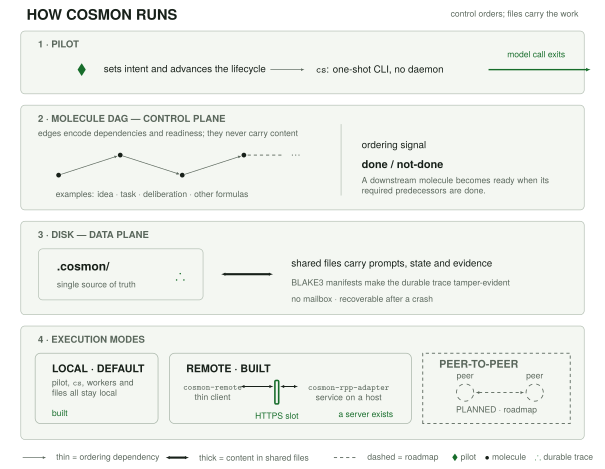
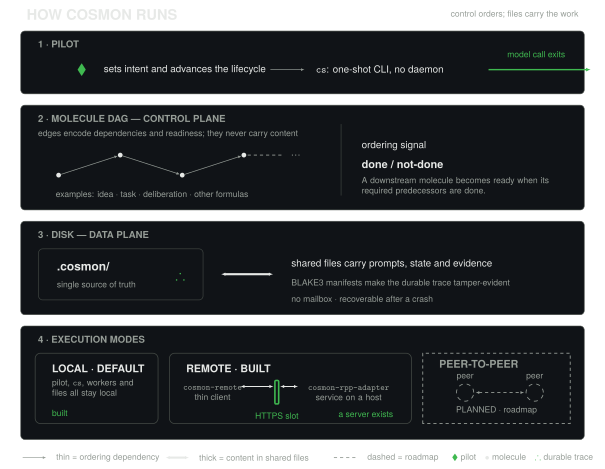
Cosmon is organized as two cooperating layers that share one state store. The first is everything you can touch today; the second is an optional process that sits on top without ever becoming load-bearing. Understanding this split explains most of cosmon's design choices at once.
Layer A: the Transactional Core (today)
The core is the stateless CLI. Every cs command is git-like: read state,
mutate, write, exit. No daemon, no lingering process. State lives on disk as JSON
files in .cosmon/state/, and that is the source of truth. Because each command
is a complete one-shot transaction, the core composes with any scheduler: cron,
launchd, a shell loop, a CI job, or a human at a terminal.
This is the load-bearing layer. Every capability cosmon offers is reachable here, human-driven, with nothing else running.
Layer B: the Resident Runtime (optional, additive)
The runtime is one long-lived process, cs run, with an event loop. It polls
the on-disk state, asks a pluggable policy what to do next (a DAG scheduler
today; a decay-aware re-planner or an external LLM-backed planner in the future),
and applies the answer through the very same commands the CLI exposes.
Four rules keep Layer B honest, and they are non-negotiable:
- It is a client, never a substrate. The runtime cannot mutate state through
any channel the CLI does not also expose. A human can
cs observeorcs freezea molecule while the runtime works on it; they are clients of the same file-based truth. - It owns no state. JSON on disk stays authoritative. Kill the runtime, restart it, and it rebuilds its entire picture from the files. There is no RAM it is afraid to lose.
- It is deletable in one move. Layer B is a separate build target; removing it never touches the core. Layer A does not require the runtime to exist.
- It is never the only path. Anything the runtime does, a human can do at the CLI. The runtime is pure convenience layered on a system that already works without it.
The three regimes formalize when each layer is in charge: Layer A drives the inert and propelled regimes; Layer B, when running, drives the autonomous regime, using Layer A's own doorways.
Inside the core: pure core, impure shell
The code mirrors the two-layer discipline at a smaller scale. cosmon-core
contains the domain (the state machines, the identity types, the validation)
and has zero I/O: no filesystem, no network, no async runtime. All the
messy outside world (reading files, spawning tmux, tracking tokens) lives behind
traits, implemented in separate crates.
graph TD
    CLI["cosmon-cli<br/>(the binary: clap)"]
    CORE["cosmon-core<br/>Pure domain logic<br/>State machines · types · validation<br/><b>ZERO I/O</b>"]
    CLI --> CORE
    CORE -->|trait: StateStore| SS["JSON files / SQLite"]
    CORE -->|trait: Transport| TR["tmux / process"]
    CORE -->|trait: EnergyTracker| ET["token accounting"]
This buys three things: the core is testable without mocks (it is pure functions over domain types), the backends are swappable (flat files today, SQLite tomorrow, without touching the core), and the transport layer can be hardened independently of the AI cognition it carries.
Two patterns worth knowing
Two Rust patterns do most of the structural work, and both trade a little verbosity for compile-time safety:
-
Typestate for the molecule lifecycle. Each lifecycle state (
Active,Frozen,Completed,Collapsed) is a distinct type, and transition methods exist only on the states that allow them. Trying toevolvea frozen molecule is not a runtime error checked with anif; it simply does not compile. The type system makes invalid transitions unrepresentable. -
Newtype IDs. Every identifier (
MoleculeId,WorkerId,AgentId) is its own wrapper type with validation on construction. It cannot be a bareString. Passing aWorkerIdwhere anAgentIdis expected is a compile error, and an ID that exists is guaranteed valid because it could not have been built otherwise.
The through-line of every one of these choices is the same physics framing: minimize the gap between what the system claims to do and what it actually does. Every invariant pushed into the type system is one fewer runtime surprise, and one fewer thing that can drift when an agent crashes.
For the design bet the whole architecture rests on, see Why a stateless CLI; for how it survives failure, see Crash recovery.
Versioning policy
Cosmon is pre-1.0. Its version numbers follow semantic versioning, read the
way every 0.x project reads it: while the leading number is zero, the minor
number carries the weight a major number normally would.
0.x.y→0.x+1.0: a minor bump may include breaking changes. Before 1.0, the API surface (CLI verbs, flags, JSON output shape, on-disk state format) can shift between minor releases. Read the changelog before upgrading.0.x.y→0.x.y+1: a patch bump is fixes and additive changes only.1.0.0onward: once cosmon reaches 1.0, the usual semver contract applies: breaking changes wait for a major bump, and the CLI surface,--jsonoutput, and state format become stable promises.
What "stable" will mean at 1.0
Three surfaces are the public contract, and they are what 1.0 will freeze:
- The CLI: command names, their flags, and their semantics. The generated reference is a projection of the actual tool, so the reference and the binary cannot silently disagree.
- The
--jsonoutput: the agent-first interface. Every command honours--json, and its shape is part of the contract because other tools parse it. - The on-disk state format: the JSON files in
.cosmon/state/. Because these files are the source of truth (see Why a stateless CLI), their format is as much a public API as any function signature.
No version switcher, yet
This documentation site describes one version: the one on main. There is
deliberately no multi-version switcher on the site today. Building one is
premature until there is a real 0.x → 1.0 break worth navigating between; the
scheme is stated here in prose now, and the switcher is deferred to the first
version boundary that actually needs it. This is the same "document the policy
first, build the tooling when the need is concrete" discipline cosmon applies
everywhere.